The Metric Bulk Actions page lets you perform actions on multiple Metric instances across work items within a selected Portfolio. They make it easy to perform multiple granular tasks all at once.
Example: Imagine you have a Metric template named "Expenses" that is attached to a number of Projects in a Portfolio. Within the "Expenses" Metric, you have a "Projected" view that displays all of the costs you are planning to spend. Once all of these costs are approved, they move into the "Actual" view. Instead of going into every instance of the "Expenses" Metric on all of the Portfolio Projects it is attached to, you can simply perform a Copy from the Metric Bulk Actions page. This way, the values from every "Projected" Metric view are automatically copied onto the "Actual" Metric views in every "Expenses" Metric in your chosen Portfolio.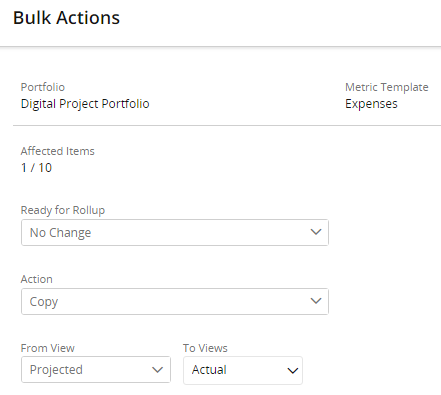
Additionally, you can filter by Tags to ensure that only the Projects you wish to copy Metric views for will be affected. In such a case, a PowerSteering administrator can create a tag called "Ready for Metric Copy" that can be set to "Yes" once the "Projected" costs have been approved. This way, only approved views will be included in the copy.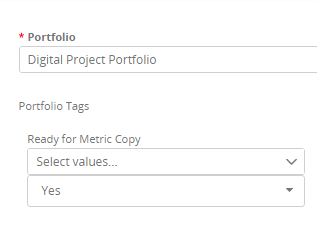
Note: Metric Bulk Actions are open to all PowerSteering by default, but users will only be able to change Metrics that they have permission to change.
If you would like to limit who can access the Metric Bulk Actions page, contact your PowerSteering representative.
Visit the following pages for more information on using Metric Bulk Actions: