Ready for Rollup
"Ready for Rollup" specifies that data in the current Metric is ready for inclusion in rollup reports. Typically, Ready for Rollup is restricted to financial representatives; however, any user with the Metric -- Set ready for rollup permission can access this setting. This property setting affects all views in the metric.
Note: "Ready for Rollup" is a replaceable term in PowerSteering. Your organization may use a different term to represent it.
To mark a Metric as "Ready for Rollup":
Before You Start: Users require the "Metric -- Set ready for rollup" Project Task permission on the work item to mark a Metric as "Ready for Rollup".
-
Navigate to a work item.
-
Select Project
 → Metrics → the desired Metric from the Navigation Menu.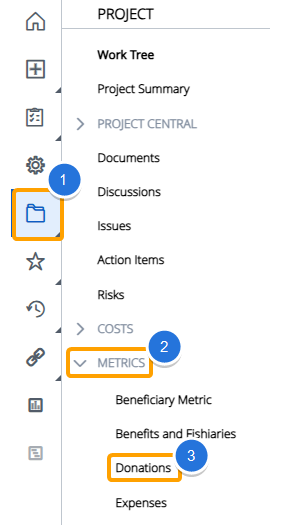
Tip: After navigating to the Metric, you should review its data to ensure that it is ready to be included in reports.
-
Select the Edit Properties button in the top right-hand corner of the page.

-
Select Yes next to "Ready for Rollup".

-
Select the Save button.

After selecting Save, the Metric will be marked as "Ready for Rollup".