The Audit Trail feature monitors all events occurring in the system and provides a detailed account of each event (date, description, user name, group, entry date and change). By classifying all transactions into logical categories, each with its own audit settings, the Audit Trail feature allow users to control the types of transactions included in the logs.
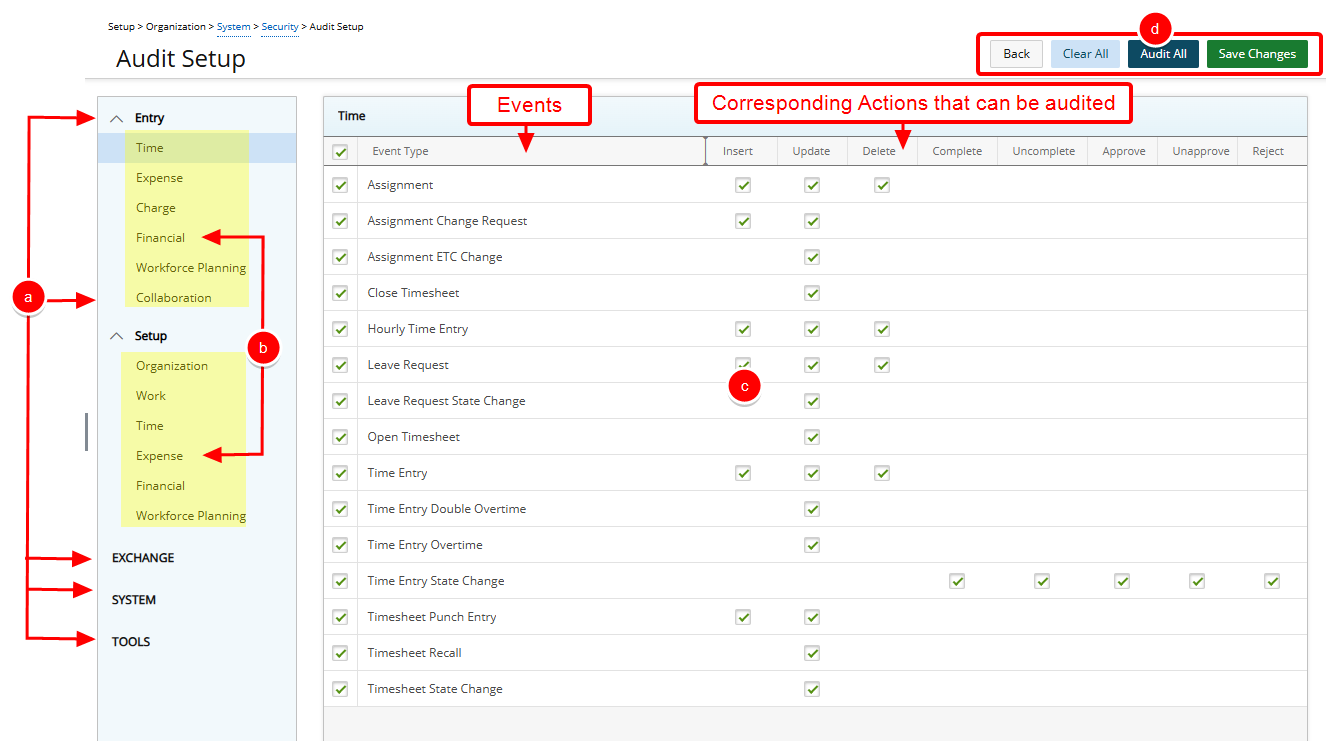
- Click the Entry, Setup, Exchange or System menu options to view and select the corresponding components to be audited in the system
- Select the appropriate subcategory to display the Event Type auditing options.
- Each subcategory lists the feature-specific Event Types, as well as the Actions and Operations that can be set for each Event. Select the appropriate boxes to audit the required Actions and Operations for each Event.
- The easy to access buttons on the top right corner of the page allow you to:
- Click the Back button to exit the Audit Setup page.
- Clear All Event Types.
- Audit All Event Types.
- Save Changes
Tip: Click the Audit All or Clear All buttons to enable or disable all auditing options respectively.