The Display Warning When Empty Timesheet is Submitted option helps maintain accurate time reporting by prompting users before an empty Timesheet is submitted. When enabled in the Timesheet Template Rules tab, users who attempt to submit a timesheet with zero hours see a confirmation message asking, Are you sure you want to submit this empty Timesheet? This allows them to review their entries and avoid unintentional submissions.
This article detail how to enable the Display Warning When Empty Timesheet is Submitted option in PSA to prevent accidental zero-hour submissions. Improve data accuracy, billing reliability, and compliance by prompting users to confirm before submitting an empty Timesheet.
- From the Icon Bar click Setup
 .
. - From the Navigation Menu click Timesheet.
- From the available options select Timesheet Templates.
- From the Timesheet Templates list that displays, click the Name of the Timesheet Template you wish to access.
- Upon the Timesheet Template Edit page displaying, navigate to the Rules tab.
- Select the Display Warning when empty Timesheet is submitted
Note: The Display Warning when empty Timesheet is submitted option cleared by default.
- Click the Save link to save the changes.
Impact Of The Change
Activating this setting reduces the risk of incomplete or inaccurate data entering the approval workflow. It supports better billing accuracy, forecasting reliability, and compliance tracking by ensuring only intentional timesheet submissions proceed.
Organizations can enable the option based on internal policies and data governance standards to strengthen overall timesheet quality control.
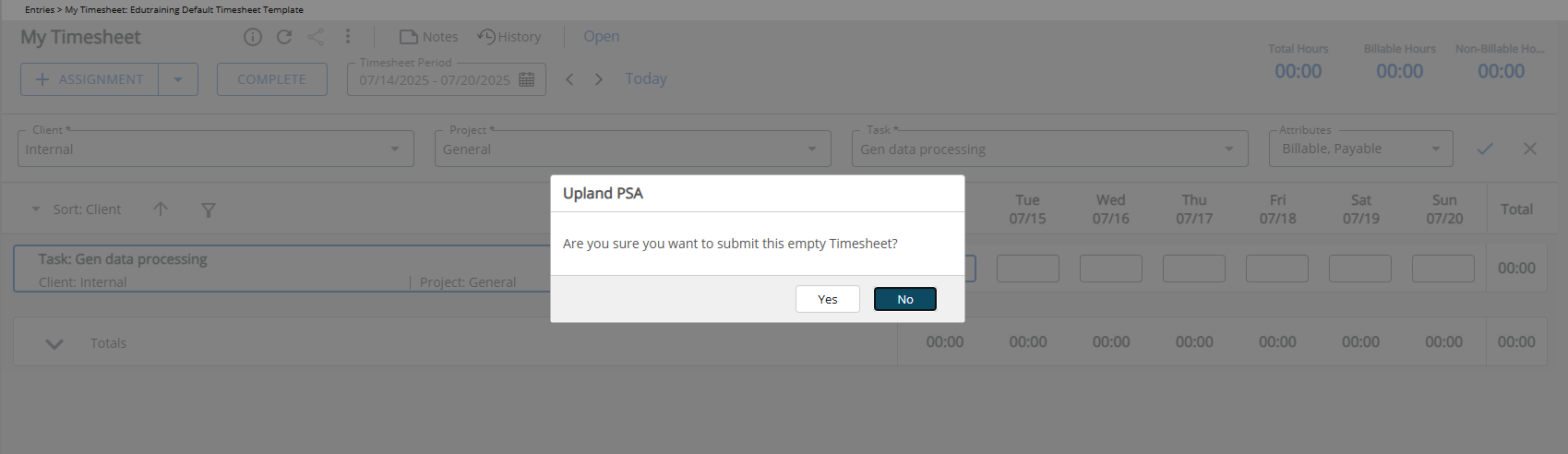
When this setting is active, users attempting to submit a Timesheet with zero hours will be presented with a confirmation dialog asking, Are you sure you want to submit this empty Timesheet? This prompt allows the user to either confirm and proceed with submission or cancel the action.