Use the Language setting in PSA to switch your user interface between English and French. Adjusting your language preference ensures that menus, labels, and notifications appear in your preferred language, helping you work more comfortably and efficiently.
Note: Each user can choose their own language without affecting other users in the system.
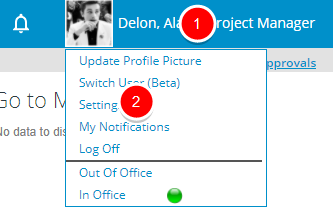
- Click your name or your profile picture to access the Profile Menu.
- Click Settings.
- On the General tab of the User Settings dialog box, locate the Language field.
- Select French or English from the dropdown list.
- Click Save.
Note: After you save, a yellow confirmation bar appears with a close (X) icon for dismissal. The message reads: “The changes you requested will not take effect until your next logon.”
- Log off and sign in again to apply your Language change.