We’ve made it easier to understand the approval status of Timesheet Entries. An icon ( ) appears in the Timesheet interface to indicate partially approved Time Entries. This helps administrators quickly identify which entries have been approved by some Project Managers but are still waiting for others’ approval. It enhances visibility, reduces confusion, and makes collaboration across projects smoother.
Why You’re Seeing This Icon
When you submit your timesheet, different project managers may need to approve time entries linked to their respective projects. Previously, it wasn’t always clear which entries were fully approved and which were still pending.
Example Scenario
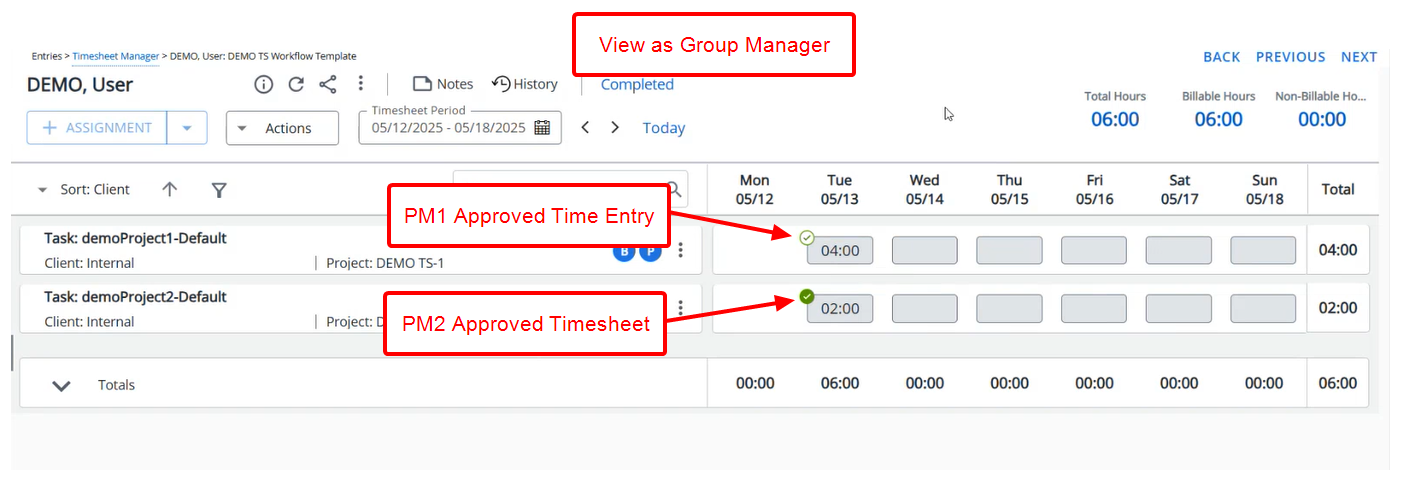
Let’s look at an example:
- Jane Doe submits a Timesheet with two Time Entries:
- 4 hour on Project A1
- 2 hours on Project A2
- The Project Manager for Project A1 approves the individual entry but not the entire Timesheet.
- The Project Manager for Project A2 approves the Timesheet.
- Timesheet will still remain in a Completed State.
- When a Group Manager or another approver views the Timesheet.
- The entry for Project A1 shows the Partially Approved icon () .
- The entry for Project A2 shows the Fully Approved icon (
 ) .
) .
- The entry for Project A1 shows the Partially Approved icon (
What This Means for a Group Manager
More transparency: Instantly see which entries are waiting for approval so that the Timesheet can enter the next Workflow State.
Less confusion: Avoid guessing which project manager has approved what.
Faster processing: Resolve pending approvals without manual checks or extra communication.