The Logins Sheet displays information on log-in patterns to the Rant & Rave dashboard, including how many users are logging in, who are the most frequent users, and what are the most common log-in times. If your Fast Feedback solution includes Discover and Frontline Engagement, the log-in patterns for those modules are also included.
To make selections and update the report:
-
Click a data point in a chart or graph in the content area of a sheet.
All associated visualisations are updated immediately. A confirmation box displays around the selection.
-
To confirm the selection, click the Tick (
 ) icon or press ENTER.
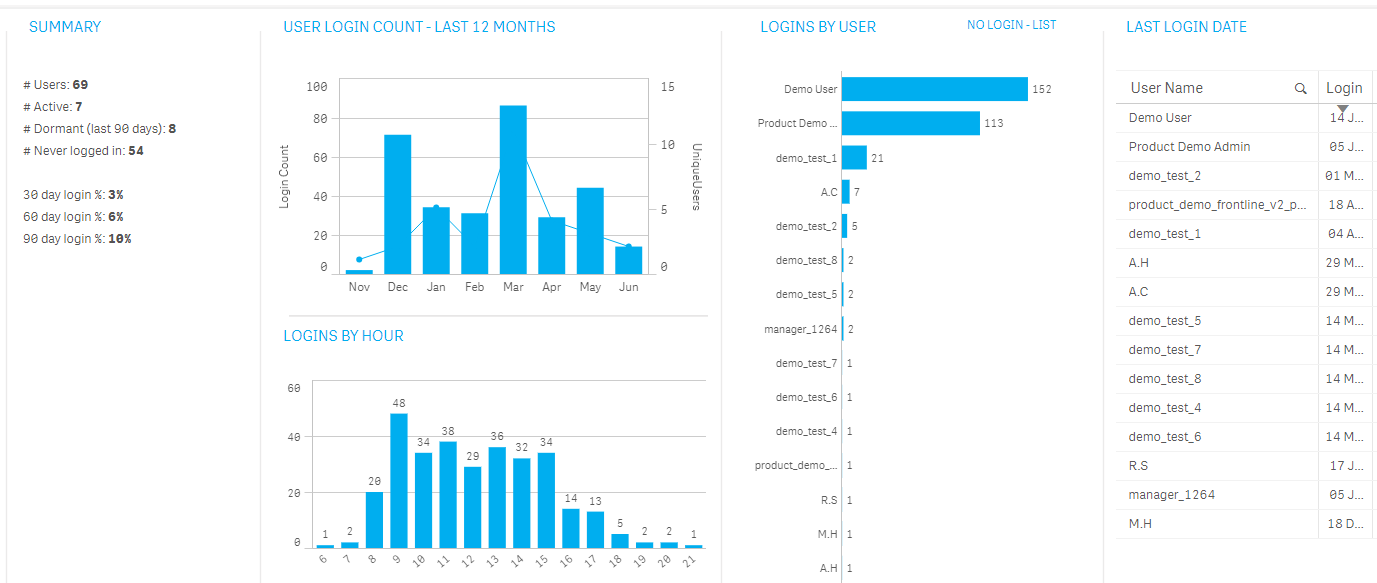
The following table describes the sections of the Logins sheet:
| Section | Description and actions |
|---|---|
| SUMMARY |
Displays the following items:
|
| USER LOGIN COUNT - LAST 12 MONTHS | Provides a month-by-month view of the total number of log-ins |
| LOGINS BY HOUR | Shows the total number of logins by hour of day |
| LOGINS BY USER |
Shows the number of log-ins by user, in order by the most frequent users.
|
| LAST LOGIN DATE | Shows the last time each user logged in. |