How to Configure the West km Connector
All BA Insight connectors can be downloaded from Right Answers under Knowledge > BA Insight > Product Downloads > Connectors.
This connector is installed with the same generic steps as any BA Insight connector.
Satisfy the Prerequisites for your connector before installing.
Configuration specifics are detailed below.
How to Configure West KM Connector
-
Add the Component West KM Metadata.
-
Click Existing Components to see the Configuration section:
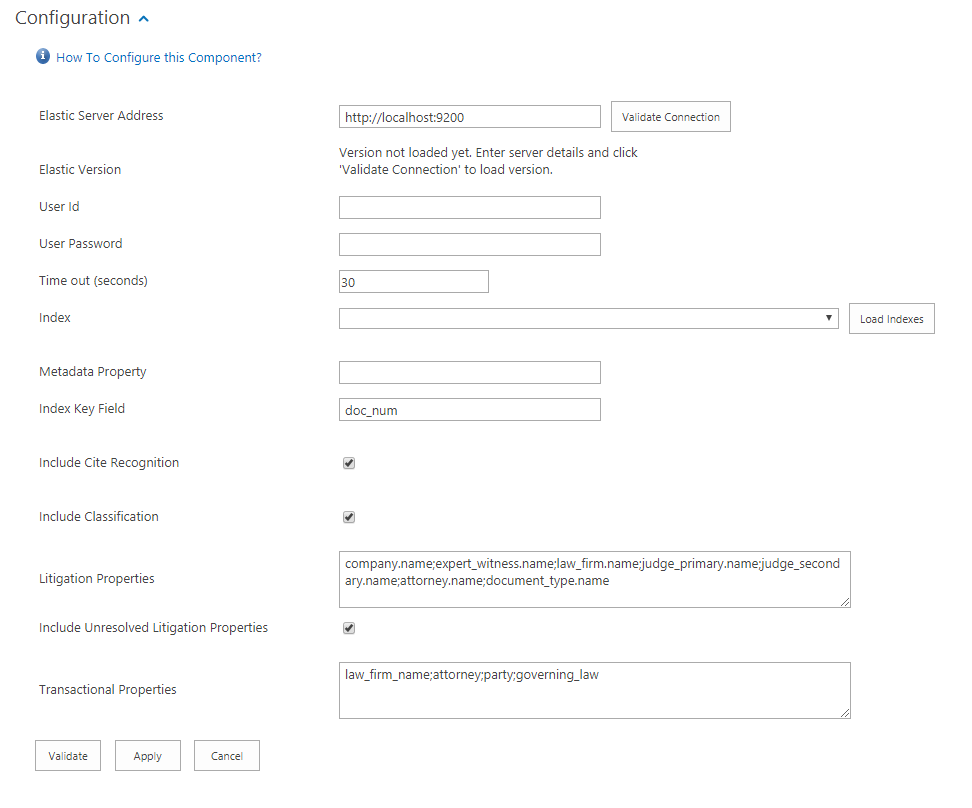
-
Elastic Server Address:
-
Specify the Elastic Server Address
-
All Elastic v6.x versions are supported
-
-
Click Validate:
-
User and Password fields may be required if Elastic is secured.
-
-
User Id:
-
Provide your Elasticsearch User ID, if required.
-
-
User Password:
-
Provide your Elasticsearch user password, if required.
-
-
Timeout:
-
Provider desire Timeout.
-
Default: 30
-
-
Load/Select Index:
-
Select the desired West km index for vetted documents
-
-
Metadata Property:
-
Enter metadata property to match the Elastic document.
-
Typically, DocumentId
-
-
Index Key Field:
-
Enter elastic document number index field.
-
Typically, doc_num
-
-
Include Cite Recognition:
-
Select this option to include Cite Recognition data
-
-
Include Classification:
-
Select this option to include Classification data
-
-
Litigation Properties:
-
Enter litigation properties, semi-colon separated, to retrieve as metadata from the Elastic Index.
-
Leave empty to ignore litigation properties.
-
Configuration defaults standard West Metadata fields
-
-
Include Unresolved Litigation Properties:
-
Select this option to include metadata that West KM has extracted but are not fully resolved by West KM.
-
-
Transactional Properties:
-
Enter transaction properties, semi-colon separated, to retrieve as metadata from the Elastic Index.
-
Leave empty to ignore litigation properties.
-
Configuration defaults standard West Metadata fields
-
Output Properties
Classification Properties
| Property | Type |
| WKMClassification | Text – Multi |
Citation Properties
| Property | Type | Description |
| WKMCitation | Text – Multi | Citation Title |
| WKMCitationLink | Text – Multi | Delimited Citation field for UI display. Separator: "|" Format: Citation Title|Citation Normalized|Cite Publication|Cite Serial Number|Cite Summary if available |
| WKMCiteNormalized | Text – Multi | Citation Title without special characters |
| WKMCitePublication | Text – Multi | Citation Publication Number |
| WKMCiteSerialNumber | Text – Multi | Citation Serial Number |
Transactional Properties
Transaction Properties are dynamic based on input properties.
-
Default Properties:
-
law_firm_name;attorney;party;governing_law
-
-
Example:
-
law_firm_name when detected returns WKMTransLawFirmName
-
| West km Property | Property | Type |
| law_firm_name | WKMTransLawFirmName | Text – Multi |
| attorney | WKMTransAttorney | Text – Multi |
| party | WKMTransParty | Text – Multi |
| governing_law | WKMTransGoverningLaw | Text – Multi |
Litigation Properties
Litigation properties are dynamic, based on input properties.
-
Default Properties:
-
company.name;expert_witness.name;law_firm.name;judge_primary.name;judge_secondary.name;attorney.name;document_type.name
-
| West km Property | Property | Type |
| company.name | WKMLitCompanyName | Text – Multi |
| expert_witness.name | WKMLitExpertWitnessName | Text – Multi |
| law_firm.name | WKMLitLawFirmName | Text – Multi |
| judge_primary.name | WKMJudgePrimaryName | Text – Multi |
| judge_secondary.name | WKMJudgeSecondaryName | Text – Multi |
| attorney.name | WKMAttorneyName | Text – Multi |
| document_type.name | WKMDocumentType | Text – Multi |
Note: Transaction properties can be combined for UI display purposes.
Example
company.name|company.url

Return Property  WKMLitCompanyName: ACME|http://www.westlaw.com/......
Including Additional Properties
Additional Elastic Properties can be included.
-
Use Elastic to search for a document
-
Download the JSON Results
-
The JSON results are flattened
litigation_metadata.company.westlaw_id = 2883123
litigation_metadata.company.name = Capital Trade
litigation_metadata.company.id = 2fffabf0-e33b-4ae8-a1a8-143acd501ed6
litigation_metadata.company.url = http://www.westlaw.com/Search/Results.html?query=advanced%3a+WCAID(I48F4449042B311DDA5520014224D2780)&jurisdiction=ALLCASES&saveJuris=False&contentType=BUSINESS-INVESTIGATOR&startIndex=1&contextData=(sc.Default)&categoryPageUrl=Home%2fCompanyInvestigator&originationContext=document&transitionType=DocumentItem&vr=3.0&RS=wlw