How to Set Up and Configure Your Nuxeo Connector
All BA Insight connectors can be downloaded from Right Answers under Knowledge > BA Insight > Product Downloads > Connectors.
This connector is installed with the same generic steps as any BA Insight connector.
Satisfy the Prerequisites for your connector before installing.
Configuration specifics are detailed below.
When finished, you lastly register the Nuxeo connector as an external application.
Connection Configuration Specifics
- Connect to the web service.
- Select authentication type (Basic or oAuth)
Configure Connection with Basic Authentication
- Go to the Connection page and select the General Settings tab:
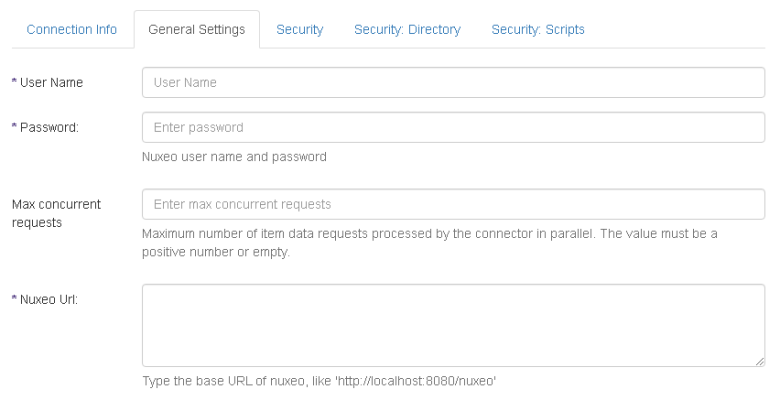
- Fill in the following:
- Use Name: Specify the user name of the Nuxeo Administrator.
- Password: Enter the account password.
- Nuxeo URL: Enter the url of Your Nuxeo instance..
- Save the connection.
Configure the Connection with oAuth Authentication
- Go to the Connection page and select the General Settings tab:
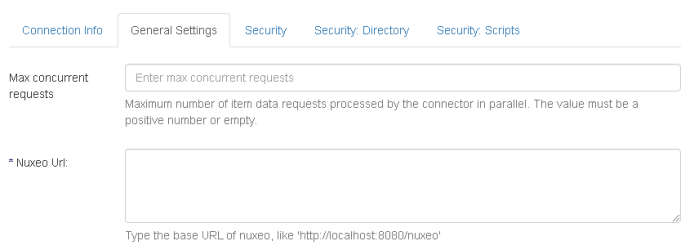
- Fill in the following:
- Nuxeo URL: Enter the url of Your Nuxeo instance..
- Nuxeo URL: Enter the url of Your Nuxeo instance..
- Save the connection.
Content Configuration Specifics
- Go to Content page and select Content Filters tab:
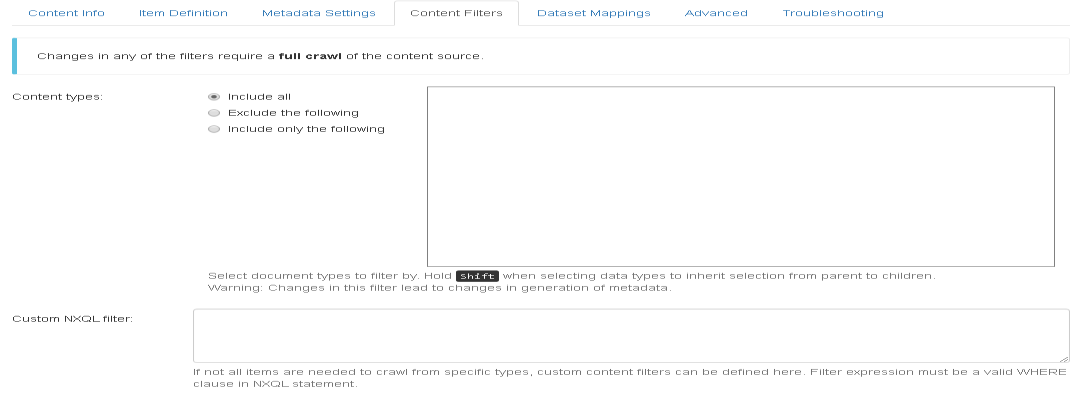
- Fill in the following:
- Content types: Select all document types You plan to crawl.
- Custom NXQL filter (optional): Set a
WHEREclause of a valid NXQL statement to filter by any properties of the documents. NXQL documentation is found here: https://doc.nuxeo.com/nxdoc/nxql/