How Users Can Submit Feedback About Search Results
SmartHub contains two features for submitting feedback:
- Result Feedback:
- Enables the users to submit feedback about a specific query result (such as a document) via e-mail.
- Search Results Feedback:
- Enables the user to submit feedback about the current search session via e-mail.
About the Result Feedback
The Result Feedback competent can be used by users to report content issues.
The Result Feedback button  can be found in the action bar for each result.
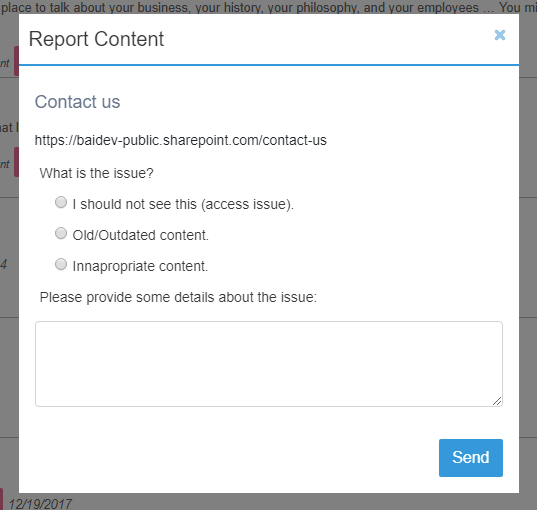
Clicking the button opens a modal window that displays:
- Result title
- Result URL
- The option to select the issue from three predefined issues:
- Access issue
- Old/Outdated content
- Inappropriate content
- The option to provide additional details about the issue with that result
- Click Send to send an email using your local email client.
How to Customize Your Result Feedback Component
Before continuing, familiarize yourself with the information in the topic How to Customize Your SmartHub User Interface.
The Results Feedback component is integrated into the base templates for Item and People results.
- If you want to use the Result Feedback component in a custom template such as a custom Results page add the following code to your file:
<div class="CoveoResultFeedback"></div> - The default email where the feedback is sent to is
search@bainsight.com. - Customize the email by adding the
data-feedback-emailattribute on the search interfacedata-feedback-email="your@email.com".- In the ResultsCopy.html file, this is around line 42:

- In the ResultsCopy.html file, this is around line 42:
About the Search Results Feedback Component
The Search Results Feedback component is similar to the Submit Feedback component.
The Search Results Feedback component has the following characteristics:
- It enables the user to submit feedback via e-mail about:
- Current page (URL) the user is on
- The last query run
- Search Results Feedback settings can be modified in your the Results HTML page.
- Make your modifications to your custom Results HTML file, based on file ResultsCopy.html, found in the directory <SmartHub root>\CustomerCustomization\pages.
How to Customize the Page Feedback Component
To modify the Search Results Feedback component use the following instructions:
- Open your custom Results HTML file in an editor. See How to Customize Your SmartHub User Interface.
- Around line 103, you see <div class
"CoveoFeedback"under<div-class="footer-zone">. - The class
"CoveoFeedback"contains the modifiable attributes. See the graphic below. - Modify the class attributes as you desire.
Note: The objectwindow.location.hrefreturns thehref(URL) of the current page.