About Tuning Stages
Tip: Tuning stages were formerly referred to as "Pipeline" stages.
You can use SmartHub Tuning stages to further refine your metadata.
Tuning Stage Key Facts
Note the following basic information about Tuning stages:
- Tuning stages can offer uniformity to the end user
- Each of the various tuning stages provide a different function
- Tuning stages can apply to all of the active backends in SmartHub (Global), or to specific backends (Backend-specific)
- Global Tuning stages run before backend-specific tuning stages run.
- See Tuning Categories: Global and Backend , below
- Tuning stages are set as one or both of the following two types:
- Query
- Results
- Most Tuning stages require BOTH a Query and Results stage.
- Tuning stages that require both stages describe this requirement in the tuning stage description found in the Tuning stage dialogue box.
- See Tuning Categories: Global and Backend , below.
- Tuning stages that require both stages describe this requirement in the tuning stage description found in the Tuning stage dialogue box.
- The various Tuning stages are accessible from the drop-down menu in the tunings dialogue box that appears when adding a Query or Results Tuning stage.
- Example: "Backend-specific Tuning Stage," below.
- Tuning stages are used to do things like map names and values to match local refinements
- Different content sources use different names and values for a given term such as "date," or "title"
- Tuning stages such as the Property Mapper stage map these names and values
-
See Example: Achieving Term Uniformity section below
Video Walk-through
For a walk-through of the Tuning stage tool and further explanation, see the following video: Introduction to BA Insight SmartHub Pipelines
Example Tuning Stage: Property Mapper
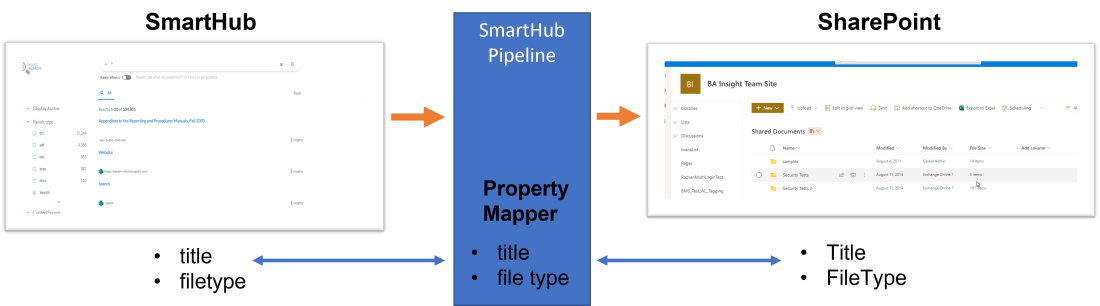
In the example below, the SmartHub Property Mapper tuning stage maps two terms:
- "title"
- "file type"
This results in SmartHub users discovering consistent results when searching content across different content sources.
Tuning Categories: Global and Backend
Tuning stages are one of two categories:
Backend-specific Tuning stages run second.
- Global
- These Tuning stages apply to all of the backends configured in SmartHub
- Global Tuning stages are found under "General Settings"
- Backend
- These stages apply to a single, specific backend configured in SmartHub
- Backend-specific tuning stages are found under each backend's configuration page.
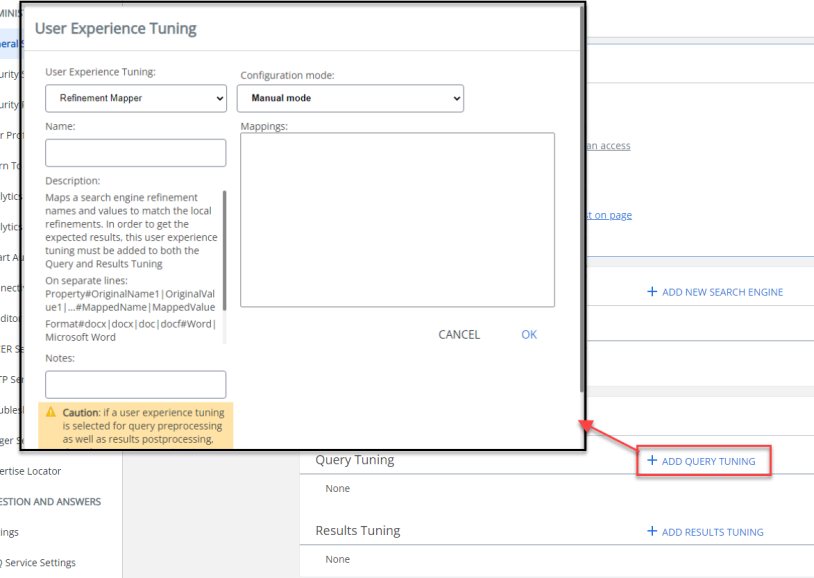
- Example: "Backend-specific Tuning Stage," below.
Backend-specific Tuning Stage
Available Tuning Stage Types
Tuning stages are available (and typically, must be created) as two different types of stages
-
Query
-
Results
The various available tuning stages (typically available as both Query and Results type), and their functions, are listed below.
See the individual tuning stage descriptions in the user interface for additional information.
Mapper Stages
- Property Mapper
- Translates named property names to that these names map to an existing property on a specific backend.
- In order to get results, this stage must be added to both the Query and Results stages.
- Refinement Mapper
- Maps backend refinement names and values to match the local refinements.
- In order to get the expected results, this tuning stage must be added to both the Query and Results stages.
- NLQ Processing Stage
- Extracts information from the query using machine learning (ML) algorithms and append the extracted intent and entities to the query.
-
Range Facets
-
Customize ranges for date, size, and so on.
-
This tuning stage must be added to both the Query and Results stages.
-
-
Debug/Diagnostics Tuning Stages
Playback and Recorder tuning stages:
- Query Playback
- Results Playback
- Query Recorder
- Results Recorder
Scripting/Results Processor Stages
- Query Scripting Processor
- Query Suggestions Results Processor
- Results Scripting Processor
- Suggestion Query Processor
- Personalized Query: See the Personalize queries page.
- The stage requires the User Profile to be set.
SharePoint Tuning Stages
- SharePoint Online Refiner Mapper:
- Maps taxonomies so that the taxonomy labels are displayed and not the GUID.
- To get results, this stage must be added only as a Results tuning stage.
- SharePoint OnPremise Refiner Mapper:
- Maps a backend refinement names and values to match the local refinements.
- To get the expected results, this tuning stage must be added only as a Results tuning stage.
Tuning Stage Parameters
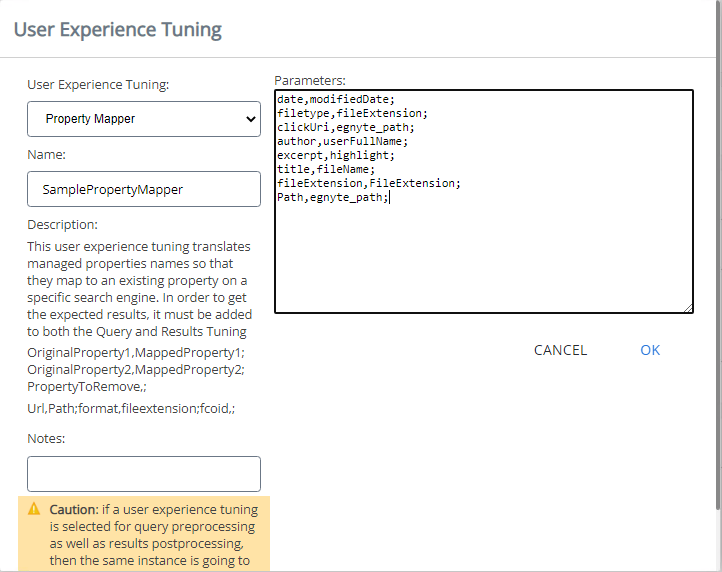
Parameters for each SmartHub Tuning stage are set in SmartHub.
-
SmartHub offers both global and backend-specific tuning stages.
-
The Property Mapper tuning stage below is a global tuning stage that maps terms (parameters) across all of the backends configured in SmartHub.
-
For more information, see How to Map Metadata Property Values: Property Mapper.
Example: Achieving Term Uniformity
The mapping process described below is a common and popular use of Tuning stages.
-
For example, you may have 5 different content sources, and within each content source are various documents.
Every document in each content source has a title.
- In content source A, document titles is tagged as "title"
- In content source B, document titles are tagged as "heading"
- In content source C, document titles are tagged as "headline"
- In content source D, document titles are tagged as "topic."
You want, in this case, all document titles labeled as "Title."
- When performing queries with SmartHub users will see "Title" as an available search refinement.
- Using a Tuning stage, you can map all document titles from all of your content sources to the same term - "Title".
- When performing queries with SmartHub users will see "Title" as an available search refinement. and it will match with the corresponding titles in documents from all content sources.