How to Use the Log Files
Available Log Levels
To capture the information you need, without In order of verbosity:
- Error:
- Used to find any error which is fatal to the operation, but not the service or application (can't open a required file, missing data, etc.).
- These errors force user (administrator, or direct user) intervention.
- These are usually reserved for incorrect connection strings, missing services, etc.
- Warn:
- Use to uncover application oddities.
- Such as switching from a primary to backup server, retrying an operation, missing secondary data, etc.
- Info:
- Default.
- Generally useful information to log (service start/stop, configuration assumptions, etc).
- Debug:
- Information that is diagnostically helpful to people more than just developers (IT, sysadmins, etc.)
- Trace:
- Used to trace the code and find one part of a failing operation, specifically.
- All:
- Only used is special cases.
- Creates a large log file with a lot of information, much of which obscures what you are searching for or else adds an unnecessary amount information which makes the log hard to use.
How to Access the Log Files
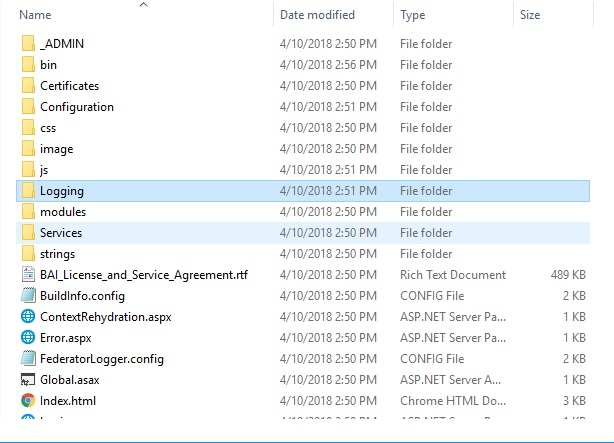
The log files are located in the logging folder of the SmartHub directory.
See the following graphic.
How to Change the Log Level
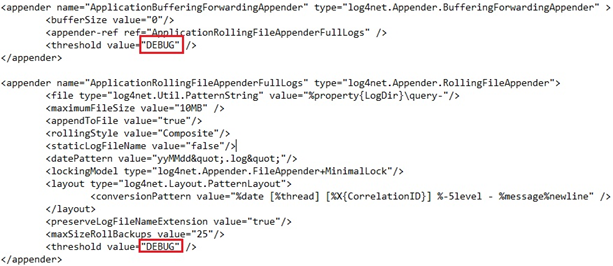
- Use a text editor to modify the FederatorLogger.config file in your SmartHub folder.
- Change all of the threshold values from
WARNto one of the following levels:
-
- INFO
- ERROR
- DEBUG