SharePoint 2016/19 Add-In Prerequisites
Before installing the AutoClassifier Add-In, ensure the following conditions are satisfied:
- You must complete all of the General AutoClassifier Prerequisites.
- You must have a Domain Account that is running the IIS Site:
- This account must have the ability to run as a Windows Service as it will use the Windows servies to determine how AutoClassifier interacts with managed metadata.
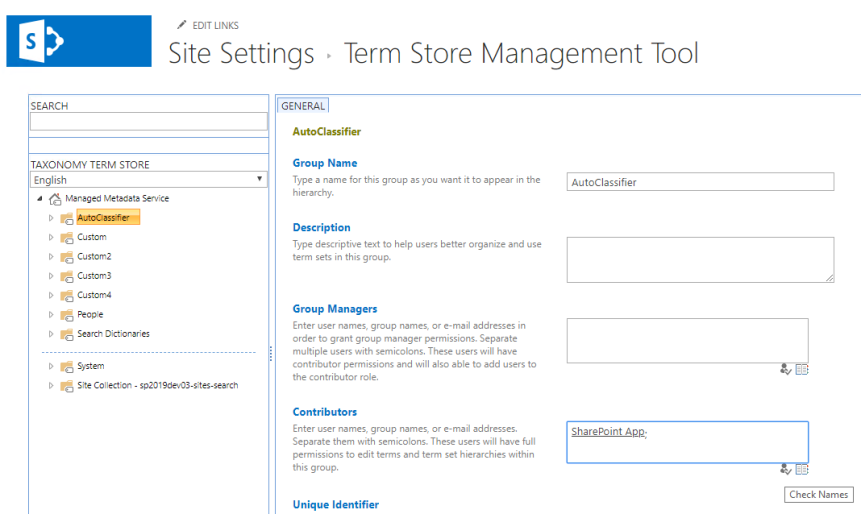
- Enter the SharePoint App (app@sharepoint) as a contributor in the SharePoint Site Settings > Term Store Management Tool
- The (Managed Metadata Service) MMS Synchronization Service account must have Management permissions in the Managed Metadata Default KeyWord Store
- This is required to synchronize terms/termsets that are created in the AutoClassifier Admin site:
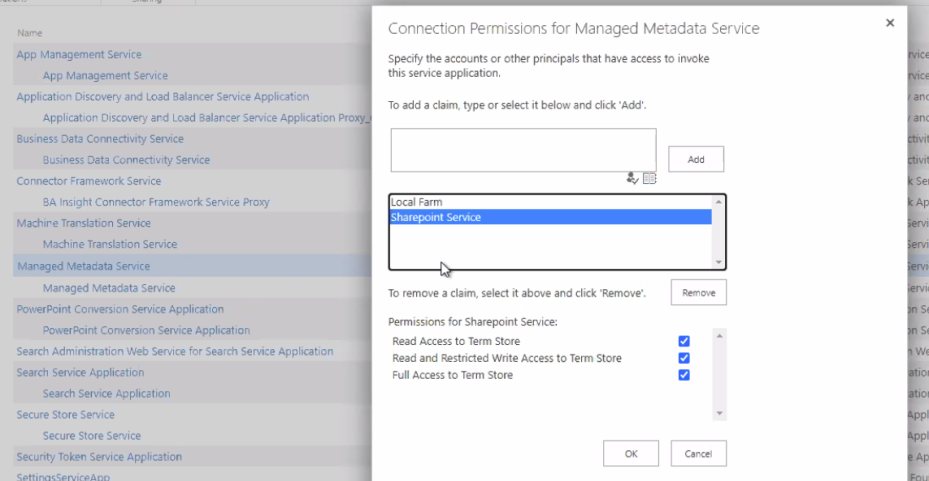
- This is required to synchronize terms/termsets that are created in the AutoClassifier Admin site:
- The AutoClassifier Engine must be installed and configured.
- A web server certificate must be installed.
- The latest Windows updates must be installed.
The following values are required for the installation of the AutoClassifier SharePoint Add-In web application. These values are obtained throughout the prerequisite and installation steps. For a successful installation, BA Insight suggests that you copy the following text into a Notepad document and update the values as they are presented.
- AutoClassifier Engine Service URL:
- SharePoint Site Collection URL:
- Issuer ID:
- Client Signing Certificate Number:
- Client ID:
- Client Secret:
- Addin Title:
for more information, refer to the following topics: