Prerequisites
Universal prerequisites
Note the following prerequisites that are common across all BA Insight products:
| Requirement | Description |
|---|---|
| Operating System |
The following software must be installed and running:
Microsoft is ending support for Windows Server 2016 on January 12, 2027. As a result, you must upgrade to Windows Server 2019 or 2022 after the end of life date.
|
| User accounts and permissions |
The following user accounts and permissions are required in all BA Insight products
|
| Windows Server roles and features |
The following Windows features are required:
|
| .NET Framework |
|
| Java |
BA Insight support Java v11. For more information, see https://adoptium.net/temurin/releases/?version=11. Java v11 must be set as a system variable, and not a user variable. BA Insight develops and tests using Adoptium. BA Insight does not guarantee support of Oracle Java, but it may function in your environment. |
| Web Browser support |
The following web browsers are officially supported:
The following web browsers are not officially supported, but they may work with Connectivity Hub:
|
| Database support |
BA Insight requires SQL server 2019. In large environments where a database team is responsible for creating and maintaining databases, BA Insight recommends following your standard internal practice for database creation, and assigning the appropriate user account the appropriate permissions as defined below:
|
| License | You must add a valid BA Insight license to the /License/ folder in the relevant sub-product installation package. For example, "<Program Files>\Upland BA Insight\Upland BA Insight <product>\License". |
Connectivity Hub
Additional Connectivity Hub prerequisites
| Search engine | Details |
|---|---|
| Azure AI Search | In Connectivity Hub, there is one index created per content source for Azure AI Search. The search index is populated when you perform your first target sync in Connectivity Hub. |
| Elasticsearch |
For Connectivity Hub users on Elasticsearch, Connectivity Hub v4.0 and later supports Elasticsearch v7 to v8.x. In Connectivity Hub, there is one index created per content source for Elasticsearch. The search index is populated when you perform your first target sync in Connectivity Hub. |
| Microsoft Search | Microsoft Search requires access to the internet from your Connectivity Hub server. |
| Solr |
Solr cloud
Solr Standalone
|
AutoClassifier
Additional AutoClassifier prerequisites
| prerequisite | Description |
|---|---|
| Python |
Python 3.9.0 and later is supported. If you are planning to use Python script capabilities, you must install Python for all users. You can have multiple versions of Python installed on your server, and specify the version you wish to use in the Python script component. Additionally, when installing AutoClassifier, you must Install the AutoClassifier Python Script Runner Rest API. |
| Adoptium JDK v11 |
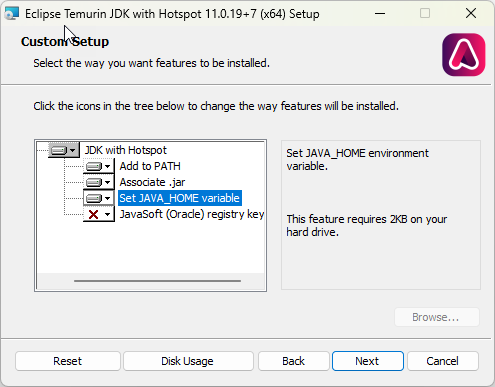
Select the Custom Setup options shown below:
|
| Adapter crawler support | |
| Elasticsearch |
AutoClassifier v7.2 and later supports Elasticsearch version 7 and later. Authentication must be done via username and password. |
| SharePoint Online |
AutoClassifier v7.2 and later supports SharePoint Online. SharePoint must be able to register a SharePoint app and have permissions to access the term store. See the SharePoint Online add-in Prerequisites topic for specific requirements. |
| SharePoint On-prem | AutoClassifier v7.2 and later supports SharePoint 2016/19/SPSE. |
| Database Requirements | |
| SQL Server |
AutoClassifier uses a SQL Server database as a backend repository.
|
| Azure SQL |
An SQL account with dbOwner permissions on the SQL database for use with AutoClassifier.
|
| Account requirements | |
| SharePoint Account (for SharePoint backends/integrations) | If you are using AutoClassifier with SharePoint (Online or On-Premise), the SharePoint App user account (app@sharepoint) must be added to the SharePoint Term Store (under Site Settings). |
SmartHub
Additional SmartHub prerequisites
| Search engine | Prerequisite | Details |
|---|---|---|
| Amazon Kendra | Elasticsearch Index |
Elasticsearch v7.10-8.x is supported. SmartHub supports secured or non-secured Elastic configurations. The Elasticsearch index used for the SmartHub data does not have to be the same instance used for the search index (search engine).
Java: The SmartHub Analytics component requires Elasticsearch Java JDK. Elasticsearch v7.x and later bundles Java with the software (OpenJDK). A separate Java download/install is NOT required. For more information see Elasticsearch documentation.
For assistance installing a single-node instance of elastic, see Install Elasticsearch for Analytics. |
| Kibana |
Kibana v7.10-8.x is supported.
|
|
| Haystack (Optional) |
Haystack Service is required for the Questions and Answers feature. Upland BA Insight recommends Haystack be deployed to a separate server/resource so SmartHub performance is not negatively impacted.
|
|
| NLQ Services (Optional) |
RASA v1.9, Amazon Lex, and CLU are supported. Only one NLQ service should be configured. For more information, see: |
|
| Amazon Kendra |
You must have an Amazon Kendra instance and know the following:
|
|
| Azure AI Search | Elasticsearch Index |
Elasticsearch 8.1.2 is supported. SmartHub supports secured or non-secured Elastic configurations. The Elasticsearch index used for the SmartHub data does not have to be the same instance used for the search index (search engine).
Java: The SmartHub Analytics component requires Elasticsearch Java JDK. Elasticsearch v7.x and later bundles Java with the software (OpenJDK). A separate Java download/install is NOT required. For more information see Elasticsearch documentation.
For assistance installing a single-node instance of elastic, see Install Elasticsearch for Analytics. |
| Kibana |
Kibana 8.1.2 is supported.
|
|
| Haystack (Optional) |
Haystack Service is required for the Questions and Answers feature. Upland BA Insight recommends Haystack be deployed to a separate server/resource so SmartHub performance is not negatively impacted.
|
|
| NLQ Services (Optional) |
RASA v1.9, Amazon Lex, and CLU are supported. Only one NLQ service should be configured. For more information, see: |
|
| Azure AI Search |
SmartHub v6.x and later supports Azure AI Search as a search index. Before you integrate your Azure Search Backend with SmartHub you must satisfy the following requirements:
Azure Index Limitation: In SmartHub you must configure one backend for every Azure Search index you intend to query.
You must know the following information about your Azure AI Search instance:
|
|
| Elasticsearch | Elasticsearch Index |
Elasticsearch 8.19.2 is supported. SmartHub supports secured or non-secured Elastic configurations. The Elasticsearch index used for the SmartHub data does not have to be the same instance used for the search index (search engine).
Java: The SmartHub Analytics component requires Elasticsearch Java JDK. Elasticsearch v7.x and later bundles Java with the software (OpenJDK). A separate Java download/install is NOT required. For more information see Elasticsearch documentation.
For assistance installing a single-node instance of elastic, see Install Elasticsearch for Analytics. |
| Kibana |
Kibana 8.19.2 is supported.
|
|
| Haystack (Optional) |
Haystack Service is required for the Questions and Answers feature. Upland BA Insight recommends Haystack be deployed to a separate server/resource so SmartHub performance is not negatively impacted.
|
|
| NLQ Services (Optional) |
RASA v1.9, Amazon Lex, and CLU are supported. Only one NLQ service should be configured. For more information, see: |
|
| Elasticsearch 8.x search engine |
SmartHub supports Elasticsearch 8.x as a search index. The same Elasticsearch instance used for the Analytics Index above can be used for the Search index, however this is not required and they can be separate instances. You must know the following information about your Elasticsearch instance:
|
|
| SharePoint On-prem | Elasticsearch Index |
Elasticsearch 8.1.2 is supported. SmartHub supports secured or non-secured Elastic configurations. The Elasticsearch index used for the SmartHub data does not have to be the same instance used for the search index (search engine).
Java: The SmartHub Analytics component requires Elasticsearch Java JDK. Elasticsearch v7.x and later bundles Java with the software (OpenJDK). A separate Java download/install is NOT required. For more information see Elasticsearch documentation.
For assistance installing a single-node instance of elastic, see Install Elasticsearch for Analytics. |
| Kibana |
Kibana 8.1.2 is supported.
|
|
| Haystack (Optional) |
Haystack Service is required for the Questions and Answers feature. Upland BA Insight recommends Haystack be deployed to a separate server/resource so SmartHub performance is not negatively impacted.
|
|
| NLQ Services (Optional) |
RASA v1.9, Amazon Lex, and CLU are supported. Only one NLQ service should be configured. For more information, see: |
|
| SharePoint 2016/19/SPSE |
SmartHub supports the following versions of SharePoint On-Premise:
You must know the following information about your SharePoint On-Premise instance:
|
|
| SharePoint Online | Elasticsearch Index |
Elasticsearch 8.1.2 is supported. SmartHub supports secured or non-secured Elastic configurations. The Elasticsearch index used for the SmartHub data does not have to be the same instance used for the search index (search engine).
Java: The SmartHub Analytics component requires Elasticsearch Java JDK. Elasticsearch v7.x and later bundles Java with the software (OpenJDK). A separate Java download/install is NOT required. For more information see Elasticsearch documentation.
For assistance installing a single-node instance of elastic, see Install Elasticsearch for Analytics. |
| Kibana |
Kibana 8.1.2 is supported.
|
|
| Haystack (Optional) |
Haystack Service is required for the Questions and Answers feature. Upland BA Insight recommends Haystack be deployed to a separate server/resource so SmartHub performance is not negatively impacted.
|
|
| NLQ Services (Optional) |
RASA v1.9, Amazon Lex, and CLU are supported. Only one NLQ service should be configured. For more information, see: |
|
| SharePoint Online |
SmartHub supports SharePoint Online as a search index. You must know the following information about your SharePoint Online instance:
|
|
| Solr | Elasticsearch Index |
Elasticsearch 8.1.2 is supported. SmartHub supports secured or non-secured Elastic configurations. The Elasticsearch index used for the SmartHub data does not have to be the same instance used for the search index (search engine).
Java: The SmartHub Analytics component requires Elasticsearch Java JDK. Elasticsearch v7.x and later bundles Java with the software (OpenJDK). A separate Java download/install is NOT required. For more information see Elasticsearch documentation.
For assistance installing a single-node instance of elastic, see Install Elasticsearch for Analytics. |
| Kibana |
Kibana 8.1.2 is supported.
|
|
| Haystack (Optional) |
Haystack Service is required for the Questions and Answers feature. Upland BA Insight recommends Haystack be deployed to a separate server/resource so SmartHub performance is not negatively impacted.
|
|
| NLQ Services (Optional) |
RASA v1.9, Amazon Lex, and CLU are supported. Only one NLQ service should be configured. For more information, see: |
|
| Solr |
SmartHub supports SOlr 7.5 as a search index. Solr required the following:
You must know the following information about your SharePoint Online instance:
|
|
| Other search engines | Bing News | You must have a Bing API Access Key. This is the subscription key that you received when you signed up for this service. |
| Bing Search | ||
| Egnyte |
|
|
| Expertise | To configure yout expertise locatotr, you need to download the Expertise location application. zip file. This can be downloaded from the Upland Right Answers portal. | |
| iManage Server | You must have a network service account. A service account can only be used with a single SmartHub instance at any one time. | |
| Microsoft Academic Knowledge | You must have an academic API subscription key. This key is found on your "Microsoft Research APIs" account page. See the Microsoft Academic Knowledge search engine topic for details. | |
| Microsoft Search Items |
You must have Microsoft Graph API permissions. See the specific documentation topic of your Microsoft search engine for details: |
|
| Microsoft Search Calendar | ||
| Microsoft Search Emails | ||
| Microsoft Search Chat Message | ||
| Microsoft Search Persons | ||
| NetDocuments |
You must have user access to the NetDocuments cabinets being searched. SmartHub requires the Admin user to have the following permissions:
The cabinets you access must be in the same repository. To search cabinets from multiple repositories, you must configure a separate SmartHub NetDocuments search engine for each repository. |
|
| PubMed | You must have a PubMed search engine API Key. When you register a new PubMed account, you are given the option to create a key. | |
| RightFind |
|