Internet Printing Protocol (IPP) is a standard Internet protocol for communication between client devices like computers, mobile phones, tablets, printers and more. It allows clients to submit single or multiple print jobs to a printer or print server and perform the following tasks.
-
Query the status of a printer
-
Obtain print job(s)
-
Cancel individual print jobs
Client users can useHP CR Client to process jobs that have IPP/IPPS printing enabled on their devices.
Using HP CR Client
Use the Create Distribution option to create a distribution for IPP/IPPS enabled printers.
The printer is identified with a URL IP address only, for example, http://10.43.16.233. Server names are not used.
The server will look for IPP/IPPS printers on port 443 by default unless specified otherwise with a colon, for example, http://10.43.16.233:9100. A colon and port number is used after the IP address.
Contact your Administrator for information about your IPP/IPPS printers, if necessary.
See the HP CR Client > Printer Destination example below.
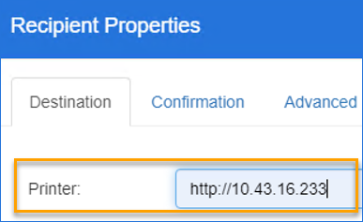
Note: The URL IP address can also use https://.
See About Distributions for more information.