Licensing
Administrators can view InGenius user license information from the InGenius Admin App. In InGenius, managed groups are assigned to license pools, and license usage count is based off of the number of users in licensed managed groups.
This page describes the licensing page on the Admin App, as well as information relevant to licensing your users:
- Assigning Users to an InGenius
- Assigning Users to a Managed Group
- Licensing Page User Interface
Assigning Users to an InGenius Call Center Contact Center
Assign users to the InGenius
Note: InGenius supports licensing for up to 25,000 users in Salesforce.
Note: InGenius supports licensing for up to 8,000 users in Microsoft Dynamics.
For steps on both creating a
Assigning Users to a Managed Group
Users must be part of a managed group to be added to an InGenius license pool. Review the Managed Groups page for information on how to create a managed group and assign users to it.
User Interface
The following section describes the various components of the Licensing page.
 License Table
The license table provides information about an individual license pool.
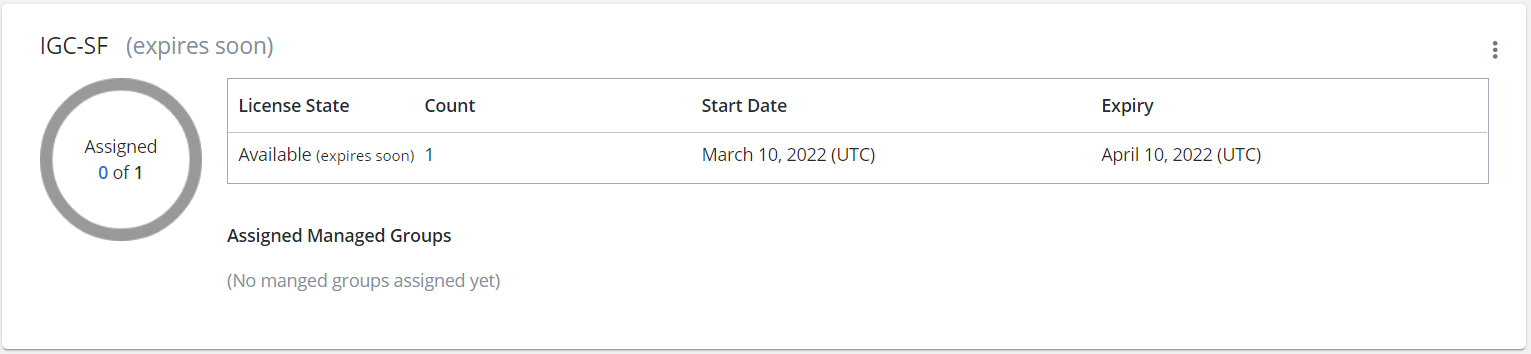
| License State |
Indicates whether the licenses in the license pool are:
|
| Count | The total number of licenses in a license pool. |
| Start Date | The exact date the licenses in the pool were or will be issued to the account. |
| Expiry | The exact date the licenses in the pool expire. |
| Assigned Managed Groups | The managed groups currently assigned to the license pool. |
License Status
The status is displayed next to the license pool name.
License statuses are as follows:
- Expires Soon: The users in the license pool have a limited amount of time before the license expires. This status is displayed when there are 60 days or less left to use the InGenius license.
- Expired: The InGenius license is expired and users in the license pool can no longer use InGenius.
- Inactive: The org registration that this license belongs to has been deactivated and is unavailable for use.
License Usage
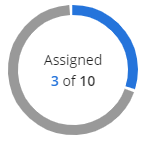
The total number of InGenius licenses assigned to users are shown as a visual on the licensing page. All users within a licensed managed group will be assigned a license if one is available.
In the following image, three users have been assigned licenses. There are 10 licenses available within this license pool, with seven remaining to be assigned to users.
There are additional scenarios where the visual may change color:
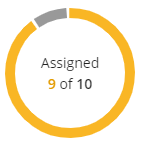
- High Usage: The visual turns yellow when the number of assigned licenses reaches 90 percent or more of the total number of available licenses in the license pool:
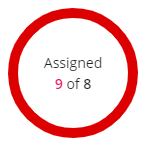
- Exceeded Usage: The visual turns red when the number of assigned licenses exceeds the total number of available licenses in the license pool. If you have assigned more licenses to users than are available, you must remove the excess licenses from users by removing them from their managed group, or purchase more licenses from InGenius.
More Options 
The More Options menu allows you to:
- Rename a license pool. The name is displayed above the license usage visual.