Enabling usage alerts
As an administrator, you can enable alerts to remind you when you reach 70% and 90% of utilization across each of your company's message allotments (SMS and MMS). This will help you plan your messaging campaigns.
You can also track your company's usage of SMS and MMS messages. For more information, see Reviewing allotment usage.
To enable usage alerts:
-
On the title bar, select your profile picture.
-
Select Configure Company.
The Edit Firm form opens.
-
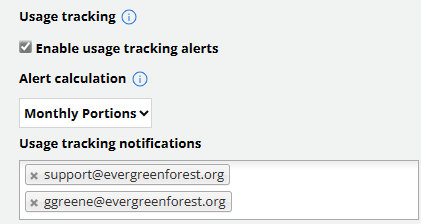
In the Usage Tracking section, select the Enable usage tracking alerts checkbox.
-
Select an alert calculation type from the drop-down list:
-
Full term: Calculates and sends alerts based on the allotment term (contract length).
-
Monthly portions: Calculates and sends alerts based on the allotment term divided by the number of months in the allotment.
-
-
In the Usage tracking notifications text box, add one or more email addresses for users who will receive email notifications. You can add addresses individually or enter multiple addresses separated with a comma (,) or space. To remove an email address, select x Remove next to the entry.
-
When you are done, select Update.