Release notes history
Here are the legacy Mobile Commons release notes. To stay current on feature updates, see the latest release notes.
| Release | Features and fixes |
|---|---|
| May 2023 |
View usage tracking data in the UI: new Allotments page Support for using SMS for multi-factor authentication |
| April 2023 |
Usage tracking alerts Updated UI elements |
| March 2023 |
Updated UI elements for navigation Improvements to processing time zone broadcasts |
| February 2023 |
New group filter Updated log-in screen Double opt-in message flow |
| January 2023 |
Support for email for multi-factor authentication (MFA) Minor updates for unique clicks functionality |
| December 2022 |
Review unique clicks versus total link clicks Ability to mark partially sent broadcasts as complete Return the count for total link clicks with the clicks API endpoint Ability to add a list of emails for quiet hours notifications |
| September 2022 |
New feature: Quiet hours Page performance improvements |
| May 2022 |
Broadcast send time speed improvements Broadcast test messaging Platform security enhancements |
May 2023
View usage tracking data in the UI: new Allotments page
Mobile Commons is making it easier than ever to track your usage of SMS and MMS messages in the platform with the introduction of our new usage tracking feature. You can enable alerts to remind you when you have utilized most of your message allotments as well as keep an eye on usage directly in our new allotments page.
-
To open the new allotments page, select
 Home from the left pane, and then select Allotments.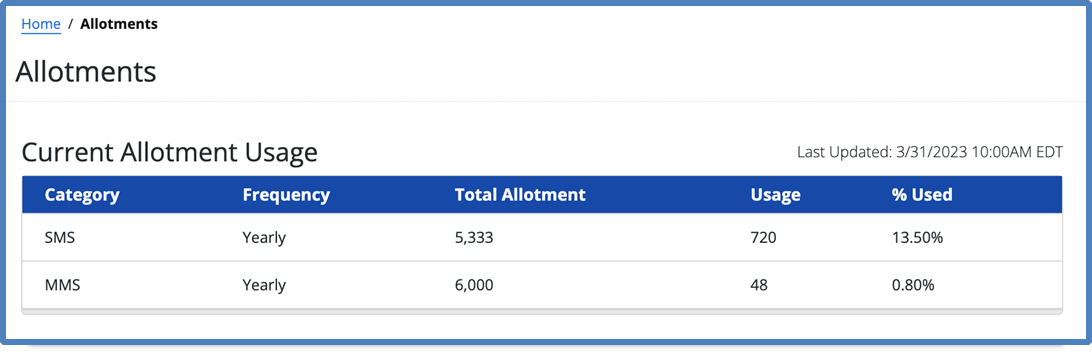
You can review the allotments that have been entered based on your contract for an overall view of your usage.
Support for SMS for multi-factor authentication (MFA)
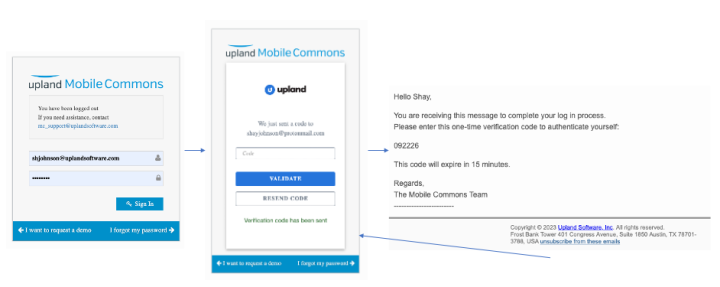
Mobile Commons is committed to continually striving towards the best security practices. In keeping with this, we have added support for using SMS for multi-factor authentication. You can now enable SMS for MFA to apply across your company account (in addition to email MFA, which was released in January).
Note: Using SMS for MFA requires that users have provided a mobile phone number within their profile setup. For users without a mobile phone number, email will remain the default channel for MFA verification.
To enable SMS for MFA for your organization:
-
On the title bar, select your account icon, and then select Configure Company.
-
On the Edit Firm page, go to the Multi-factor authentication section, select the Enable MFA checkbox and then select the SMS checkbox.
-
When you are done, select Update at the bottom of the page.
When users next log in, they will be prompted to provide validate their account with an access code that is emailed to them.
Bug fixes and additional updates
-
Continued UI enhancements to update platform iconography.
-
Added links to report data points listed in the dashboard.
-
Upgraded the charting version used for reports.
-
Addressed issue returning an error due to number of expressions used to query for filtered groups.
-
Addressed issue blocking the “received row from active schedule” from running properly.
-
Addressed issue with active subscribers count for smart campaigns.
-
Addressed issue with varying column orders returned for csv exports.
-
Updated US government representatives that were missing after re-geocoding.
April 2023
Usage tracking alerts
Mobile Commons is making it easier than ever to track your usage of SMS and MMS messages in the platform. With the introduction of our new usage tracking feature, you can enable alerts to remind you when you have utilized most of your message allotments.
To enable automatic email alerts when you reach 70% and 90% of utilization across each of your message allotments (SMS and MMS):
-
On the title bar, select your account icon and then select Configure Company.
The Edit Firm form opens.
-
In the Usage Tracking section, select the Enable usage tracking alerts checkbox.
-
Select an alert calculation type from the drop-down list:
-
Full term: Calculates and sends alerts based on the allotment term (contract length).
-
Monthly portions: Calculates and sends alerts based on the allotment quantity divided by the number of months in the allotment.
-
-
In the Usage tracking notifications text box, enter the name of one or more CSV (comma-separated values) files containing email addresses that will receive email notifications.
-
When you are done, select Update.
Important notes:
-
Allotments are manually entered. If you do not see any present for your account, contact your CSM for assistance.
-
This release covers tracking for standard contracts including an allotment for SMS and MMS. Future releases will provide additional support for handling other unique contract considerations.
Updated UI elements
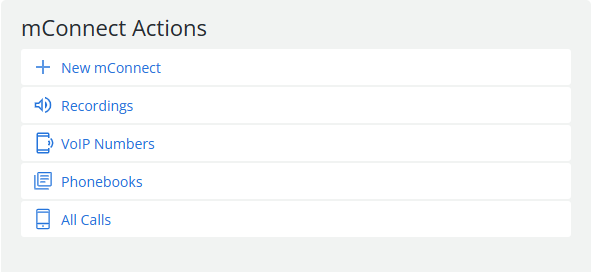
We will continue to roll out UI enhancements. This release includes updates to the drop-down in the top navigation bar and adds updated iconography to several areas throughout the platform.
The following screenshot illustrates the new design of the mConnect Actions panel:
Bug fixes and additional updates
-
Added improved handling of group uploads to better display when uploads are still being processed.
-
Addressed an issue where commas provided in a string field for custom columns were breaking the filter query.
-
Fixed CSV files for group exports that were provided with varying column orders.
-
Fixed Mobile Giving Foundation reports that were not loading properly in the UI.
-
Fixed an issue with recurring broadcasts that had a property of local_time=false getting stuck.
March 2023
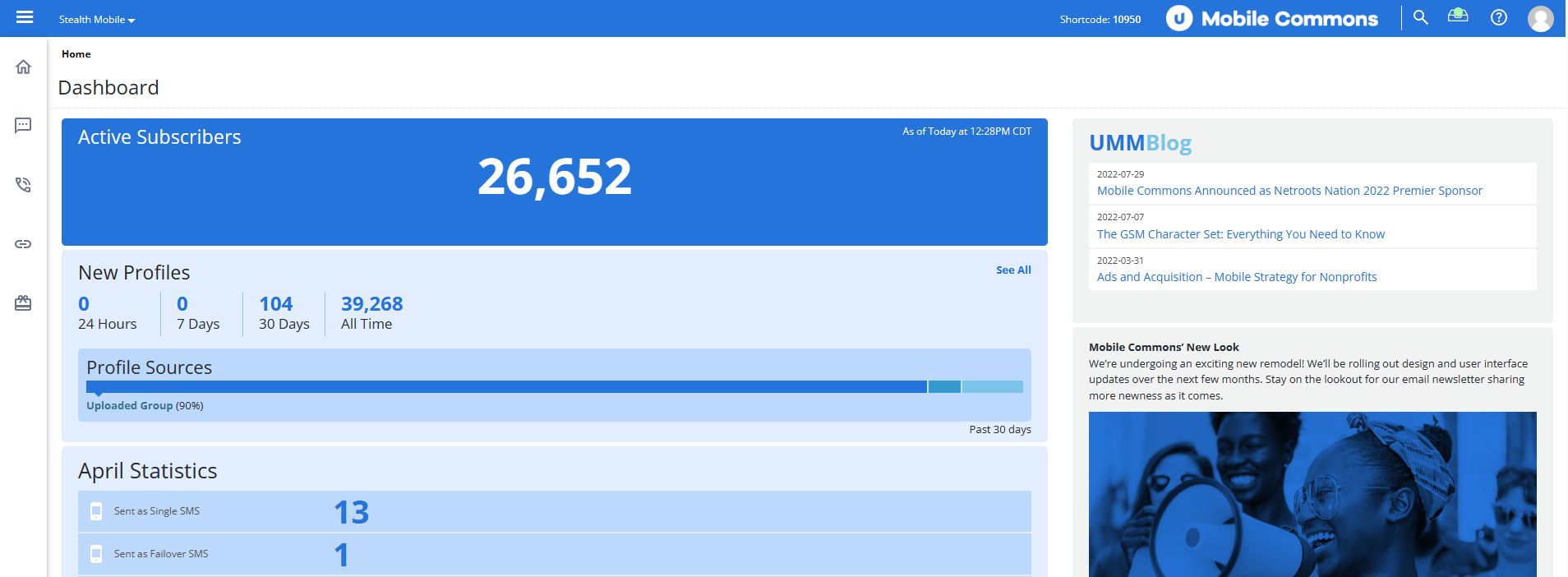
Updated UI elements for navigation
With this release we introduce an updated Mobile Commons logo that is visible in the top navigation bar. We’ve also made updates to our color scheme, fonts, and even made improvements to our iconography.
Improvements to processing time zone broadcasts
Our R&D continues to identify ways to speed up and improve our logic for managing broadcasts.
In this release, we have updated logic for time zone broadcasts to ensure that they start sending on time instead of waiting for all parts of the broadcast to be processed.
Bug fixes and additional updates
-
Updated the error pop-up thrown when a user attempts to deactivate a schedule in use by a group filter to include the group name.
-
Updated the password requirements for new passwords to be more secure.
-
Updated how special characters are handled by group filters to ensure they are included in queries.
-
Addressed an issue where profile counts were not updated when changing the group(s) assigned to a broadcast.
-
Updated the ActionKit sync to use their REST endpoints.
-
Addressed an issue impacting the status message in the UI for optimized broadcasts.
-
Addressed an issue where exports over a certain size containing profile data were not exported with data.
February 2023
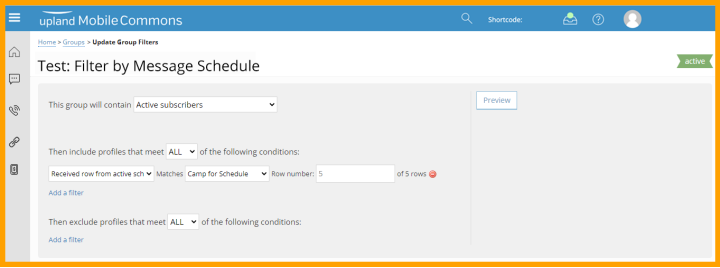
New group filter: received row from active schedule
Users can now filter groups by message schedules. This highly requested features enables users to target subscribers who have received a specified row in the message schedule. The new filter provides a way to target subscribers who have started or ended a specific schedule by filtering for the appropriate row in the message schedule.
This group filter works with all active message schedules; deactivated schedules will not appear for filtering.
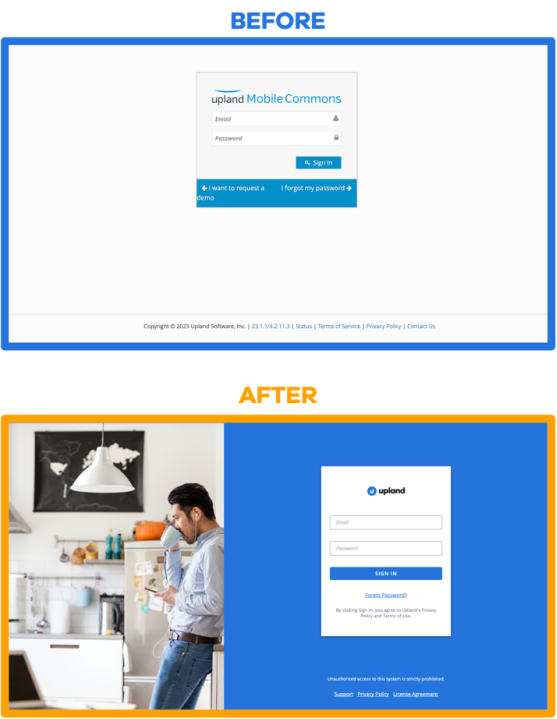
Updated log-in screen
We have given the Mobile Commons log-in screen an update. You can expect the same log-in behavior as the previous screen layout but with a more modern look and feel.
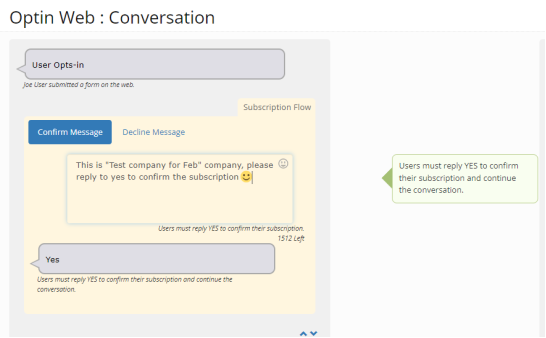
Minor update to the double opt-in message flow
The Development team has updated the Edit and Creation screens for double opt-in flows so that the subscription flow starts expanded. This box was previously collapsed despite being a required field to review and update for double opt-ins.
Bug fixes and additional updates
-
Added restrictions to prevent duplicate requests for CSV exports for several pages in the platform.
-
Updated the MFA logic to apply the updated log in process during the next log in instead of immediately after the setting is applied.
-
Updated the new mark as complete feature to fully support throttled broadcasts,
-
Fixed an issue causing difficulty accessing the dashboard page when no data was available to calculate the churn rate.
-
Fixed an issue that prevented users from searching using more than one search terms.
January 2023
Support for email for multi-factor authentication (MFA)
Mobile Commons is committed to continually striving towards the best security practices. In keeping with this, we have added support for using email for multi-factor authentication. You can now enable email MFA to apply across your company account. Once enabled under company configuration, all users associated with the given company will be required to provide an emailed 6-digit code to complete their log in process.
Steps to enable MFA for your organization:
-
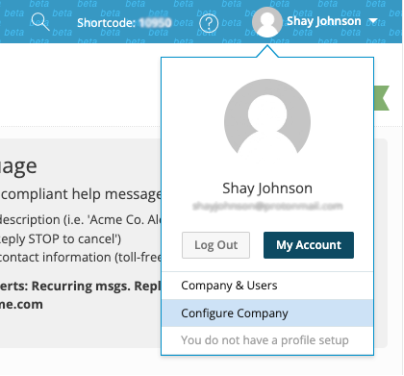
Log into the platform and navigate to configure company.
-
Select Enable MFA for email and then Update at the bottom of the page.
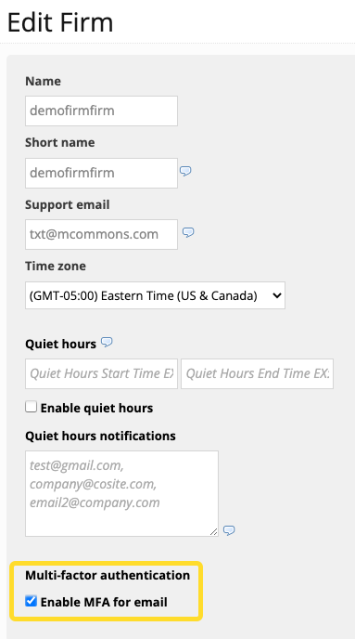
-
MFA will be enabled once for any users logging in after this setting is applied.
Note: Users will complete their login normally when MFA is enabled but will be prompted to provide a code that has been emailed to them as shown below.
Minor updates for unique clicks functionality
We added the ability to view unique link clicks from the dashboard, reports pages, as well as the links section of the platform. We performed some minor clean-up to ensure uniformity with the way that total link clicks are displayed throughout the platform. These updates did not change functionality.
Bug fixes and additional updates
-
Fixed an issue where specific tags did not link the appropriate information.
-
Addressed issue regarding a 3rd party tool not providing key data for an mConnect process.
-
Updated the way the platform handles broadcasts that are updated while being sent to ensure updated message copy is used.
-
Performed a complete refactor of how our queries and jobs used for a specific set of statistics in the platform.
December 2022
Review unique link clicks versus total link clicks
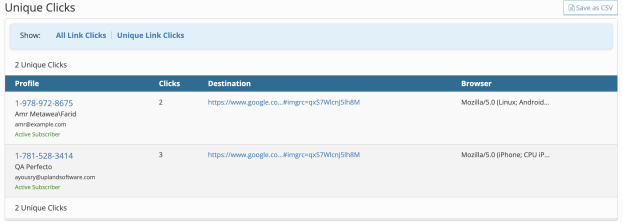
The ability to see unique link clicks in addition to total link clicks throughout the platform has been highly requested. We have added the ability to review this data for the dashboard, reports, and broadcasts reports pages.
In addition to these updates, you can also review the Links > Clicks page to filter between all or total links clicks and unique link clicks.
Dashboard view
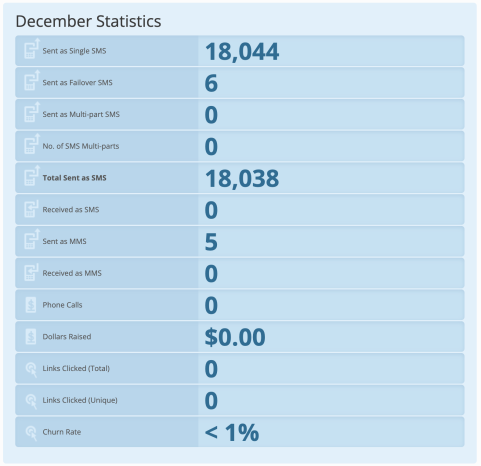
Reports view
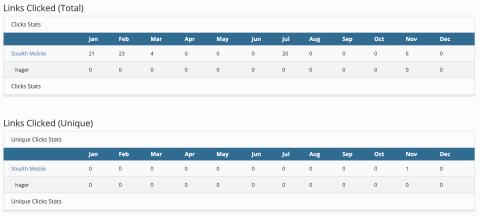
Broadcast report view
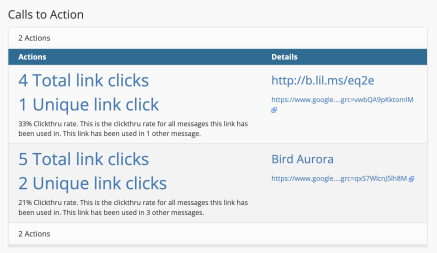
Links > Selected Link > Clicks
Ability to mark partially sent broadcasts as complete
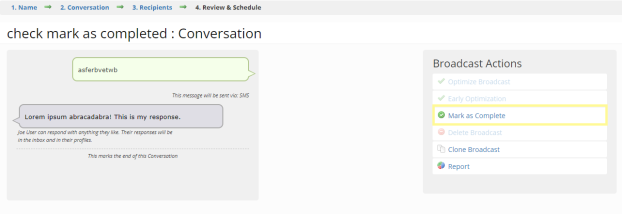
When a standard or time zone based broadcast is manually stopped, it is then placed into a draft state. We have added the ability to mark these broadcasts as complete so that you may use the “Received Broadcast” group filter to identify subscribers who have already received a broadcast to send out the remaining messages with a new broadcast.
Note: The broadcast must have sent to at least 1 recipient to mark the stopped broadcast as completed.
Return the count for total link clicks with the clicks API endpoint
The “list web clicks” endpoint for the Mobile Commons API has been updated to support a new parameter: total_link_clicks. This new parameter can be used to pull total link and unique clicks without including response data for each individual click to enable easier reporting. Users previously had to count the number of results returned to capture this data. Please review the API documentation in the Upland Community for more details on the “list web clicks” endpoint.

Ability to add a list of emails for quiet hours notifications
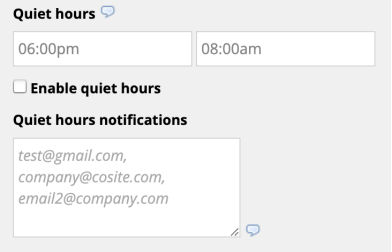
The Mobile Commons team continues to identify feature improvements with the new quiet hours! We now provide the ability to enter a comma separated list of emails that will receive an email notification when a broadcast is stopped due to the configured quiet hours.
Bug fixes and additional updates
-
Updated logic for smart campaigns to improve performance.
-
Added logic to handle elements of a broadcast that are un-optimized.
-
Updated status check for optimized broadcasts to ensure timely processing for jobs created more than 3 days in advance.
-
Addressed a user role privileges issue occurring for a user with 2 different roles in 2 different accounts.
-
Fixed recipients count for time zone based broadcast recipient on the dashboard.
-
Split profile analysis jobs into additional jobs to ensure they run properly.
September 2022
New feature: quiet hours
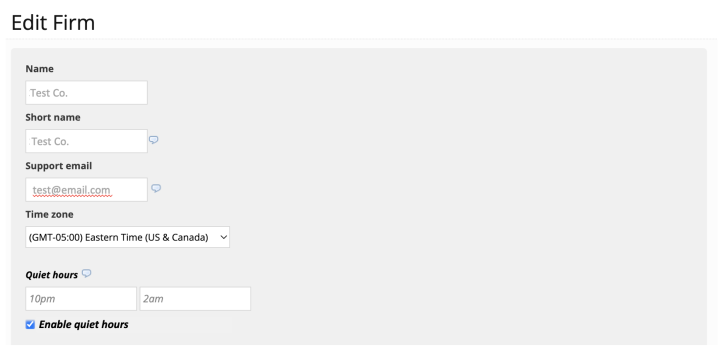
Mobile Commons has an exciting new feature that allows users to set “quiet hours” within the company configuration. This will prevent messages from being sent during less than ideal times such as late at night or early in the morning. If a broadcast is still sending when quiet hours are reached, the broadcast will be placed back into a draft status and the remaining messages can be rescheduled. An email will be sent out to company support email as a reminder to reschedule the remaining messages when a broadcast is placed in to draft status due to quiet hours.
Important notes:
-
This is enabled in the company configuration section of the user account.
-
Once enabled, quiet hours will apply across all standard and time zone broadcasts.
-
Throttled and optimized broadcasts are excluded.
-
-
This setting will base the quiet hours on time zone set for the company except for time zone based broadcast.
-
Time zone based broadcasts will ignore the company time zone and map quiet hours such as 10 PM to 2 AM to the time zone for each segment. For example, time zone broadcast sending to Eastern, Central and Pacific the quiet hours would be considered as the following:
-
10 PM to 2 AM EST
-
10 PM to 2 AM CST
-
10 PM to 2 AM PST
-
-
Page performance improvements
As a part of our commitment to updating the Mobile Commons infrastructure, we have released a new enhancement that improves the performance when loading information on the Campaign Report page (this page can be accessed by navigating to a specific campaign then selecting campaign report). Additional optimizations were also made to improve the speed of search capabilities on the Outbox page.
Bug fixes and additional updates
-
Addressed issue preventing advanced targeting from working in mConnect
-
Addressed inconsistent round robin functionality within mConnect
-
Restored filtering capabilities within the inbox page
-
Addressed issue with profile counts in group filters when using a comma separator for custom attributes
-
General security updates
May 2022
Broadcast send time speed improvements
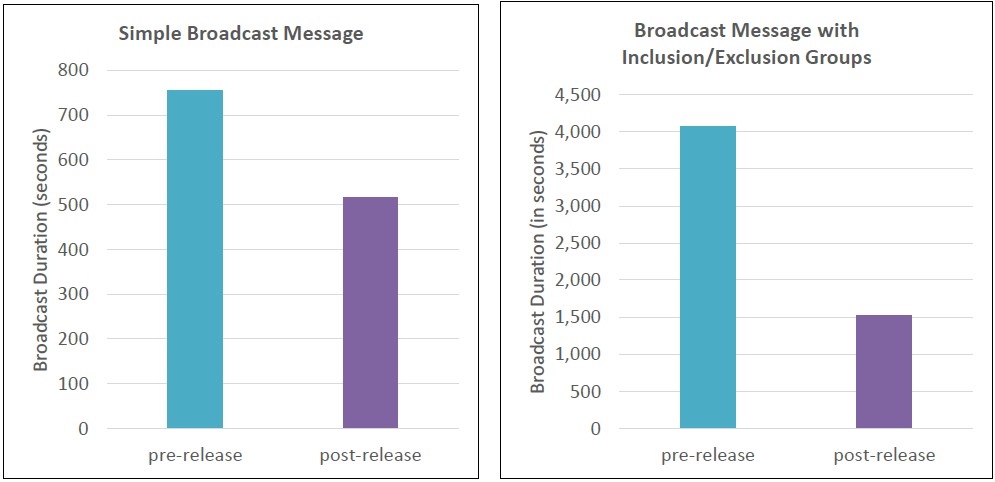
Effective broadcast messaging means sending the right content to the right audience at the right time. To best enable that your subscribers receive messages at the relevant time, it is critical that broadcast messages execute as quickly as possible.
Upland Research and Development identified several opportunities to improve send time speeds for broadcast messaging. To begin, we identified a service that could be optimized to positively affect 100% of broadcasts that go out through Mobile Commons. With this change, we expect for you to see profound improvements in broadcast send times. For a simple message broadcast, we have observed an average increase of 31% in speed. For a more complex broadcast, specifically one with inclusion and exclusion groups, we have observed a 62% average increase in speed.
Note: There is no action a customer must take to enjoy this improvement. A customer should build and schedule a broadcast as they had previously.
Broadcast test messaging
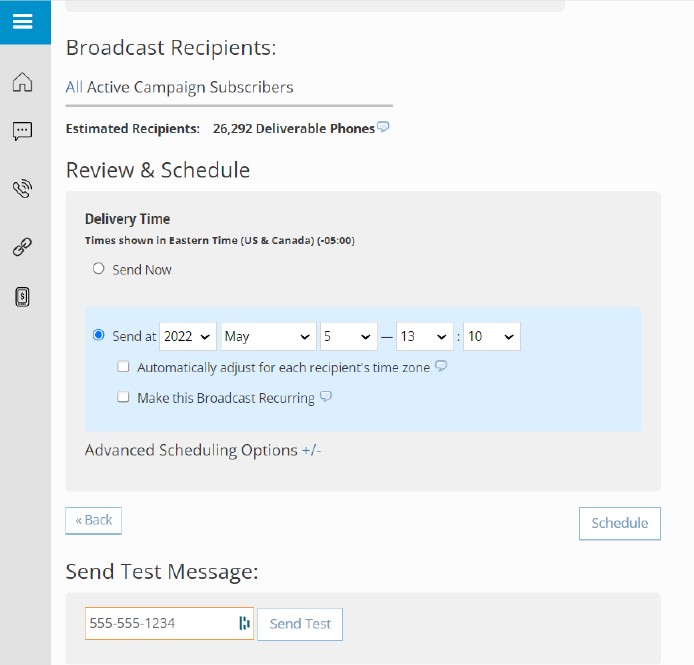
When Mobile Commons users craft content, it’s critical that the content can be quickly and easily tested so that message content can be experienced across a mobile device. Mobile Commons now provides this functionality so that testing is just a quick click away. Nestled below the scheduler on “Review and Schedule” step, one may enter a phone number and click “Send Test”. The message will then be sent to the applicable mobile device number.
Notes:
-
Only the first message in a conversation can currently be tested.
-
The phone number must exist in that short code’s profile database for a test to run effectively.
-
Only one phone number can be tested at a time.
Platform security enhancements
The Mobile Commons platform leverages third-party services. In June, our vendor will begin using Secure FTP to transfer files. Mobile Commons now supports this protocol to ensure we utilize the best security measures to protect client data.
Bug fixes
-
Run more frequent data syncs with our ActionKit integration to ensure that data synchronization occurs faster and more reliably.
-
Expand the recipients of ActionKit synchronization results to broaden internal coverage of this service.
-
Fix ability to select multiple values on custom field filters for dynamic groups.