Release notes
Want to know what's new?
To stay current on the most notable feature updates, take a look at the latest release notes. For older, legacy releases, see the release notes history.
| Release | Features and fixes |
|---|---|
| June 2025 |
Enhancements Bug fixes and additional updates |
| May 2025 |
New feature and enhancements Bug fixes and additional updates |
| April 2025 |
New feature and enhancements Bug fixes and additional updates |
| March 2025 |
New feature and enhancements Bug fixes and additional updates |
| February 2025 |
Enhancements Bug fixes and additional updates |
| January 2025 |
Enhancements Bug fixes and additional updates |
| December 2024 |
New features and enhancements Bug fixes and additional updates |
| October 2024 | New rich communication services (RCS) feature |
| September 2024 |
New features and enhancements Bug fixes and additional updates |
| August 2024 |
New features and enhancements Bug fixes and additional updates |
| July 2024 |
Revamped broadcast creation process Bug fixes and additional updates |
| May 2024 |
New "Save View" feature New "Attribution Analytics" feature Revamped group creation process Bug fixes and additional updates |
| April 2024 |
New automated list cleaning feature New message “Status” filter on the “Outbox” page Bug fixes and additional updates |
| March 2024 |
Data Sync page (UI refresh) Mobile Commons APIs (read only) in Swagger "Message" density customization on the "Broadcasts" page |
| February 2024 |
Additional customization on the "Broadcasts" page Bug fixes |
| January 2024 |
New columns for the Broadcasts table New "mConnect" page View additional campaign tags without expanding the Campaign Details window View additional campaign keywords by scrolling cursor over expand bubble New "Create Smart Campaign" window "New Custom Field" window New "Upload Files" window to upload new recordings Ability to sort the "Calls" page based on call duration |
| December 2023 |
Updated form modals: attachments and file drop Custom page input across Mobile Commons Enhanced filter display for select tables Updated tables (UI Refresh): VoIP, recordings, calls, profiles, mDatas, and ended campaigns Help Center updates Bug fixes and additional updates |
| November 2023 |
Self-service polling locators Branded links Updated tables (UI Refresh): Phonebooks, links, recordings, and reports Bug fixes and additional updates |
| October 2023 |
Updated group filter: Filter by political party with U.S. Senator Updated tables (UI Refresh): mConnects and message templates Bug fixes and additional updates |
| September 2023 |
EveryAction integration Updated tables and pages (UI Refresh): Campaigns, inbox, outbox, attachments, and profiles Bug fixes and additional updates |
| August 2023 |
New group filter: Governor UI refresh: Broadcasts and tags tables |
| July 2023 |
New group filter: Filter by political party New auto-route option for mConnect: Governors Update allotment tracking for monthly contract types Support for sending MMS messages without an attachment UI refresh: Custom fields, secure files, and profiles tables |
| June 2023 |
Upland Assist for Mobile Commons New Help Center |
June 2025
Enhancements
Fundraising Terminology and UI Updates
-
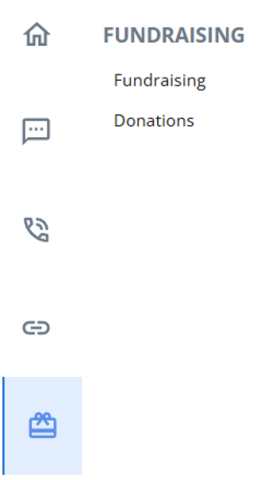
The term "Mobile Giving" has been updated to "Fundraising" across the platform for better clarity and consistency.
-
The + New Fundraising Program button has been removed to streamline the interface.
-
Editing capabilities for mCollect have been restricted to maintain data integrity.
-
The "Donations" page is now conveniently located under the "Fundraising" section.
Deprecated Optimized Broadcasts
The "Optimized Broadcasts" feature has been removed from the broadcast journey to simplify and modernize the platform.
Bug fixes and additional updates
-
Fixed an issue where incorrect MMS usage alerts were being sent, including inaccurate usage percentages and allotment values.
-
Resolved a bug where the capital letter “Ö” was being removed from broadcast messages. Messages now retain this character correctly.
-
Addressed a discrepancy where applying filters (Sent, Read, Failed) in the Outbox resulted in fewer records than expected.
-
Fixed an issue where sending a test message prevented the actual broadcast from being delivered to the same recipient.
-
Resolved a problem where CRM syncs were creating duplicate member records, which previously disrupted successful syncing.
-
CSV reports now generate correctly on the following pages:
-
Profiles
-
"Recipients" page in Broadcast Reports
-
Opt-in Path
-
Campaign Subscribers
-
Cleaned Profiles
-
Speed Improvements
Made optimizations to improve CSV export speed through Snowflake. While results may vary depending on the dataset size, you should notice faster data exports, improving reporting workflows without any manual effort.
May 2025
New Feature
(Preview Feature) Suggested Actions for RCS Broadcasts
Preparing Mobile Commons for the future of messaging by introducing Suggested Actions in RCS broadcasts. These actionable elements are designed to make your broadcasts more interactive, intuitive, and effective—helping recipients take direct steps from within the message itself.
While full RCS broadcast sending is not yet available due to pending carrier enablement, this release lays the groundwork so you’re ready when it is.
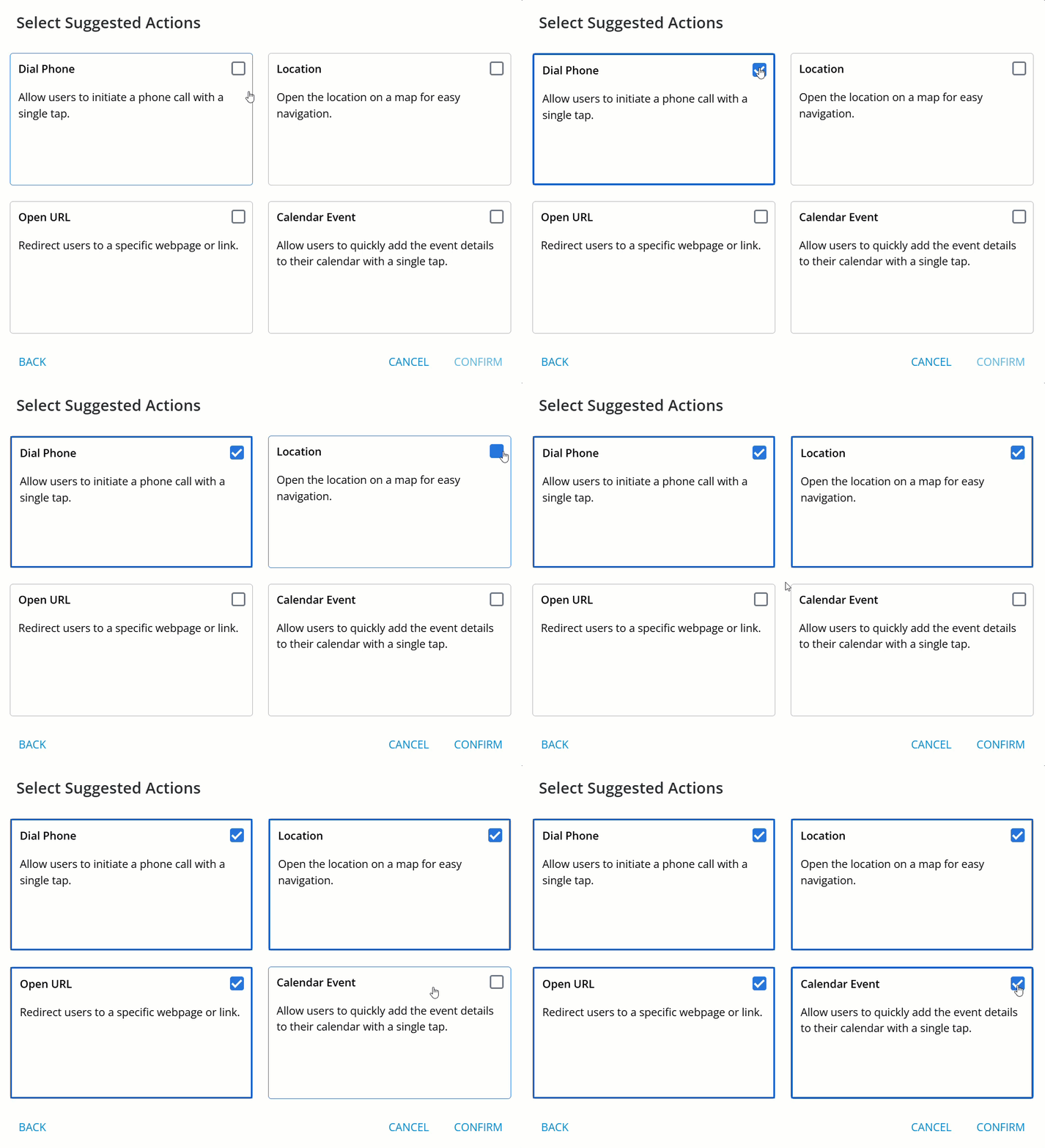
Once carrier support is in place, you’ll be able to add rich, interactive actions to your RCS messages, including:
-
Dial Phone
-
Share Location
-
Open URL
-
Add Calendar Event
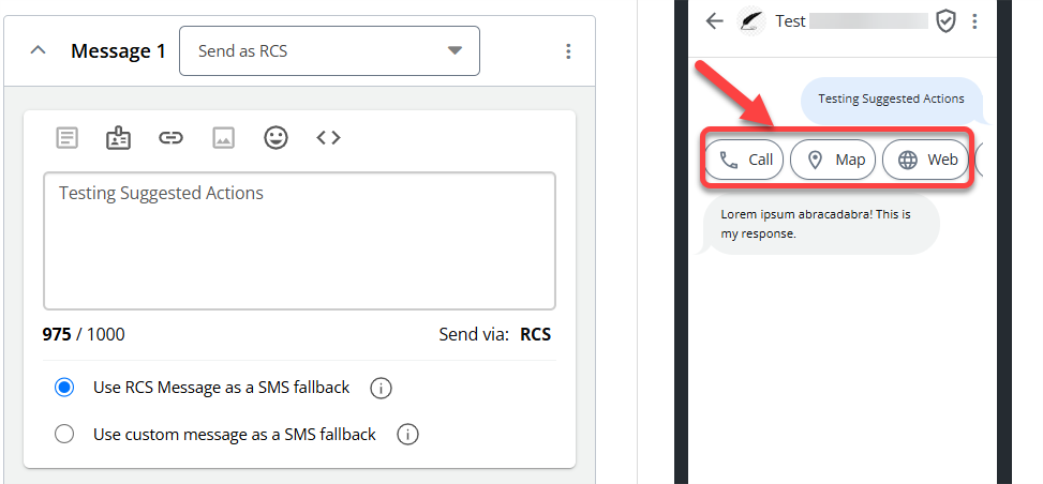
For more information, see Using rich communication services (RCS) messaging function.
Enhancements
-
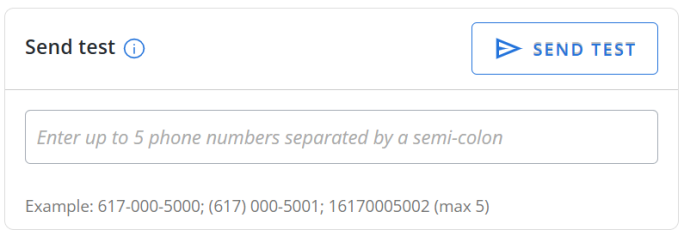
Send Test Messages to Multiple Numbers: You can now send test messages to up to 5 phone numbers at once by separating them with a semicolon (;), making testing more efficient and collaborative.
-
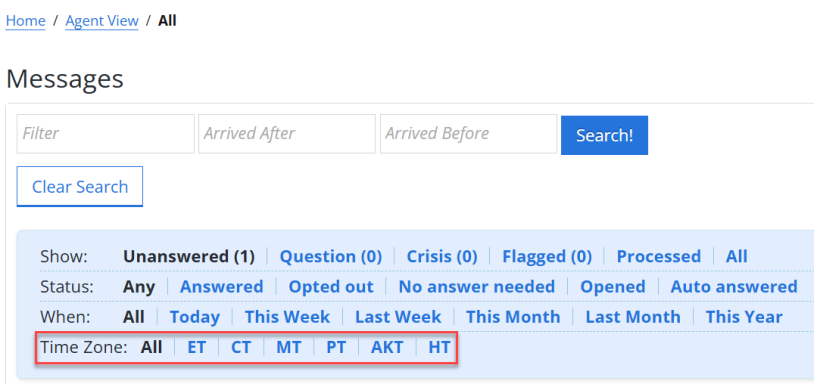
Time zone Filter Added to Agent View: Introduced a time zone filter on the "Agent View" page to help you segment your audience more effectively. Now, you can filter profiles by time zone and use this filter seamlessly alongside existing filters for more targeted engagement.
-
Smarter Group Creation with Donation Filters: When creating groups using filters, you now have more ways to segment based on donor behavior. New filtering options include:
-
Number of Donations
-
Highest Amount Donated
-
Last Date Donated
-
Last Amount Donated
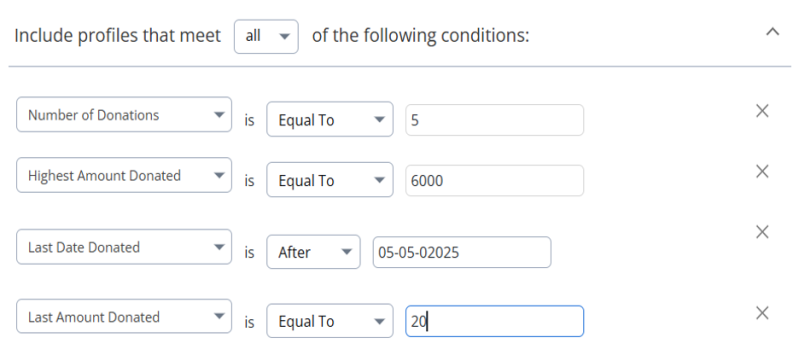
These additional filters allow for more strategic audience building, especially for fundraising campaigns.
-
-
Expanded Donation Insights: On the "Donations" page, new columns are added to give you richer context:
-
Last Amount Donated
-
Last Date Donated
-
Highest Amount Donated
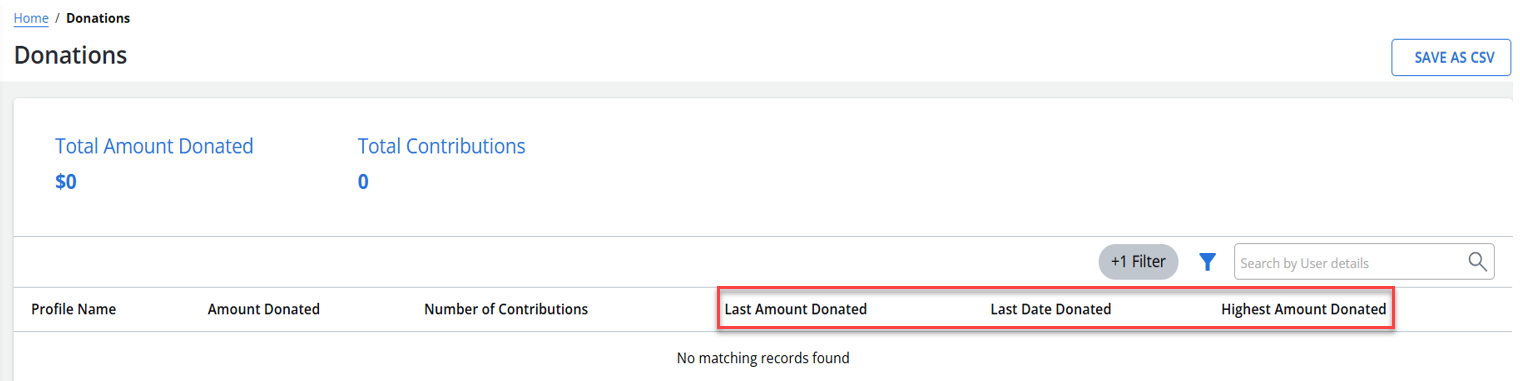
These fields are especially helpful when reviewing donor activity or preparing outreach lists.
-
-
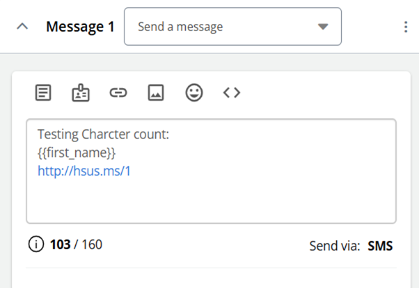
Improved Character Count Accuracy in Message Composer: Reinstated the earlier character count logic in the "Conversation" stepper of the Broadcast Journey to fix discrepancies when using insertable elements like links or dynamic tags. Now the character count will run on average message length during composition.
Bug fixes and additional updates
-
The "Suppress Groups" modal in the "Recipients" stepper now visually matches the "Include Groups" modal for a consistent, clean experience.
-
Fixed an issue where some emojis, such as the registered trademark (®), were being incorrectly converted to text (e.g. “(R)”).
-
Resolved an issue where the Save as CSV function wasn’t working properly with active search filters in broadcasts.
-
Addressed a server error when trying to save a Web Form Opt-in Path with empty Confirmed or Declined message fields.
-
Fixed several display and behavior inconsistencies in the "Conversation" stepper, including:
-
Messages with only emojis displaying as multipart in the"Conversation" stepper and single SMS in the "Review" stepper.
-
Character count issues when mixing templates and text.
-
-
Fixed an issue for extra line breaks or spaces being added in the message container within the "Conversation" stepper unexpectedly after saving.
-
Fixed an issue where adding multiple links in a message would result in only the first link being properly hyperlinked.
Speed Improvements
Made optimizations to improve CSV export speed through Snowflake. While results may vary depending on the dataset size, you should notice faster data exports, improving reporting workflows without any manual effort.
April 2025
New Feature
Mobile Commons and Salesforce Lightning Integration
Mobile Commons now supports Salesforce Lightning. This enhanced integration brings full parity with the Classic experience, while unlocking seamless compatibility with the modern Lightning interface.
This includes:
-
Bi-directional profile syncing: New user records are automatically synced daily between Mobile Commons and Salesforce Lightning.
-
Twice-daily donation data syncing: Ensure donor insights are always fresh.
-
"has_donated_previously" field: Automatically flags profiles with past donation activity, helping you segment and target donors more effectively.
This integration ensures both platforms stay in sync and enables more personalized communication strategies powered by up-to-date donor data.
For more information, see Setting up Salesforce Lightning
Enhancements
-
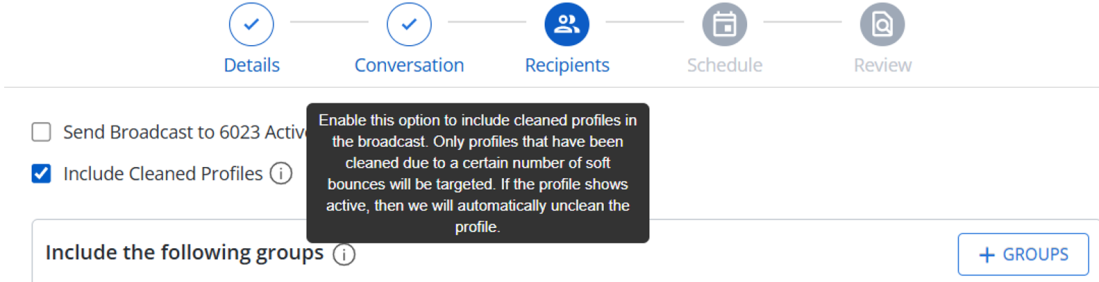
Smart Audience Targeting with Cleaned Profiles: You can now include cleaned profiles when building a broadcast. Whether a profile was mistakenly marked as cleaned or has since re-engaged, you can now check the new "Include Cleaned Profiles" box to reach them again with ease.
-
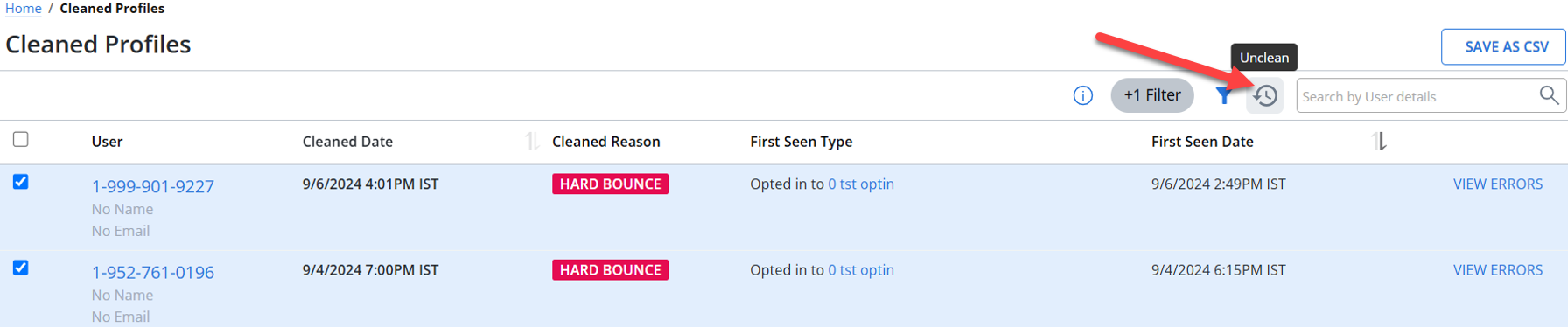
Bulk Unclean Profiles in One Click: Added the "Unclean" bulk action on the Cleaned Profiles page. No more restoring profiles one-by-one—now you can bring multiple profiles back in a single step, saving time and effort for large-scale updates.
-
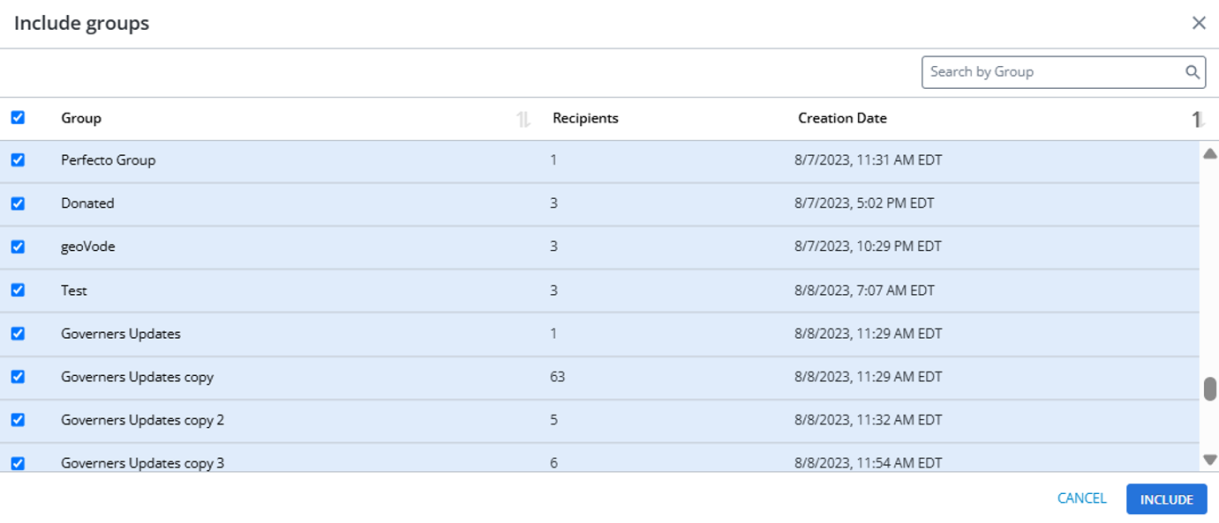
Improved Group Selection in Broadcasts: Selecting groups in the "Recipients" stepper of your broadcast journey just got better. You’ll now see not just the group name, but also:
-
Count of recipients in the group
-
Creation date of the group
This provides better visibility and confidence when targeting your audiences.
-
Bug fixes and additional updates
-
All the donations coming via ActionKit CRM now shows the actual donation time, not the sync timestamp .
-
“Save Response As” dropdown in Opt-in Paths and Broadcast journeys now correctly sorts standard and custom fields.
-
Fixed an issue where message backgrounds weren’t appearing in Agent view.
-
Resolved a bug where dynamic fields were misplaced after inserting message templates in the Broadcast Conversation stepper.
-
Fixed the liquid preview issue in mobile view when reviewing messages in the Broadcast Conversation stepper.
-
Updated copy for keyword removal warning in the Opt-in Path flow for better clarity.
Speed Improvements
Made optimizations to improve CSV export speed through Snowflake. While results may vary depending on the dataset size, you should notice faster data exports, improving reporting workflows without any manual effort.
March 2025
New Feature
Seamless Integration Between Mobile Commons and ActionKit
Making donor data management smarter and more efficient with our new ActionKit integration. Now, key donor details will sync between ActionKit and Mobile Commons, ensuring your fundraising campaigns are backed by the most accurate and up-to-date insights.

Enhancements
-
More Flexibility with Test Messages in Broadcasts: You can now send test messages even after scheduling a broadcast—no need to unschedule and reconfigure your setup.

-
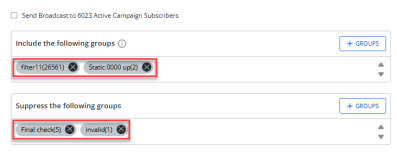
Group Pill: Users can now click directly on a group pill to navigate to that specific group’s page, making broadcast management more intuitive.
-
Better Filtering on the "Broadcasts" Page:
-
Multi-select checkboxes are now available on the "Broadcasts" page under "Broadcast Status," allowing for more efficient filtering.
-
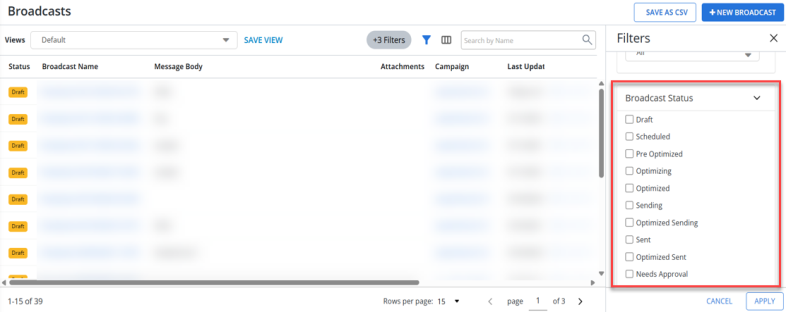
The "Save View" configuration now supports multi-select filters, making it easier to retrieve customized broadcast views with a single click.
-
Broadcast Report: Broadcast report exports now include both total and unique link clicks, providing deeper insights into engagement performance.
-
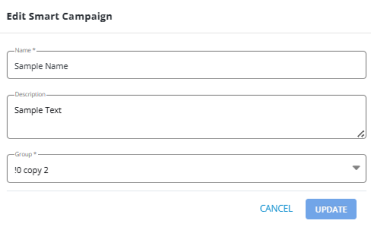
Edit Smart Campaign: The "Edit Smart Campaign" flow has been refreshed for a more seamless experience.
-
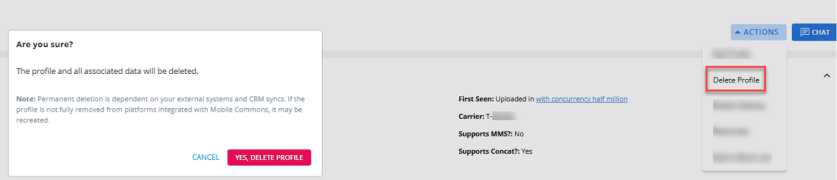
Delete Profiles: Platform company users can now delete profiles directly in Mobile Commons.
Bug fixes and additional updates
-
Fixed an issue where the "Unschedule Broadcast" option was unavailable after sending test messages—you can now unschedule broadcasts as expected.
-
Resolved an issue where test messages weren’t sending. Messages now correctly appear in profiles and the Infobip portal.
-
Call-to-Record now properly saves audio files to the platform for seamless mConnect use.
-
Fixed a duplication issue where scheduled broadcasts with message templates were appearing twice in the "Recipients" section and reports.
-
The "Notification Preferences" section is now properly aligned on the "Accounts" page.
-
Fixed incorrect message ordering in some user profiles.
-
Resolved an issue where editing multiple groups simultaneously resulted in one group overwriting another.
February 2025
-
Revamped Opt-In Path Flow:
The revamped opt-in path flow in Mobile Commons is now available. This release introduces a cleaner, more intuitive, and user-friendly way to create and manage opt-in paths, mirroring the enhancements recently introduced in the new broadcast journey.
Simplified Opt-In Path Creation with the + New Opt-In Path Button:
The + New Opt-In Path button has been added directly to the “Opt-In Path” page, similar to the + New Broadcast button on the “Broadcasts” page. This provides users with a quick and easy way to start building opt-in journeys without navigating multiple pages.
Seamless Opt-In Path Creation from the "Opt-In Path" Page:
Users can now create opt-in path directly from the “Opt-In Path” page by selecting specific campaigns.
Easily configure different types of messages tailored to your audience engagement strategies.
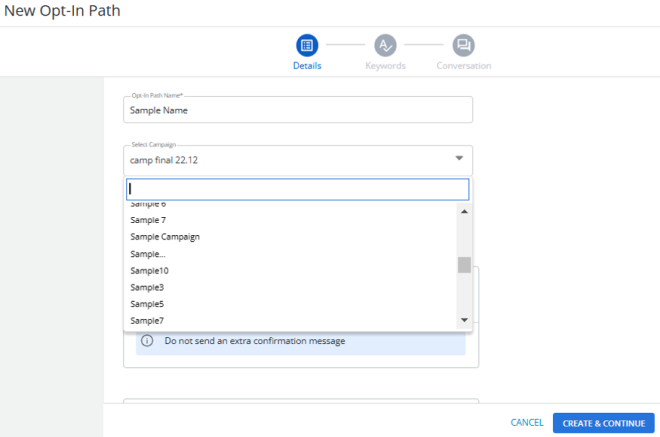
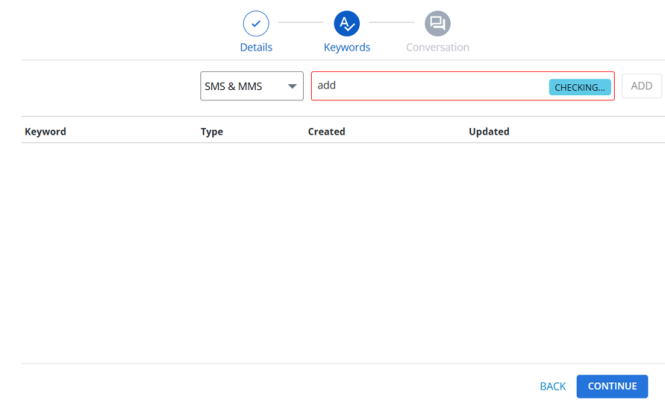
Enhanced Steppers for Opt-In Path Creation:
The opt-in path creation process now features refreshed steppers for streamlined navigation through different stages of opt-in path configuration, providing a clear and structured journey from start to finish.
-
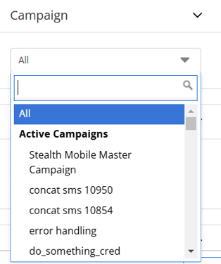
Inner Search for Campaign Selection:
Long lists no longer need to be manually scrolled through. You can now quickly search for and select campaigns directly within dropdowns, saving time.
-
Cleaner CSV Exports:
On the “Cleaned Profiles” page, the “Cleaned Date” is now included in CSV exports, providing more valuable data insights.
-
Receive All Broadcast Messages:
Testing only the first message in a broadcast was insufficient for thorough testing. You can now receive and review the full sequence of broadcast messages for thorough testing.
-
Print-Friendly Broadcast Reports:
The Print Report button has been added, allowing you to generate clean, easy-to-read printed reports directly from the platform.

-
Bulk Opt-Outs for Inbox Messages:
Select multiple messages at once and opt them out in bulk to quickly handle spam or inappropriate messages, improving inbox management.

-
Click-to-Text Links Directly in Platform:
Reduce keyword errors with direct click-to-text links creation, no third-party tools required.
-
Accurate File Size Display:
Previously, when uploading a CSV file smaller than 1 KB, the system displayed the file size as 0 KB. Now, file sizes are rounded to the nearest whole number for better accuracy.
-
Refreshed “Insert Liquid” Modal:
Updated the “Insert Liquid” modal across the platform for a more consistent and user-friendly experience.
-
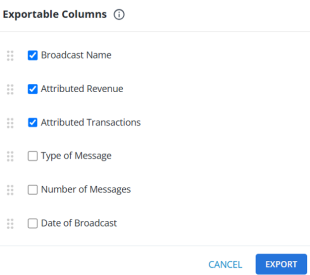
“Save as CSV” Modal on “Attribution Analytics” Page:
Users can now select and reorder columns within the modal. The generated CSV will reflect these configurations.
-
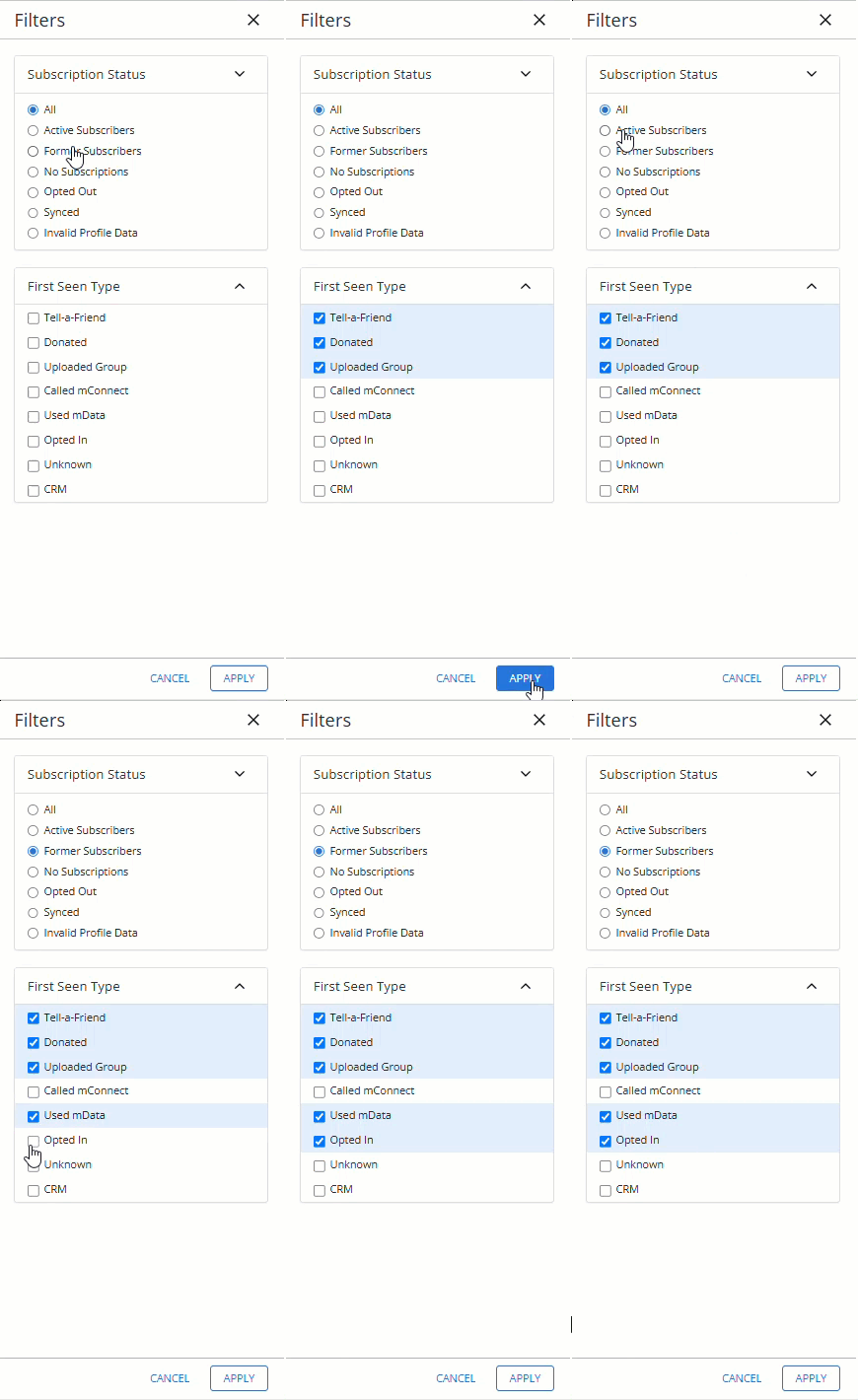
Multi-Select Filters on “Profiles” Page:
You can now easily apply multiple filters at once using new multi-select checkboxes, helping you target the right audiences faster.
-
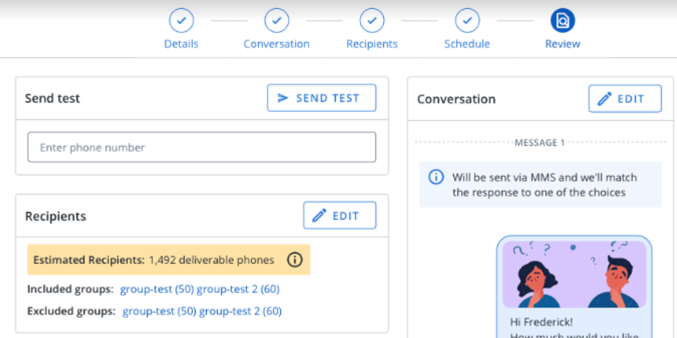
Group Profile Count Display:
View individual group profile counts for both included and excluded groups on the “Review” stepper during broadcast creation.
-
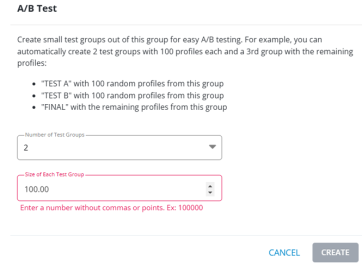
A/B Test Improvement:
Added a note in the “A/B Test” modal informing users that comma-separated or point values will not be accepted.
-
Group Filter Verbiage Changes:
The following are the group filter verbiage changes:
“Equal to” → “On”
“Greater than” → “After”
“Less than” → “Before”
-
Profile Details:
Renamed the “Phone” column to “Profiles” on the “Inbox” and “Outbox” pages, adding richer profile details.
-
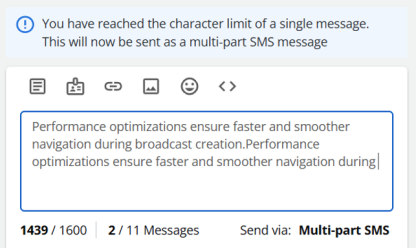
SMS Overages Alert:
A banner now alerts users when SMS messages exceed one part, helping track and control costs.
-
Faster Broadcast Journey:
Performance optimizations now ensure faster and smoother navigation during broadcast creation.
-
New API Endpoint:
Users can now clear profile fields directly via API, eliminating the need for complex workarounds.
Bug fixes and additional updates
-
Trackable Links for Broadcasts: Resolved an issue where newly created Tiny URLs in broadcast messages were being sent without their unique IDs. Now, all trackable links are generated correctly with unique IDs, ensuring accurate tracking and analytics.
-
Track Web Clicks Error: Users previously encountered a “Something went wrong” error when creating or updating URLs for tracking web clicks. This issue has been resolved, enabling users to create and save URLs without interruptions, enhancing tracking efficiency.
-
mConnect Deactivation Messages: Eliminated unnecessary deactivation messages for mConnect when it was already in use. This provides users with a cleaner, more accurate interface and reduces confusion.
-
Smart Campaign Profile Enrollment: Smart campaigns now properly enroll new profiles pulled into filtered groups. Users can confidently rely on smart campaigns to manage dynamic profile enrollments without manual intervention.
-
Quiet Hours Scheduling Error Handling: Introduced a clear error message to alert users when attempting to schedule broadcasts during configured quiet hours. This prevents accidental scheduling during restricted times, ensuring compliance with account settings.
-
Responsive “Liquid Template” Modal: The “Liquid template” modal is now fully responsive on mobile devices, providing a seamless experience for users accessing it on smaller screens.
-
Campaign Access for Restricted Users: Users with the “Editor” permission unchecked and the “Limit Access to Campaign” setting applied were previously unable to see any campaigns. Fixed the issue, allowing restricted users to view the campaigns they have access to without errors.
-
Dashboard Data Display: Fixed an issue where dashboard data appeared out of order, ensuring a clear, logical display of information for better insights and decision-making.
January 2025
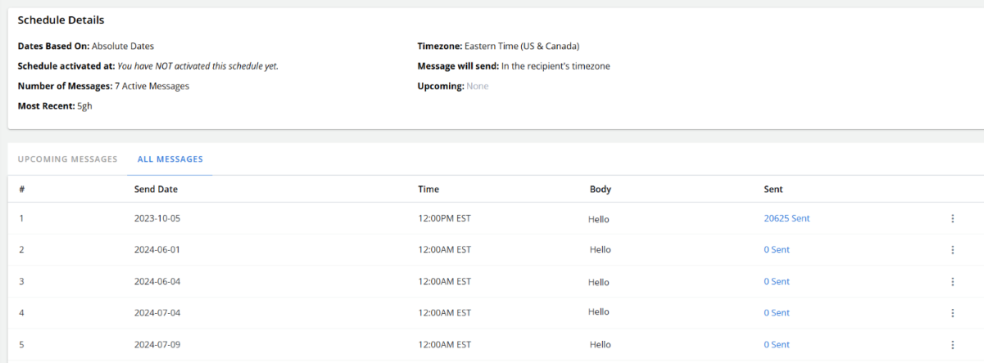
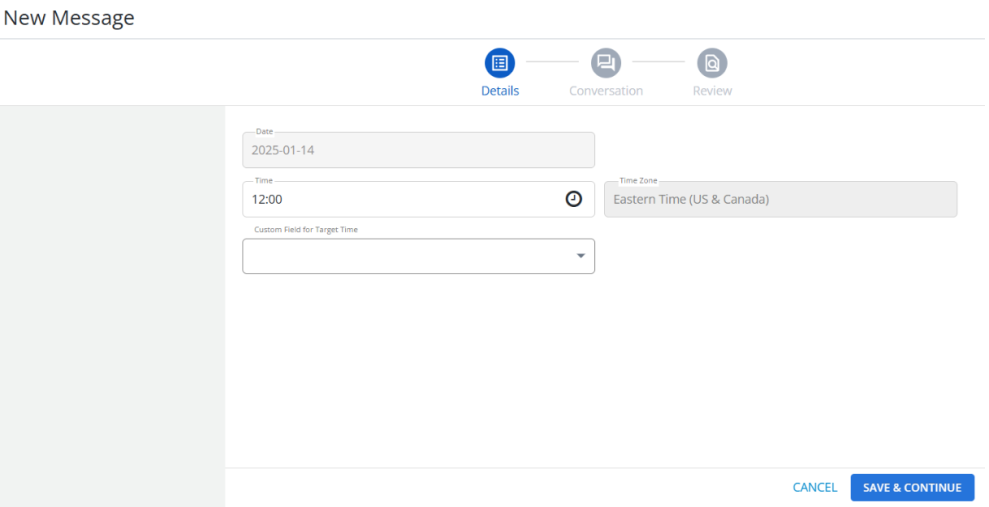
Simplified Campaign Scheduling:
Scheduling your campaigns just got easier. The refreshed interface makes it simple and quick to set up campaign schedules, so you can spend less time navigating and more time engaging with your audience.
Enhanced Broadcast Creation:
-
Create and Insert Links, Media & Custom Fields: You can now build and insert links, upload media, and add custom fields directly within the broadcast creation process—no need for extra steps.
-
Consistent User Experience: Updated the UI in the broadcast journey to ensure a seamless experience across all steps, even if you revisit a previous section.
Bug fixes and additional updates
Broadcast Creation Revamp:
-
Emojis now work correctly without repositioning the vertical bar.
-
“Suppress SMS Failover” no longer appears pre-selected after validation errors.
-
Dropdown error messages update accurately when changing message types.
-
Users will now see detailed error messages for non-unique multiple-choice values.
-
Links will always appear exactly where you place them in the message.
-
Placeholder text in the message container is no longer counted toward your character limit.
-
Time zone broadcast confirmation messages are now accurate, reflecting personalization for delivery times.
Other Fixes:
-
Search bars across multiple pages (Groups, Donations, Broadcast Creation, Custom Fields, Text Messaging Inbox, Outbox) are now perfectly aligned for a consistent look and feel.
December 2024
Introducing the "Liquid Templates" page in Mobile Commons
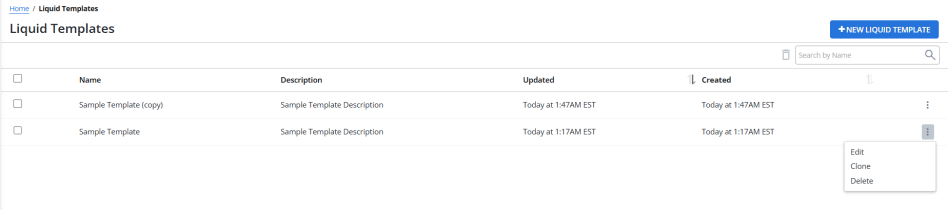
The new "Liquid Templates" page is a powerful addition to Mobile Commons, designed to give users full control over their liquid template management. This feature addresses the critical need for better organization, visibility, and editing capabilities, enabling users to efficiently manage their liquid templates.
Key capabilities of the "Liquid Templates" page:
Centralized Management:
-
All liquid templates are now consolidated into a single, easy-to-navigate page, offering users a centralized view of their liquid template repository.
-
No more scattered liquid templates or the need for manual searches—access them all in one place.
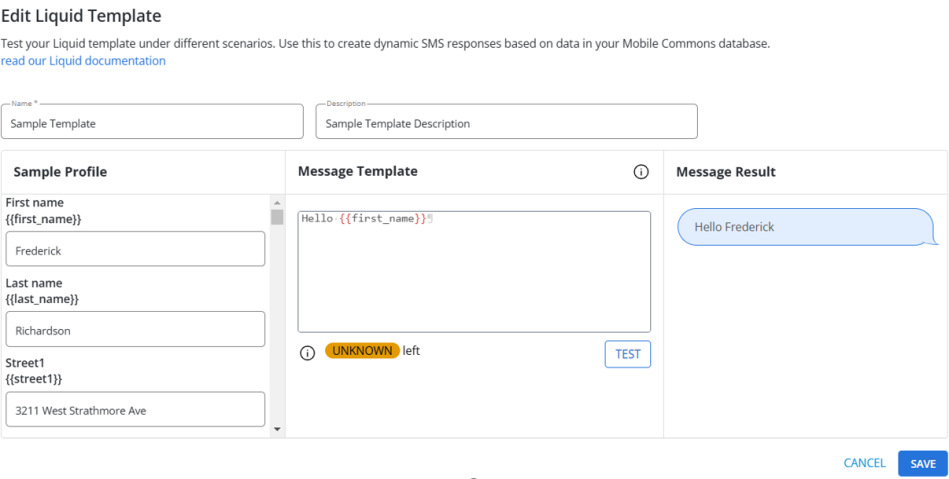
Easy Editing:
-
Liquid templates can be edited directly from the "Liquid Templates" page with real-time previews, allowing users to make and test changes quickly and confidently.
-
Built-in validation ensures liquid templates are error-free before being saved.
Search and Filter Functionality:
-
Quickly locate liquid templates using advanced search and filtering options, such as by name.
For more information, see Creating and managing liquid templates
Enhancements
Rich Communication Services (RCS):
-
Unified Message View: RCS messages (MO and MT) are now visible alongside SMS and MMS messages on the "Profiles" page, providing a consolidated view of all communication types.
-
CSV Export: The CSV export functionality for the "Outbox" and "Report" pages now includes details for both MT and RCS MT messages, offering more comprehensive reporting capabilities.
ActBlue Integration Opt-In Message Timing:
-
Enhanced the scheduling of opt-in path messages for ActBlue integrations. Messages are now sent at consistent, user-friendly times rather than randomly throughout the day.
Bug fixes and additional updates
Rich Communication Services (RCS):
-
Fallback Option: Validation errors during message creation no longer reset the fallback option to its default value.
-
Validation Error Count: The error count now decreases correctly when custom message validation errors are resolved.
-
Character Limit Message: The correct validation message is now displayed when an RCS message exceeds 1,000 characters.
-
Broadcast Cloning: Message type and character counters are now accurately displayed when cloning an RCS broadcast with custom fields.
-
Save Response Field: Editing a broadcast from SMS to RCS no longer displays incorrect preview fields on the "Summary" page.
-
Broadcast Type Change: When switching a scheduled RCS broadcast to SMS mid-delivery, reports and recipient counts now reflect both RCS and SMS data accurately.
-
Outbox Filtering: The “ALL” filter on the "Outbox" page now correctly displays RCS messages in the results table.
Platform:
-
Broadcast Table Visibility: Column visibility toggles now work independently of the column density settings.
-
Text Formatting: Improved formatting on the "Trackable Link" page for the “Add Profile Information to HTTP Parameters” description.
-
mConnect Deactivation: Resolved inconsistencies between deactivating mConnect from the main "mConnect" page and the "mConnect Details" page.
-
Screen Jumping: Fixed an issue where the screen jumps to the bottom of the page after clicking “Add a message” in the "Opt-In Path" page.
-
Opt-Out Modal: The correct opt-out modal is now displayed when reactivating a profile multiple times.
-
Broadcast Status Update: Scheduled broadcasts now correctly update to "Generated" once completed, preventing false alerts.
-
EveryAction Sync: Synchronization processes now correctly respect integration IDs, ensuring data matches only for the associated company.
-
Mobile Browser Scheduling: Users can now continue past the "Schedule" page when setting up a broadcast on a mobile browser.
-
Account Creation: Resolved issues in creating new accounts after UCM integration.
-
MMS Export Row Count: Fixed incorrect or incomplete row counts for MMS message exports in the "Inbox" page.
October 2024
Introducing rich communication services (RCS) in Mobile Commons
RCS messaging offers a more enhanced, engaging experience compared to traditional SMS, supporting multimedia, personalization, and interaction within a single message. It’s an ideal solution for marketers seeking to build deeper connections with their audience.
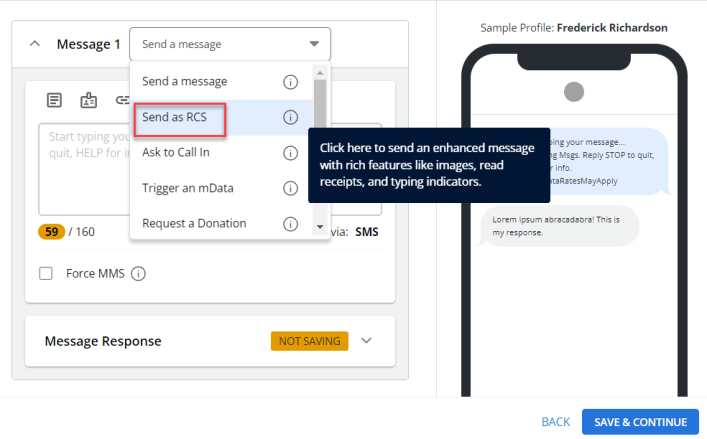
The introduction of rich communication services (RCS) in Mobile Commons provides a modern way to enhance your messaging campaigns. With the new "Send as RCS" message function, you can create more personalized and engaging broadcasts, and integrate richer, more interactive messages into your broadcasts.
After selecting "Send as RCS" message function, you can use the following actions in the message containers:
-
Add Dynamic Fields: Personalize messages by inserting dynamic fields such as user names, custom attributes, or other personalized data.
-
Insert Links: Include clickable links to drive users to external content, landing pages, or calls to action.
-
Use Emojis: Enhance message tone and engagement by adding emojis.
-
Apply Liquid Logic: Use Liquid Logic to conditionally display certain content based on recipient data, making messages more tailored.
These four actions provide flexibility while ensuring your RCS messages remain interactive and impactful.
For more information, see Using rich communication services (RCS) messaging function.
September 2024
Mobile Commons and Upland Credential Manager (UCM) Integration
Users can now enjoy seamless single sign-on (SSO) across Upland Audience Engagement products, including Mobile Commons, through integration with Upland Credential Manager (UCM). This enhancement allows users to switch between different products without having to re-enter their credentials.
For more information, see Using Upland Credential Manager.
Second Street and Mobile Commons Integration
Mobile Commons now supports a unique opt-in field mapping for Second Street form submissions. This ensures that the correct opt-in path is triggered in Mobile Commons for each form submission, improving the accuracy of opt-in data processing.
Date Range Segmentation for Opt-In Paths
Introduced the ability to segment users based on the date they used an opt-in path, enabling more precise targeting and reporting.
Broadcast Creation Process
-
Removed the "Send Without User Response" checkbox.
-
Improved the visibility and placement of the character count validation.
-
Enhanced error handling for dropdown values, ensuring users receive clear feedback when attempting to save without selecting a value.
-
Hid the kebab menu in the first message container for a cleaner interface.
-
Improved the usability of the "Select mConnect" dropdown, eliminating unnecessary scroll bars.
-
Prevented duplicate group selections in the "Include" and "Suppress" dropdowns to avoid logical conflicts.
-
Enhanced error handling by introducing tooltips and error banners, providing users with concise error information during broadcast creation.
-
Integrated character count and error messages within the "Insert Liquid" modal, ensuring compatibility with other features such as the liquid tester, attach media, and message templates.
Group Creation Process
-
Implemented enhanced filtering capabilities for group creation, providing better flexibility in subscriber data segmentation.
Bug fixes and additional updates
Broadcast Creation Revamp
-
Resolved the issue where choices in the multiple-choice broadcast were incorrectly displayed in the phone preview window.
-
Fixed alignment issues with the save response dropdown radio buttons and text.
-
Addressed problems with date picker actions (cancel and clear) in the recurring schedule that affected the number of runs.
-
Addressed the issue where custom fields remained selected in the "Save Response As" dropdown menu if they were chosen but not saved.
-
Corrected the display of templates and links, which were previously shown as normal text after inserting liquid.
-
Fixed the page view corruption issue caused by the "Choice Configuration" modal in multiple-choice questions with horizontally ordered options.
-
Resolved the issue of the missing attachment icon in the message container, which only appeared after user navigating next and then back.
-
Fixed the issue where the second message of a broadcast was not sent after a multiple-choice response.
August 2024
Introducing the "Donations" Page for CRM Users
Mobile Commons now offers a unified "Donations" page, allowing users to track and analyze donation data from multiple CRM systems such as EveryAction, ActBlue, ActionKit, and more.
Revamped the "Allotments" Page
The "Allotments" page in Mobile Commons has been completely redesigned for improved usability and functionality.
Revamped Secondary Data Tables for Groups
Secondary data tables for Groups have been revamped to enhance the user experience and provide better data management capabilities.
Save Tags Details as CSV
Users can now save tag details as CSV files for easier data handling and analysis.
Alphabetical Groups Dropdown
The Groups dropdown has been updated to display items in alphabetical order instead of chronological order, making it easier to find specific groups.
Tooltips for Each Message Function
Tooltips have been introduced for each message function to assist users in understanding various features and options in broadcast creation journey.
Inner Search for Group Creation through Filters
An inner search functionality has been added to the group creation process through filters, making it easier to find and apply specific criteria.
Filter for Cleaned vs. Active Profiles on the Campaign/Broadcast Report Page
A filter to separate cleaned profiles from active profiles has been included on the campaign/broadcast report page.
Bulk Delete Functionality on the "Groups" Page
The "Groups" page now includes a bulk delete functionality for more efficient group management.
Removed Misleading "Cross" Icon from "Column" Chips in Save View Configurations
The misleading "cross" icon has been removed from "column" chips in save view configurations to avoid confusion.
Excluded "Density" Chip when the "Message Body" Column is Unselected
The "Density" chip is now excluded when the "Message Body" column is unselected while saving a view, ensuring accurate data representation.
Enhanced Filtering Options on the "Groups" Page
The "Groups" page has been enhanced with additional filtering options for better data management.
Included Cleaned Status in the Profiles CSV Report
The cleaned status of profiles is now included in the CSV report, providing more comprehensive data insights.
Filter Capability on the "Custom Fields" Page
A filter capability has been implemented on the "Custom Fields" page for easier data sorting and management.
Filtered Unclickable Options in the mConnect Dropdown
Unclickable options have been filtered out in the mConnect dropdown menu to enhance user experience.
Removed Subscription Status from the Profile View Page Header
The subscription status has been removed from the profile view page header for a cleaner interface.
Added "Cleaned Status" Column and Removed Cleaned Pill from the Subscription Status
A "Cleaned Status" column has been added and the cleaned pill removed from the subscription status for better data clarity.
Adjusted Footers for All Steppers Under the Revamped Broadcast Creation Process
Footers for all steppers in the revamped broadcast creation process have been adjusted for a more cohesive design.
Fixed Width for All Steppers in the Broadcast Creation Process
All steppers in the broadcast creation process now have a fixed width for consistent layout and design.
Bug fixes and additional updates
-
Fixed an issue where the accordion button in the conversation stepper randomly changed position when the user acted during page loading.
-
The Cancel button in the "Save View" delete confirmation modal is now functional.
-
Resolved the issue of incorrect MMS count display on the "Allotment" page.
-
Fixed issues with the multi-select dropdown in the group creation process through filters.
-
Addressed an error that occurred when deleting broadcasts that had parts but no MTs generated.
-
Resolved the issue where users were unable to select opt-in paths from the campaign view modal.
July 2024
Revamped broadcast creation process
The latest broadcast creation process brings several improvements aimed at enhancing your overall broadcast creation journey. Users can now easily navigate through the revamped broadcast creation workflow without encountering any usability issues, ensuring a seamless user experience. For more information, see adding a new broadcast message.
Redesigned Steppers
The redesigned steppers with a clean and modern design now offer easier navigation, ensuring a smoother and streamlined broadcast creation experience. For more information, see adding a new broadcast message.
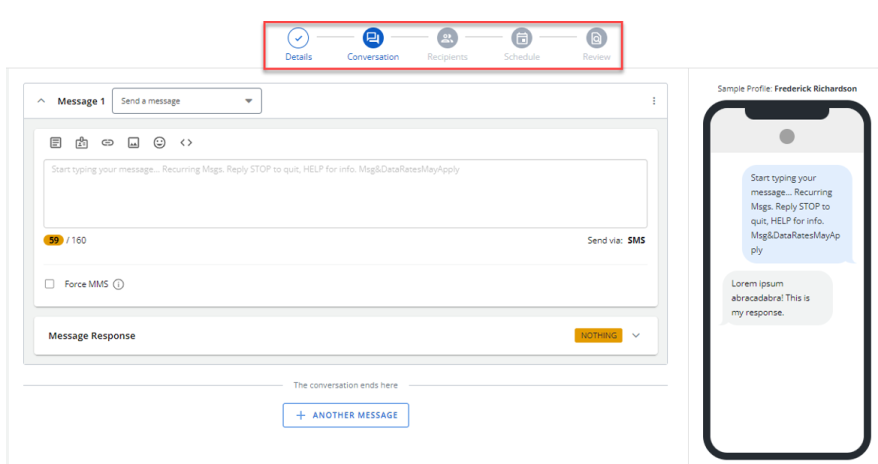
Introducing Modals
Easy to use modals are now available, for example, attach media, insert liquid, insert links, dynamic fields, select template, and insert emoji within the “Conversation” stepper in the broadcast creation process. These modals help you stay focused on creating broadcast, without the need to navigate away, thereby accomplishing the broadcast creation tasks efficiently. For more information, see adding a new broadcast message.
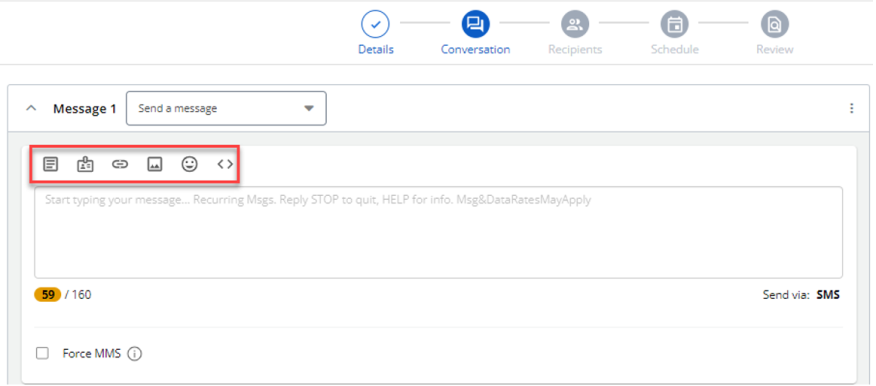
This redesign offers many benefits to Mobile Commons users, including:
-
Effortless Navigation: The streamlined stepper design and a clear information hierarchy make broadcast creation much easier.
-
Accomplish Tasks Efficiently: Modals enable uninterrupted focus on creating broadcasts, facilitating efficient completion of broadcast-related tasks.
-
Saves Time: The revamped broadcast interface saves time by streamlining the overall broadcast creation process.
Bug fixes and additional updates
-
Corrected the inaccurate percentages in the "Percentage Responded To" column in the Agent View.
-
Fixed the incorrect count of active subscribers in uploaded groups.
-
Resolved the issue of normal links being sent with unique IDs.
-
Ensured proper functionality of Liquid with broadcasts and bulk sends.
-
Carrier IDs are now correctly forwarded to MGF.
-
Restored the drag-and-drop functionality for group creation.
-
Fixed the “Segment Only” feature in uploaded groups that was improperly updating or creating profiles.
-
Resolved Liquid malfunctions.
-
Fixed the issue with ended campaigns.
May 2024
Saving Broadcast table configurations
Users encountered a lack of persistence in customized configurations on the "Broadcast" table. Following each login, the broadcast table settings were reset, requiring users to recreate their customized configurations.
To address this issue, we’ve introduced a new feature called "Save View." This feature enables users to easily save and retrieve their broadcast table configurations. With the implementation of a "Views" dropdown menu, users can conveniently access their saved configurations, thereby enhancing user experience and efficiency. This enhancement allows users to quickly access their saved broadcast table configurations, reducing setup time and resulting in a more positive user experience.
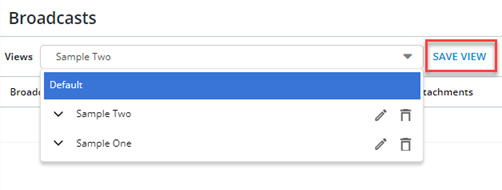
For more information, see Working with Broadcast messages and Tutorial Video.
Revamped group creation process
Introducing the revamped group creation process, which aligns visually with the refreshed design of all pages within the Mobile Commons platform. Users can now easily navigate through the revamped group creation workflow without encountering any usability issues. The customization options for creating groups are expanded and made more intuitive for users to configure. The revamped process maintains consistency with the overall Mobile Commons interface, ensuring a seamless user experience.
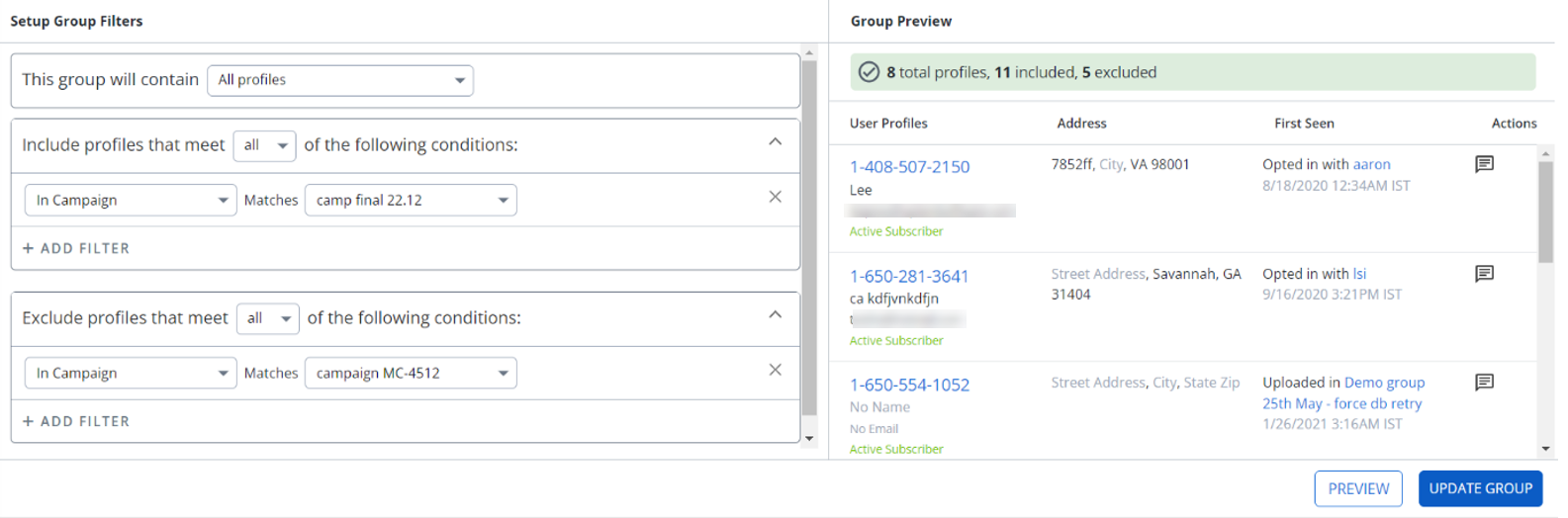
For more information, see Organizing Profile Groups and Tutorial Video.
Introducing Attribution Analytics feature
We're excited to introduce "Attribution Analytics", a new feature now available in the Mobile Commons. With this update, measuring the ROI of your text messaging campaigns just got easier.
Key Points:
-
Powered by Frakture: Thanks to our partnership with Frakture, experts in cross-channel reporting, you can trust the accuracy and reliability of your attribution data.
-
Track Donations: "Attribution Analytics" allows you to seamlessly track donations attributed to your text messaging campaigns.
-
Effortless Integration: Enjoy a hassle-free integration experience. With "Attribution Analytics", you can start measuring ROI with just a few clicks.
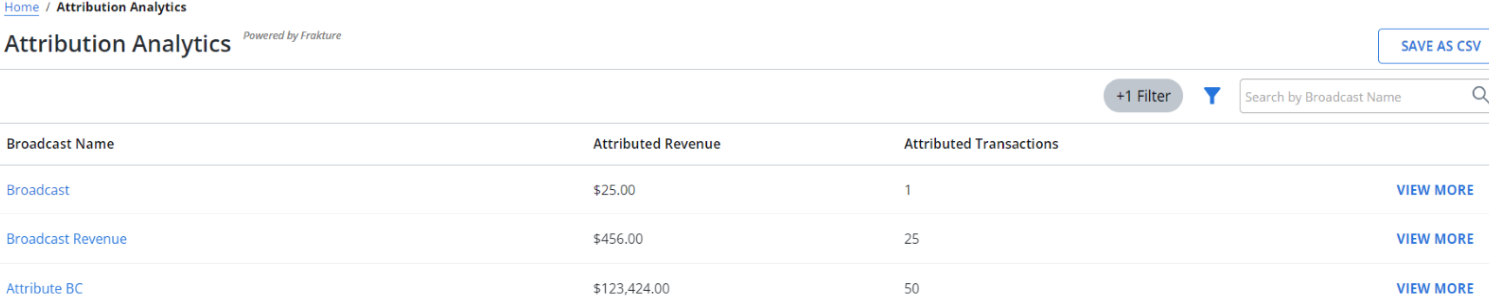
How to get started:
To take advantage of Attribution Analytics, you also need to be a Frakture customer. Here are the options to assist you in getting started:
-
Already a Frakture customer? This feature is free and easy to set up, reach out to your customer success manager or your Frakture representative to get started.
-
New to Frakture? You can learn more about their services at Frakture.com. Then reach out to your customer success manager, they’ll help answer any questions and connect you with Frakture to begin process towards automated ROI metrics.
For more information, see Accessing Attribution Analytics.
Bug fixes and additional updates
-
Fixed the inability to edit conversation for FastTrack MMS Broadcast, which resulted in an error message indicating lack of support for adding fast track delivery.
-
Resolved the issue with column width for the campaign name in both the “Campaigns” and “Broadcasts” pages, which caused inconsistency regardless of name length.
-
Fixed the issue with playing mConnect voicemails within the platform, requiring downloads for playback except when opened in a new window.
-
Addressed the issue with loading the current subscriber count from the hyperlink on a campaign view, errors were thrown in the logs, and some users couldn’t access the filtered list of profiles.
-
Resolved the issue of generating multiple short URLs with the same code when using the /send_message API endpoint, necessitating unique URLs for each recipient.
-
Fixed the issue where deactivating mConnect encounters a problem due to incomplete checks for broadcast completion, requiring additional statuses for accurate verification.
-
Addressed the issue where the global blacklisting did not block users from interacting with any organization "receiving an MO". This also affected blocking the users from their profiles on any account.
April 2024
This latest release includes a new automated list cleaning feature and a message status filter on the “Outbox” page.
Automated list cleaning
Introducing automated list cleaning designed to streamline list management within platform. We’ve replaced the previous manual “Profile Analysis” tool. Upon enabling the "Cleaned Profiles" feature, the system will automatically begin identifying, removing, and marking profiles as "cleaned" when your messages are undeliverable. The cleaned profiles will be excluded from future broadcasts. You can efficiently manage, and retrieve removed profiles from the new “Cleaned Profiles” section in the Home menu. For more information, see Cleaned Profiles.
“Status” filter on the “Outbox” page
The message “Status” filter on the “Outbox” page, provides the options to filter messages by “Sent” and “Failed” statuses. This feature aims to streamline message management, ensuring users can efficiently track successful and unsuccessful deliveries, thereby improving overall productivity and oversight. For more information, see Working with the Outbox.
Bug fixes and additional updates
-
Addressed the issue where location-based mData returns incorrect results for Utah state, reported by NEA, to ensure accurate data retrieval for all states.
-
Fixed the issue where QR codes were previously inaccessible, allowing users to view trackable links via QR codes as intended.
-
Fixed the issue with Yes/No custom fields involving the letter “S”, ensuring accurate data entry and retrieval.
-
Addressed the issue where users encountered internal server errors when attempting to create fundraising programs with invalid data, facilitating error-free program creation.
-
Resolved pagination issues affecting filtered groups, allowing users to navigate through groups seamlessly.
-
Addressed the issue where duplicate activist codes were appearing in group filters, eliminating duplicate listings and ensuring data integrity.
-
Resolved case sensitivity issues on the “Polling Locators” and “mData” page, maintaining consistency and accuracy.
-
Made improvements to the “Quiet hours” box email feature to correctly separate pills based on spaces and commas.
-
Fixed the issue with the timestamps for ActBlue donations, which were previously incorrect, to accurately reflect donation times.
-
Resolved the issue of duplicate ActBlue donations occurring, preventing duplicate entries and ensuring accurate donation tracking.
March 2024
This latest release includes customization of “message” column density on the “Broadcasts” page, UI refresh for the “Data Sync” page, and the availability of Mobile Commons APIs (read only) in Swagger.
Customizing the density of the "Message" column on the "Broadcasts" page
The "Table settings" window now contains a "Density" section with following two options for determining how much "Message Body" text is displayed:
-
Extended: Displays five to six lines of information in a message.
-
Condensed: Displays one line of information in a message.
For more information, see Working with broadcast messages
"Data Sync" page (UI Refresh)
The UI refresh work continues! We've refreshed the “Data Sync” page to make data synchronization even smoother! For more information, see Working with data syncs
Mobile Commons APIs in Swagger
The Mobile Commons APIs are now available in Swagger. To access the Mobile Commons APIs (read only) in Swagger, go to http://mcommons.uplandsoftware.com/docs/swaggerui
Bug fixes and additional updates
The following bugs have been addressed and resolved as part of this release:
-
Resolved the occurrence of "insecure download" warning when downloading QR code images.
-
Fixed the inaccuracies issue in the count of active subscribers.
-
Fixed the text overflowing issue in the revamped "Recent Broadcast" section on the Dashboard.
-
Fixed the alignment issues with elements in the profile table.
-
Implemented validation to ensure the Upload and Create buttons are active on inner forms only when all mandatory data fields are filled. Earlier, these buttons were active without filling in the mandatory data fields.
-
Fixed issues with MTs replies on the web opt-in path.
February 2024
Additional customization on the "Broadcasts" page
Mobile Commons users now have the ability to fully customize the Broadcasts table using the new "Table settings" icon:
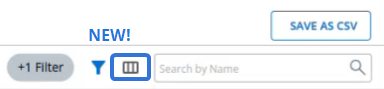
Selecting the icon will open up the "Table settings" window:
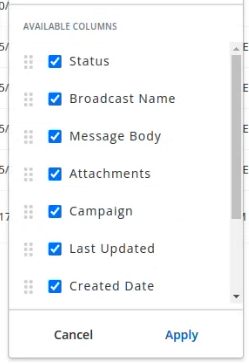
With this update, the Broadcasts table can now be customized in the following ways:
Column display
Users can now choose which columns they would like to display on the Broadcasts table:
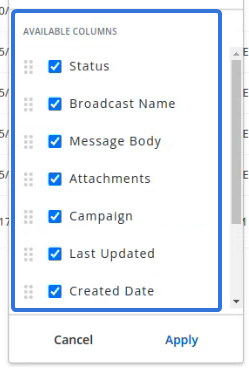
Tip: Use the scrollbar on the right to view all of the available columns.
The checkboxes next to the column names can be used to add and remove columns from the table. Columns with checked boxes will be displayed in the table and columns with unchecked boxes will not.
Note: The previous release introduced additional columns that are available for the Broadcasts table. See New Columns for the Broadcasts table below for more information.
Once all of the desired columns have been added or removed from the table, the user must select the Apply button to apply them:
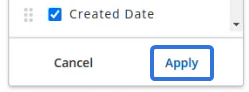
Column placement
Users can now decide where each column will appear on the Broadcasts table.
The "Table settings" window contains a list of available columns that can be added / removed from the table:
Dragging and dropping the dotted icons  next to each column name will reorder how the columns will appear on the table. For example, a user can use the dotted icon next to the "Status" column name to drag it under the "Broadcast Name" column name:
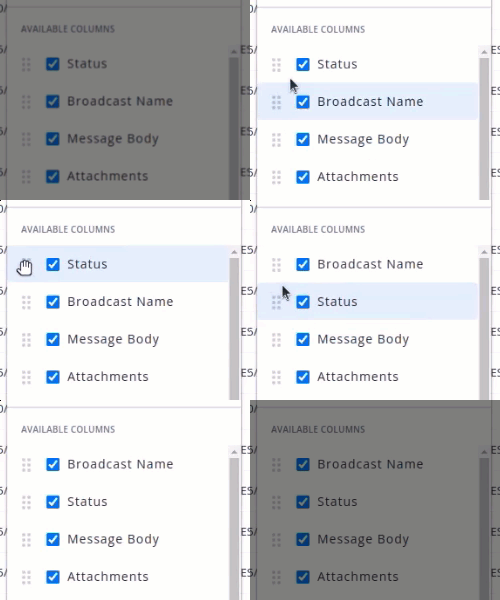
Once the columns have been rearranged appropriately, the user must select the Apply button:
The top-to-bottom order of the columns in the "Available Columns" list will be reflected from left-to-right on the Broadcasts table.
Bug fixes
The following bugs have been addressed and resolved as part of this release:
-
Corrected a tracking discrepancy issue.
-
Fixed SMS pack usage alerts; usage counts are now accurate.
-
Fixed an emoji dropdown issue on the Polling Locator page. White area was appearing at the bottom of the page when opening Emoji dropdown in the "No results Response" field on Polling Locator's Add/Edit page.
-
Resolved date custom fields filtering issue in Groups.
-
Fixed overlap problem blocking profile settings popups on the Campaigns page.
-
Addressed broken actions dropdown menu for MGF Campaigns.
-
Fixed misalignment on small screens due to varying image sizes and/or column name lengths.
January 2024
New columns for the Broadcasts table
The Broadcasts table has been updated to include new columns that will expose additional information for each listed broadcast.
Prior to this release, the Broadcast table only included seven columns.
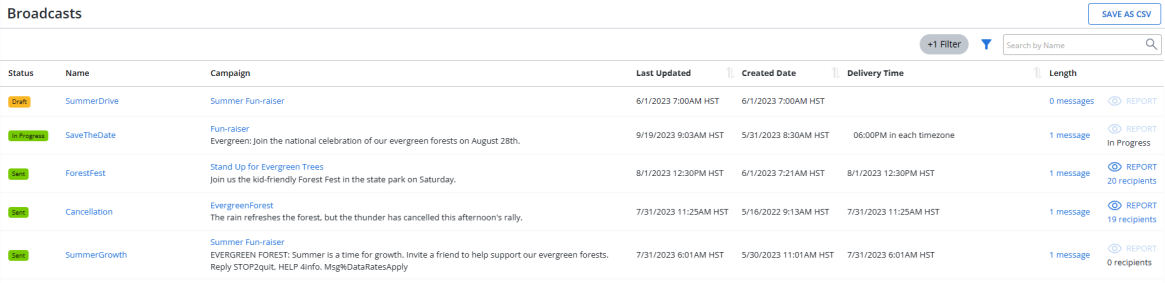
With this update, two new columns have been added to the table: "Message Body" and "Attachments". Also, the "Name" column has been renamed to "Broadcast Name".
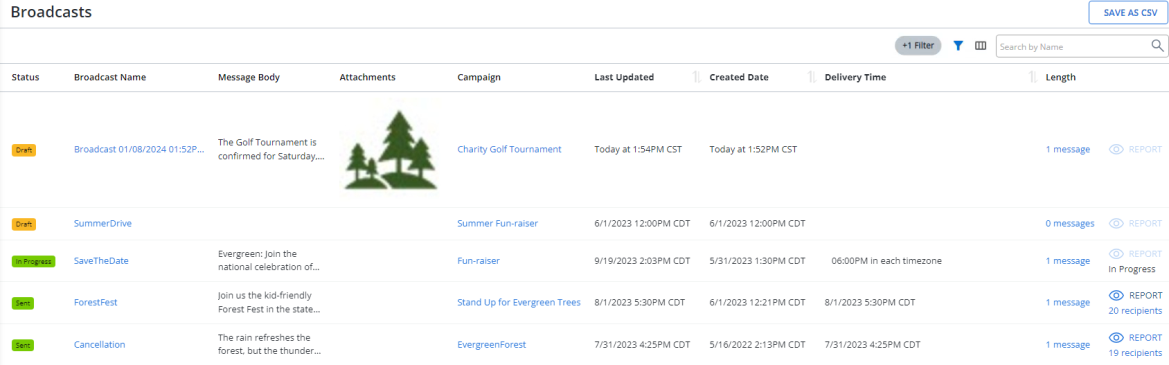
The Broadcast table is now made up of the following columns:
| Column | Description |
|---|---|
| Status | The current status of the broadcast message. For more information, see Filtering broadcast data. |
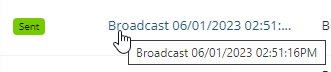
| Broadcast Name | The name of the broadcast message. Note: If "Condensed" is the selected "Density" option for the table, a maximum of 30 characters can be displayed in the column. If a Broadcast name is cut off, scroll over it with your cursor to view the entire name: |
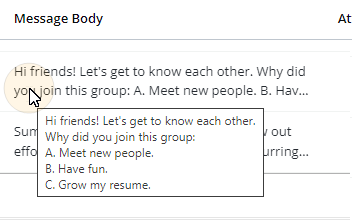
| Message Body | The content of the Broadcast message. Note: A maximum of 160 characters can be displayed in the column. If a message body is cut off, scroll over it with your cursor to view the entire body: |
| Attachments | The Broadcast's attached media file (if one has been added). Tip: See Adding an attachment for more information. |
| Associated Campaign | The name of the Campaign that the Broadcast message belongs to. |
| Last Updated | The date and time the broadcast was last edited. |
| Created Date | The date and time the broadcast was added to Mobile Commons. |
| Delivery time | The date and time the message is (or was) scheduled for delivery. |
| Length | Indicates how many messages are included in the broadcast. Selecting the value will navigate the user to the broadcast's "Edit Conversation" page. |
Tip: This release has also introduced the ability to fully customize the Broadcasts table. See Additional customization on the "Broadcasts" page above for more information.
New "mConnect" page
Each "mConnect" page in Mobile Commons has been redesigned for organization and efficiency.
Note: Users can access a list of each mConnect by selecting  Phone Calls → mConnects from the left pane menu: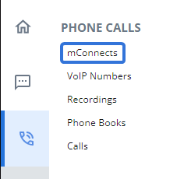
Prior to this release, each "mConnect" page featured all of the mConnect's data in a single column. Each page also contained an "mConnect Actions" window on the right-hand side.
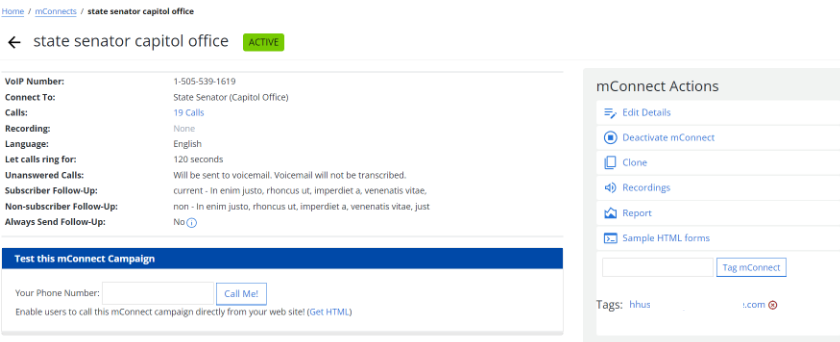
With this update, all of the mConnect's data has been split into two columns to reduce the overall length of the "mConnect Details" section. Also, the mConnect Tags and mConnect Key have both been moved from the Actions menu to the details section.
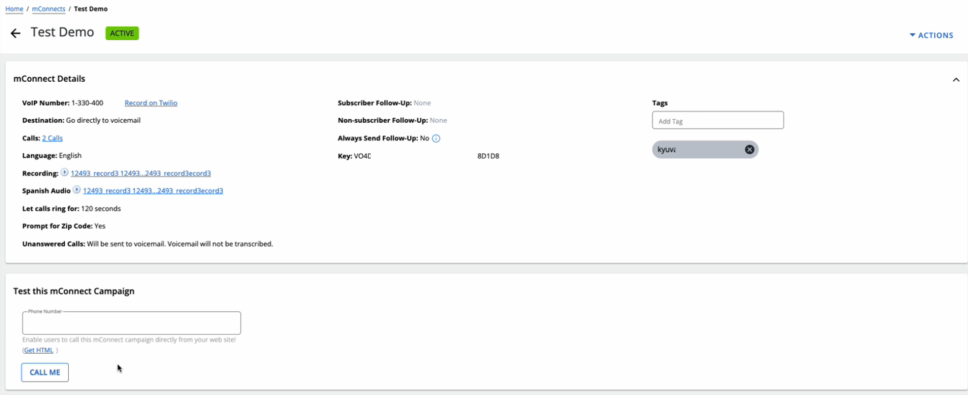
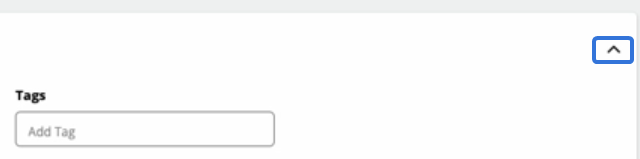
Additionally, the "mConnect Details" window is now collapsible. Users can select the arrow icon  to collapse and expand the window, allowing for easier access to the "Test this mConnect Campaign" window:
Finally, the "Actions Menu" has been removed from the page. It has been replaced by the "Actions" drop-down menu, which contains the same options users could find in the original "Actions" menu (except for the Tags, which can now be found in the "mConnect Details" window):
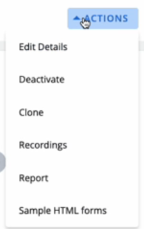
This redesign offers many benefits to Mobile Commons users, including:
-
Content Visibility: Expanding windows allow users to control the visibility of content. Users can expand the "mConnect Details" window to view their desired data and collapse it when they want to focus on the "Test this mConnect Campaign" section. This provides a cleaner and less cluttered view of the "mConnect" page, which is especially valuable on smaller screens.
-
Reduced Cognitive Load: The expanding "mConnect Details" window and the "Actions" drop-down menu reduce cognitive burden on the user by presenting information progressively, which prevents users from being overwhelmed with too much information at once. Instead, they can focus on one section at a time, making it easier to understand and process the content.
-
Consistent Design Aesthetics: When an interface design is implemented consistently, users become familiar with its cohesive and predictable behavior. The "mConnect" page interface now resembles other pages in Mobile Commons (i.e. the "Campaign" page) with the addition of the "Actions" drop-down menu and the relocation of the Tags to the details window. Users will now have an easier time working with different pages in Mobile Commons because their interfaces are similar.
View additional campaign tags without expanding the Campaign Details window
Users can now view all of a campaign's tags directly within the Campaign Details window.
Prior to this release, users would have to expand the Campaign Details window in order to see all of the tags that were associated with the campaign. With this update, users can simply scroll their cursor over the "+ more" icon to view all of the tags:
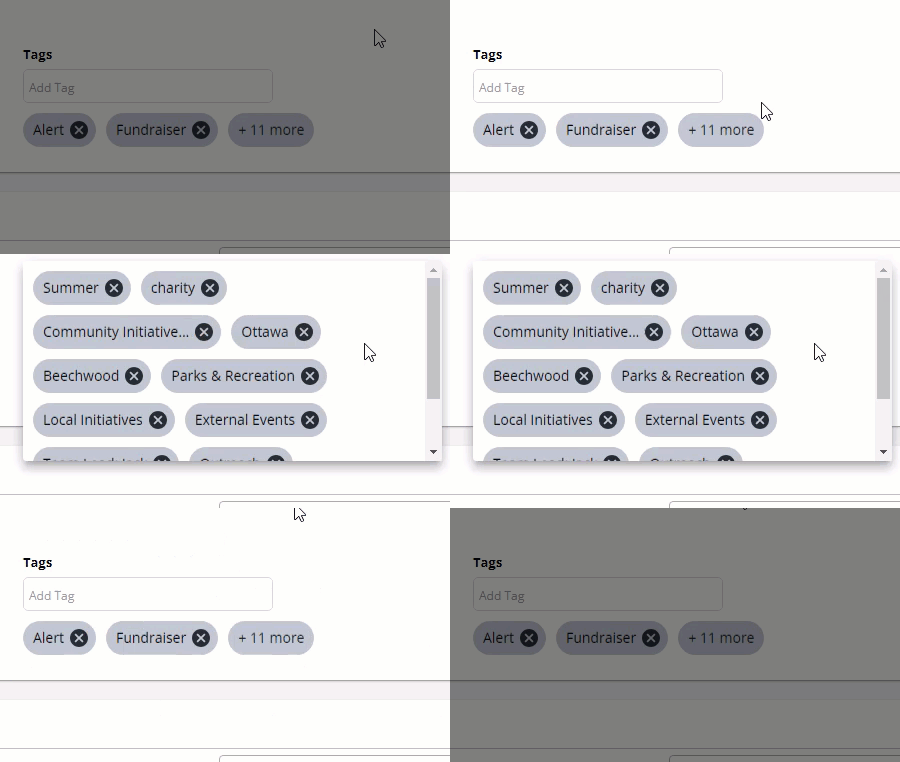
Click thumbnail to play.
This window can be closed by simply moving the cursor away from it:
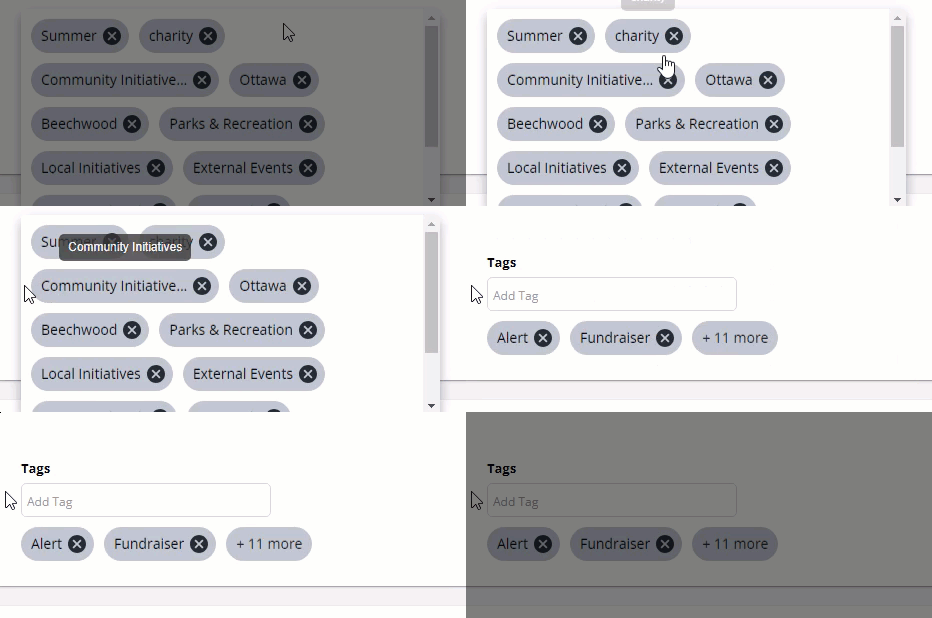
Click thumbnail to play.
Tip: See Organizing your campaign using tags for information on using tags in Mobile Commons. Also, see Setting up a campaign for information on adding tags to campaigns.
View additional campaign keywords by scrolling cursor over expand bubble
Users can now directly view all of a campaign's keywords by scrolling their cursor directly over an expansion bubble.
Prior to this release, campaigns with a large number of keywords would display the full list directly on the Campaign Details page.
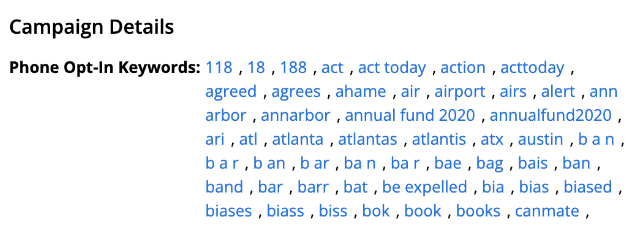
With this update, a maximum of four keywords will be displayed directly on the Campaign Details page. Any additional keywords will be hidden behind a bubble that indicates how many more keywords are attached to the campaign.

Users can view the full list of campaign keywords when they scroll their cursor over the bubble:
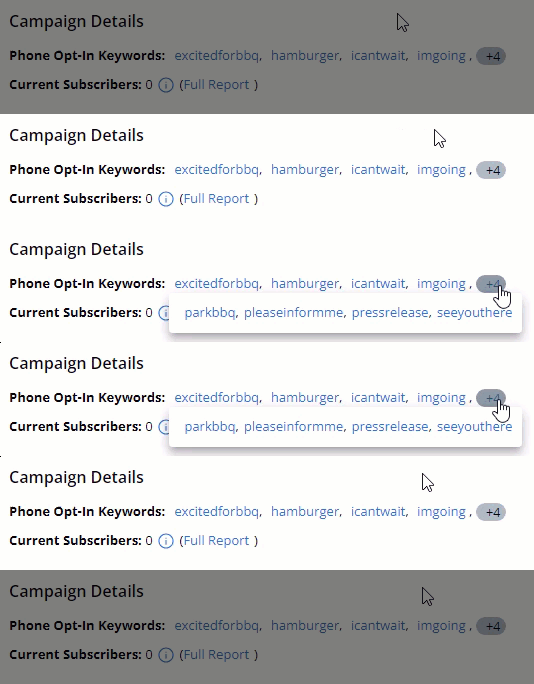
Click thumbnail to play.
This allows users to add several keywords to their campaigns without creating a cluttered Campaign Details page. The list of keywords will no longer expand past a single line of text.
New "Create Smart Campaign" window
Mobile Commons now features a "Create Smart Campaign" window that can be used to create new Smart Campaigns.
Note: Smart Campaigns is an add-on feature. To add Smart Campaigns to your company account, contact your mobile strategist or Technical Support.
Prior to this release, an entire page was dedicated to creating a new Smart Campaign. When users selected New Smart Campaign, they would be navigated to the "Create a New Smart Campaign" page.
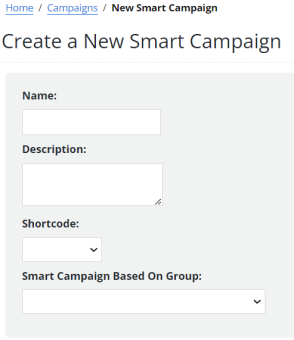
With this update, selecting New Smart Campaign will simply open up the "Create New Smart Campaign" window:
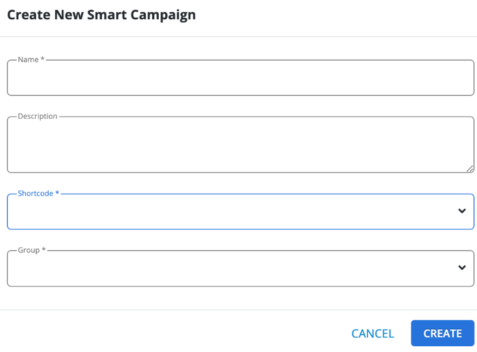
Each of the fields from the original "Create a New Smart Campaign" page can now be found on the new window. Although the functionality is the same, this pop-up window offers many benefits:
-
Context Retention: When a new window appears within the current page, the context of the original page is retained. The user can still see the underlying content, providing a clear reference point and maintaining the connection between the opened window and the main content. Users will still be able to see the "Campaigns" page while creating their new Smart Campaign; they can even scroll up and down the page to view the list of campaigns without closing the window.
-
Reduced Cognitive Load: Opening a window reduces cognitive load by keeping the user in a familiar environment. There is no need for the user to mentally switch between different pages or lose track of their current position in the application.
-
Aesthetics: Opening a window allows for a visually pleasing presentation of content. Modal windows can have a distinct style and overlay effect, providing a modern and dynamic feel to the user interface. This reflects Mobile Commons' commitment to maintaining a useable, responsive, and modernized application for its users.
"New Custom Field" window
Mobile Commons now features a "New Custom Field" window that can be used to create new Custom Fields.
Note: Custom fields capture additional information that is important to your company or organization. The data collected by custom fields provide additional data points for building out customer segments and for collecting, importing, and syncing data with your CRM (customer relationship management) or CDP (customer data platform).
For more information, see Working with Custom Fields.
Prior to this release, an entire page was dedicated to creating a new Custom Field. When users selected New Custom Field, they would be navigated to the "New Custom Field" page.
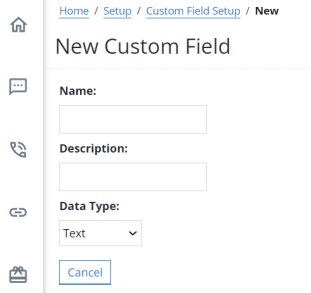
With this update, selecting the New Custom Field button will open up the "New Custom Field" window instead of navigating the user to a new page. Users will be able to create their new Custom Field directly in the window.
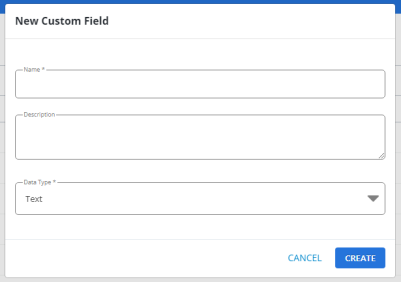
Each of the fields from the original "New Custom Field" page can now be found on the new window. Although the functionality is the same, this pop-up window offers many benefits:
-
Context Retention: When a new window appears within the current page, the context of the original page is retained. The user can still see the underlying content, providing a clear reference point and maintaining the connection between the opened window and the main content. Users will still be able to see the "Custom Fields" page while creating their new Custom Field; they can even scroll up and down the page to view the list of Custom Fields without closing the window.
-
Reduced Cognitive Load: Opening a window reduces cognitive load by keeping the user in a familiar environment. There is no need for the user to mentally switch between different pages or lose track of their current position in the application.
-
Aesthetics: Opening a window allows for a visually pleasing presentation of content. Modal windows can have a distinct style and overlay effect, providing a modern and dynamic feel to the user interface. This reflects Mobile Commons' commitment to maintaining a useable, responsive, modernized application for its users.
New "Upload Files" window to upload new recordings
Mobile Commons now features a new "Upload Files" window that can be used to upload new recordings.
Note: Recordings are audio files that can be played when users call in to your mConnect campaigns. You can create a new audio recording or upload an MP3 file.
For more information, see Adding a recording.
Prior to this release, an entire page was dedicated to uploading a new recording. When users selected Upload Recording, they would be navigated to the "Upload a Recording" page.
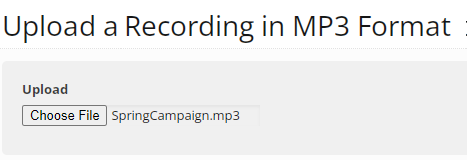
With this update, selecting the Upload Recording button will open up the new "Upload Files" window instead of navigating the user to a new page. Users will be able to upload their new recording directly in the window.
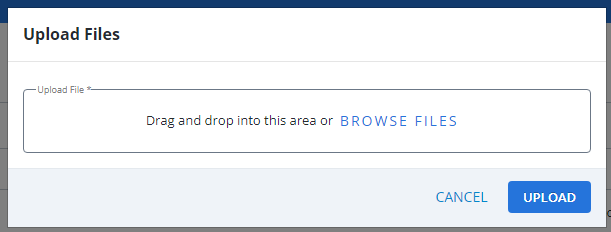
Additionally, users can now drag-and-drop their mp3 files directly into the new window:
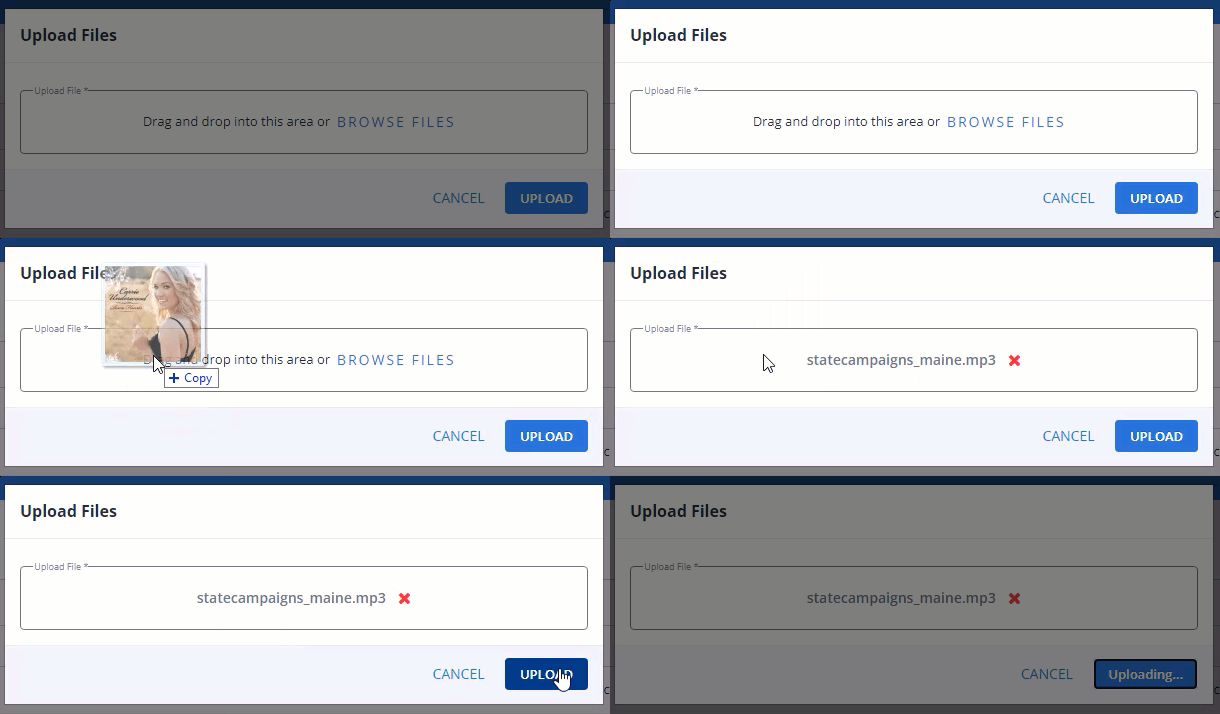
Click thumbnail to play.
Aside from this new functionality, this pop-up window offers other benefits:
-
Context Retention: When a new window appears within the current page, the context of the original page is retained. The user can still see the underlying content, providing a clear reference point and maintaining the connection between the opened window and the main content. Users will still be able to see the "Recordings" page while uploading their new recording; they can even scroll up and down the page to view the list of recordings without closing the window.
-
Reduced Cognitive Load: Opening a window reduces cognitive load by keeping the user in a familiar environment. There is no need for the user to mentally switch between different pages or lose track of their current position in the application.
-
Aesthetics: Opening a window allows for a visually pleasing presentation of content. Modal windows can have a distinct style and overlay effect, providing a modern and dynamic feel to the user interface. This reflects Mobile Commons' commitment to maintaining a useable, responsive, modernized application for its users.
Ability to sort the "Calls" page
Mobile Commons users can now sort the list of calls on the "Calls" page by the time of call.
Prior to this release, the "Calls" page was always sorted based on recency with the most recent calls appearing at the top of the page. There was no way for users to sort the calls in the table to their liking.
With this update, sorting arrows have been added to the "Calls" page:
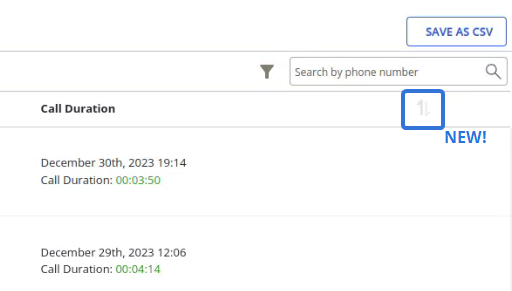
The arrows are greyed-out by default when a user navigates to the page; this indicates that the default sorting (from the most recent calls to the earliest calls) is applied. When the user selects the arrows the first time, the "ascending" arrow will be darker and the calls will be sorted in ascending order by time of call (from the earliest calls to the most recent calls):
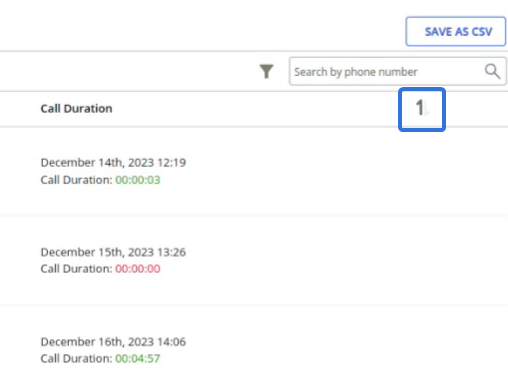
The earliest calls appear at the top of the table when the "ascending" arrow is dark.
When the users selects the arrows again, the "descending" arrow will be darker and the calls will once again be sorted in descending order by time of call (from the most recent calls to the earliest calls).
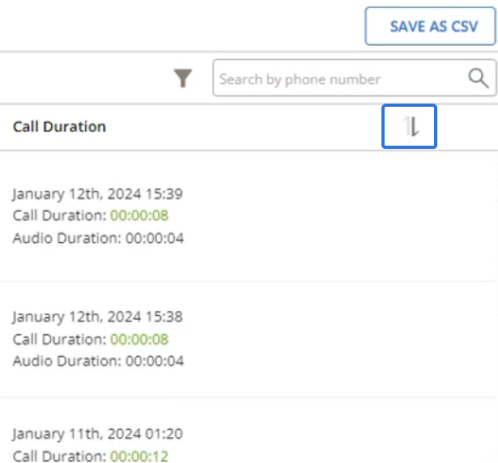
The most recent calls appear at the top of the table when the "ascending" arrow is dark, just like the default behavior.
Note: The time within each "Call Duration" value represents the start time of the call.
Tip: The "Call Duration" column header can also be selected to change the sorting:
Notice that the sorting arrows will alternate when the "Call Duration" column header is selected.
Note: The selected sorting will remain applied when filters are added to the table. However, sorting will not be remembered when users navigate away from the page and return.
The ability to sort the "Calls" table allows users to organize and easily navigate to their desired information. For example, users who wish to scroll through older calls can now simply select the sorting arrows to view the earliest calls directly at the top of the table. This saves users from having to navigate to other pages in the table to find relevant information.
December 2023
Pagination updates
Users can now navigate directly to a page in any table by entering the page number in the page-navigation options on the lower-right.
Attachments and file drop form updates
Easy to use, modern modals are now available when adding new attachments and files within the file drop pages.
Filter indicators
The pages listed below now display an indicator at the top of the table with the number of applied filters. Hover over the indicator for a list of applied filters.
-
Attachments
-
Broadcasts
-
Opt-in paths
-
Campaigns
-
Profiles
Updated tables (UI Refresh): VoIP, recordings, calls, profiles, mDatas, and ended campaigns
The December release includes updates to the VoIP, calls, recordings, profiles, mDatas, and ended campaigns tables. We’ve maintained all the key pieces of functionality you’re used to while updating the table look and feel.
Help Center updates
In this release, we are introducing two new topics in the Help Center:
-
Video library provides access to videos of key features in Mobile Commons.
-
Release notes history is a searchable archive of older, legacy release notes.
Bug fixes and additional updates
-
Addressed an issue where including trackable links incremented the character counter incorrectly.
-
Addressed an issue where the broadcast report chart displayed the timeline of messages on a skewed schedule.
-
Restored the ability to load the broadcast page with rows ordered by updated date.
-
Fixed an issue where hyperlinks in the campaign report where not passing applied filters.
-
Restored ability to filter against custom fields that includes commas (,).
-
Added fix to prevent phonebooks and recordings with the same name.
-
Addressed issue where the parts counter for multi-part messages displayed more parts in use than necessary.
-
Restored proper ordering on the messages shown in individual profiles.
-
Restored ability to access campaign actions from a mobile device.
-
Addressed overlap issues when working with left-hand navigation and drop downs from the home page.
November 2023
This latest release includes self-service polling locators and branded links, as well as continuing UI refresh for phonebooks, links, recordings, and reports tables.
Self-service polling locators
We’ve made it easier than ever to set up your own polling locators, which allow users to discover their nearest polling location by texting their full address.
Polling locators are immensely beneficial during elections, making it convenient for individuals to locate and access their designated voting stations based on their specific address details.
With this release, existing active polling locators are available on a dedicated Polling Locator page within the platform, ensuring easier access and utilization of this valuable feature.
-
To create polling locators using a simple form, select
 Text Messaging in the left pane, and then select Polling Locators.
 Watch the video
Branded links
Mobile Commons supports the use of branded links, which are typically vanity or shortened URLs that a organization purchases for use in their broadcast messages. We have added new functionality making it easier to set these up in the platform for quicker enablement. Contact your CSM for more details!
Updated tables and pages (UI Refresh): Phonebooks, links, recordings, reports
The UI refresh work continues! The November release includes updates to the phonebooks, links, recordings, and main reports page. We’ve maintained all the key pieces of functionality you are used to while updating the table look and feel.
Bug fixes and additional updates
-
Updated the sort order for the Broadcasts page to ensure the page is loaded based on the updated date and hides all drafts older than one year.
-
As part of our platform cleanup, removed old links no longer in use in the platform.
October 2023
This latest release includes a new group filter update and UI refresh for mConnects and message templates tables.
Updated group filter: Filter by political party with U.S. Senator
Added a group filter to allow users to filter by the political party of their elected U.S. Senator.
In the following example, the U.S. Senator filter selects profiles from states where at least one of the elected U.S. senators is a Democrat.

Note: If a state elects senators from different parties, then profiles from the state may be included in multiple groups, for example, Democratic Senator and Independent Senator filters.
Updated tables (UI Refresh): mConnects and message templates
The UI refresh work continues! The October release includes updates to the mConnect and Message Templates tables. We’ve maintained all of the key pieces of functionality you are used to while updating the table look and feel.
Additionally, we’ve added sort functionality to the Inbox and Groups pages.
Bug fixes and additional updates
-
Added the profile number to the details section of each profile.
-
Removed the ‘+ campaign’ button from individual campaigns.
-
Restored the Export MMS button to the Inbox page when sorting by MMS messages.
-
Updated the sort order for the Broadcasts page to ensure the page is loaded based on the updated date and hides all drafts older than one year.
-
Fixed an issue where reviewing subscription history in a profile would load in the wrong order.
-
Restored the profile view of messages to display full message contents on hover.
September 2023
This latest release includes a new CRM sync for EveryAction and a UI refresh for the campaigns, inbox, outbox, attachments, and profiles tables and pages.
EveryAction integration
The Mobile Commons integration with EveryAction syncs key CRM fields, such as opt -in status, phone number, email, address, etc. This integration also includes some nonstandard fields, such as activist code, last donation date, and highest donation amount. For more information, see Setting up EveryAction.
Reach out to your customer success manager to learn how to enable this integration!
Updated tables and pages (UI Refresh): Campaigns, inbox, outbox, attachments, and profiles
The UI refresh work continues! The September release includes updates to the campaigns, inbox, outbox, attachments, and profiles tables and pages. We’ve maintained all of the key pieces of functionality you are used to while updating the table look and feel.
The campaigns pages include some of the biggest changes as we’ve worked to improve the overall usability of these while updating the look and feel.
Bug fixes and additional updates
-
Restored pagination for the Opt-in Paths table.
-
Fixed an issue preventing Outbox.csv files from exporting.
-
Fixed an issue preventing a user with a Campaign Editor role from accessing lists of broadcast recipients.
-
Updated filters for the Broadcasts and Opt-in Paths tables to reset when navigating away from a page and returning.
-
Fixed an issue where selecting tags from the Tags table would return fewer results than listed in the Tagging Count column.
-
Updated the password reset process to ensure users can reset their credentials without receiving an “incorrect password” error before providing a password value.
-
Addressed a defect causing all master campaigns to show “0” active subscribers.
August 2023
This latest release includes a new group filter update and a UI refresh for the broadcasts and tags tables.
New group filter: Governor
Added a group filter to allow users to filter by the governor of the state associated with subscriber’s profile data. Use this filter to target subscribers with a specific governor in office.
In the following example, the Governor filter selects residents of Maine, whose governor is Janet Mills (D):

UI refresh: Broadcasts and tags tables
The UI refresh work continues! The August release includes updates to broadcasts and tags tables. We’ve maintained all of the key pieces of functionality you are used to while updating the table look and feel. The Broadcasts table includes additional ability to sort on columns that include dates to quickly navigate through broadcast details.
Bug fixes and additional updates
-
Fixed an issue where search results became “stuck” for certain tables within the platform.
-
Fixed an issue where the character “&” would be saved incorrectly as “&s;”.
-
Added UI validations for some new features around updated tables in the platform.
-
Fixed an issue causing incorrect details to be displayed in a profile after a subscriber calls in to the Capitol switchboard.
-
Fixed an issue causing legislator data to not be displayed when other tables on the profiles page were paginated.
-
Updated the process for checking available keywords and keyword phrases to ensure that the normalization of special characters leads subscribers to the correct opt-in path.
July 2023
This latest release includes feature updates and a UI refresh for the custom fields, secure fields, and profiles tables.
New group filter: Filter by political party
A new group filter allows users to filter by the political party of their elected representatives, including:
-
U.S. Congressperson
-
State Senator
-
State Representatives
For more information, see Creating a dynamic (filtered) group.
New auto-route option for mConnect: Governors
mConnect call auto-routing now includes Governors, so your subscribers can contact their state governors. For more information, see Setting up a new mConnect.
Update allotment tracking for monthly contract types
We have fixed usage tracking in the Allotments dashboard. Usage allotments for yearly contracts was showing correctly, but monthly contracts were showing usage against the entire contract instead of the given month. For more information, see Reviewing allotment usage.
Support for sending MMS messages without an attachment
You can now send long text messages via MMS, without including an attachment. This is most useful for sending narrative-focused messages with an expanded character count (up to 1600 characters), which also allows extra capacity for messages with special characters.
Important notes:
-
Force MMS is a checkbox setting that is available once it has been enabled by your customer success manager or Support.
-
Messages are limited to 1600 characters, messages over 1600 will not be sent.
UI refresh: Custom fields, secure files, and profiles tables
The UI refresh work continues! The July release includes updates to the custom fields, secure files, and profiles tables. We’ve maintained all of the key pieces of functionality you are used to while updating the table look and feel.
Bug fixes and additional updates
-
Refined the entry field in the quiet hours email notification list and usage tracking notification list.
-
Added tooltips for Forgot Password hints.
-
Removed old Help Center links from the right pane; users can access Help topics via Assist.
-
Updated the multifactor authentication (MFA) message format to improve readability.
-
Addressed an issue impacting a custom paid services tool that was caused by a change to an rss feed, which caused an error parsing rss feed data.
-
Updated security items related to pentest feedback.
-
Fixed a defect causing some groups that contained opt-outs and undeliverable phones to fail to load.
-
Fixed an issue causing 504 time outs for the profile_update api endpoint.
June 2023
Upland Assist for Mobile Commons
This latest release introduces Upland Assist for Mobile Commons to help you find the answers you need when you need them.
To access troubleshooting assistance and full documentation:
-
Select
 Help on the title bar.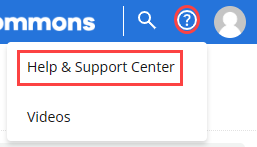
-
Select Help & Support Center.
Note: To open a collection of instructional videos for Mobile Commons, select Videos.
The Upland Assist pane opens.
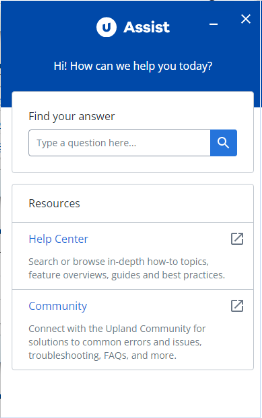
Upland Assist is a single point of access for self-service and customer support directly within Upland Mobile Commons.
New Help Center
In this release, we introduce a new Help Center, which is available from the Upland Assist pane.
To open the Help Center:
-
Select
Help on the title bar. -
Select Help & Support Center.
The Upland Assist pane opens.
-
Select Help Center.
Note: The Help Center opens in a new browser tab.
-
From the Help Center home page, enter search terms or phrases in the Search box at the top of the page or select a tile to browse the Help Center contents.
-
Select a result to open the topic.