Working with trackable links
You can create shortened, trackable URLs to include in your text messages. Shortened links take up fewer characters in your text message. Trackable links keep a record of every user click, providing key usage information for your campaign.
To add trackable links to your campaign:
-
Select
 Mobile Web in the left pane, and then select Links.
The Trackable Links table opens.
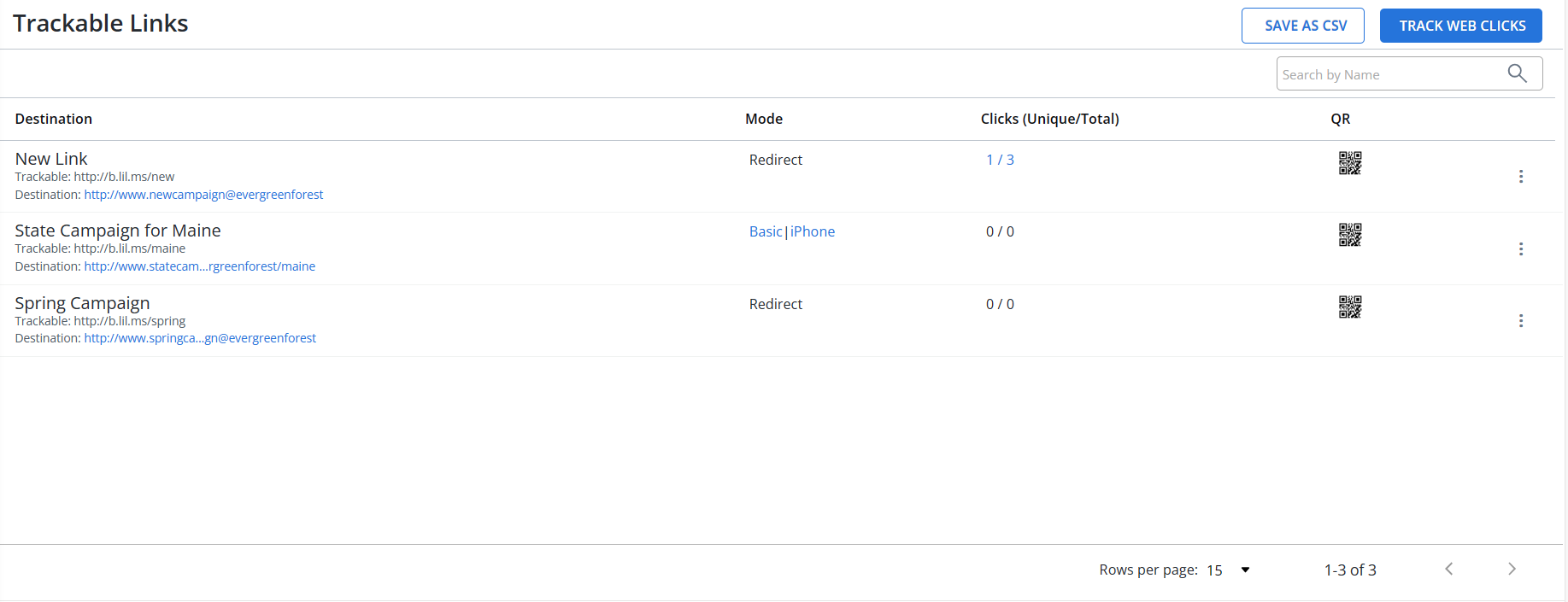
 About the Trackable Links table
The Trackable Links table contains the following information:
Column Description Destination The trackable link (lil.ms URL) you have already created and where it directs. Mode One of the following modes:
-
Basic/iPhone: The link goes directly to the destination.
-
Redirect: The link opens a web page that you design.
Clicks (Unique/Total) The number of clicks:
-
Unique shows only one click per user.
-
Total shows each time a link was clicked, even if a single user clicked multiple times.
QR An automatically generated QR code for the URL:
-
Select the QR code symbol to open a scannable version.
Tip: You can also select the View record link to open the link record, and then select
 QR Code in the Link Actions panel on the right.
Available actions for a trackable link:
-
Edit: Edit the link settings.
-
Clone: Make a copy of the trackable link.
-
View record: Review the full record for the trackable link.
-
If the table is longer than one page, use the page-navigation options on the lower-right to select the number of rows per page and to navigate to the  next or
  previous page.
Tip: To navigate directly to a specific page, select the page field, enter the page number, and then press ENTER.
From the Trackable Links table:
For more information, see Adding trackable links.
Searching the Trackable Links table
To search the Trackable Links table by link name:
-
Select
Mobile Web in the left pane, and then select Links. -
Above the Trackable Links table, on the right, enter a search term in the Search box, and then select
 Search.
 The Trackable Links table displays the matching records.
Exporting trackable links records
You can export the full set or a subset of trackable links records to a CSV (comma-separated values) file.
To export trackable links records:
-
Select
 Home in the left pane, and then select Mobile Web.
 -
(Optional) Use Search to display the records to export in the Trackable Links table.
-
Above the Trackable Links table, on the right, select Save as CSV. Mobile Commons generates a comma-separated values (CSV) file.
-
When the file is ready, select Download CSV.
The trackable links records in the Trackable Links table are downloaded in a CSV file containing the following columns:
Column Description name The name of the link. trackable The shortened address for the link. destination The full address for the link. unique_clicks The number of users who clicked the link, counting only one click per user. total_clicks The total number of clicks for the link, counting every click for every user.