Editing a message schedule
Note: If you want to make changes to an active schedule, you must first deactivate it. For more information, see Deactivating a message schedule.
To edit a message schedule:
For more information, see Setting up scheduled messaging.
Editing a message schedule
To make updates to your schedule:
-
In the left pane, select
 Text Messaging, then select Campaigns.
Locate the campaign in the Campaigns table and click its name.
-
The Campaign Details page opens.
-
Select Actions at the top of the page, and then select Edit Schedule.
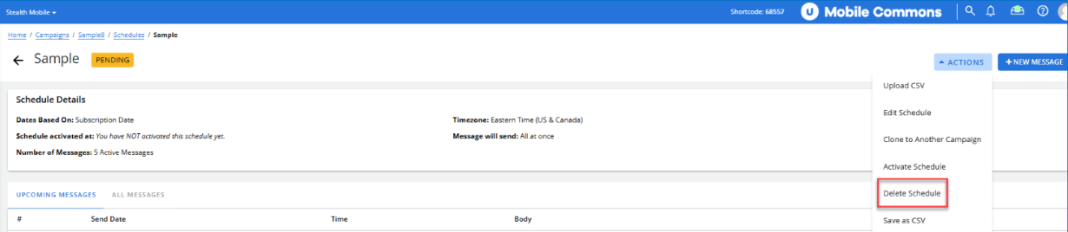
The Schedule Details page opens.
-
At the top of the Schedule Details page, click Actions, then select Edit Schedule.

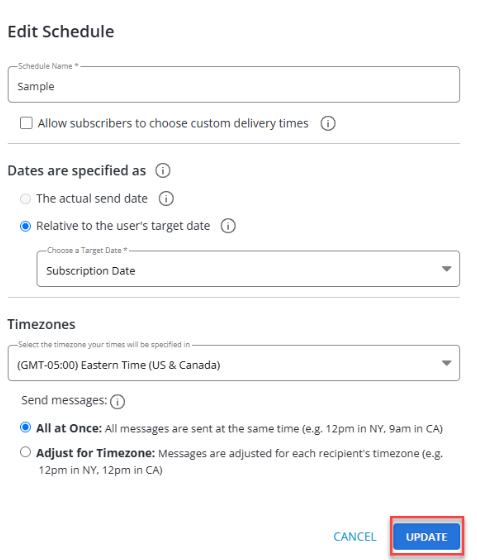
The Edit Schedule modal opens. Make the necessary changes to the schedule. Once you have completed your updates, click UPDATE. Click CANCEL to close the modal without saving any changes.
Deactivating a message schedule
If you want to make changes to an active message schedule, you must first deactivate it.
Note: Messages will not be sent while the schedule is deactivated.
To deactivate an active schedule:
-
Select
Text Messaging in the left pane, and then select Campaigns. -
Locate the campaign in the Campaigns table, and then select the campaign name link.
The Campaign Details page opens.
-
Select Actions at the top of the page, and then select Edit Schedule.
The Schedule Details page opens.
-
In the Actions panel on the right, select Deactivate Schedule.

Deleting the messages schedule
When you delete the messages schedule, you automatically delete the message schedule, whether it has been activated or not.
To remove a set of scheduled messages and delete the message schedule:
-
Select
Text Messaging in the left pane, and then select Campaigns. -
Locate the campaign in the Campaigns table, and then select the campaign name link.
-
Select Actions at the top of the page, and then select Edit Schedule.
The Schedule Details page opens.
-
In the Actions panel on the right, select Delete Schedule.
Caution: Use caution when deleting the messages schedule. All of your messages and messaging settings will be lost.
-
Select OK to confirm.