Sample lookup usage
This is the forth topic of the Simple Data Lookups guide.
The previous sections showed how to retrieve print production settings from CSV or JSON reference data. At this point in the flow, the extracted document type is available in msg.docType (derived from the incoming filename), and the corresponding configuration record is available in msg.docTypeConfig as the result of the lookup.
This section demonstrates a practical use case: using the configured output preset name to dynamically control the preset applied by the paginated output node. The flow reads the preset name from msg.docTypeConfig and passes it downstream so that different document types can be generated using different presets without branching the flow.
This approach assumes that the referenced output presets have already been uploaded to the OL Connect server. In production, this is typically handled ahead of time, for example via a startup flow that deploys required resources (such as output presets, templates, and other dependencies) before processing begins.
An example configuration object stored in msg.docTypeConfig may look like this:
{
  "name": "invoice",
  "orientation": "portrait",
  "groupByAddress": true,
  "maxSheetLogic": true,
  "stationery": "invoice_letterhead",
  "outputPreset": "invoice_print.OL-outputpreset"
}
Dynamic resources
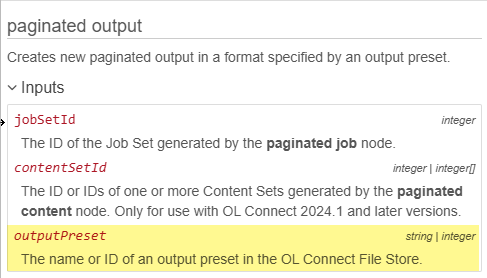
Several OL Connect Automate nodes, including the paginated output and all in one nodes, support dynamic configuration through message properties. While the output preset can be statically defined in the node configuration, it can also be supplied dynamically via msg.outputPreset as shown in the embedded Help for this node:
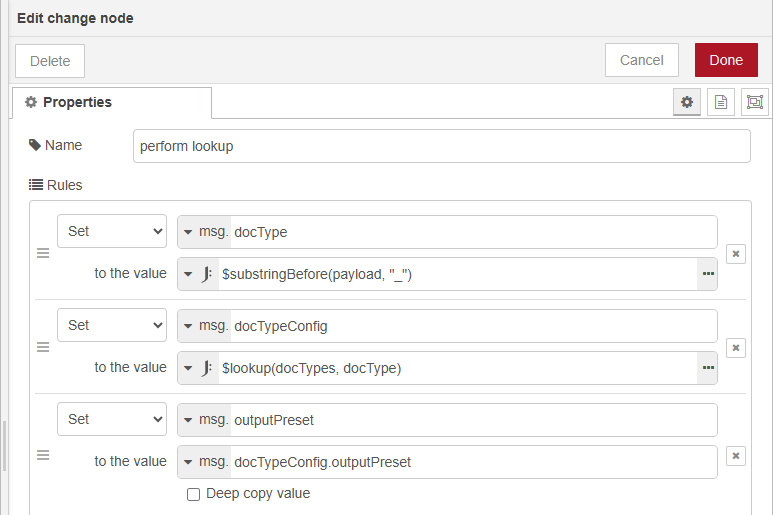
To enable this, add a separate change node after the lookup step, or add an rule and configure it as follows:
-
Set:
msg.outputPreset -
To the value:
msg.docTypeConfig.outputPreset