Simple Data Lookups
A common pattern in production environments is to centralize print production parameters in a structured text source and perform a lookup at runtime based on the document type. The document type is typically derived from a filename convention, such as a prefix or other structured segment. For example, in a file named inv_net30_acc67829_20250001.xml, the prefix inv can be extracted and used as the lookup key to retrieve the corresponding production configuration.
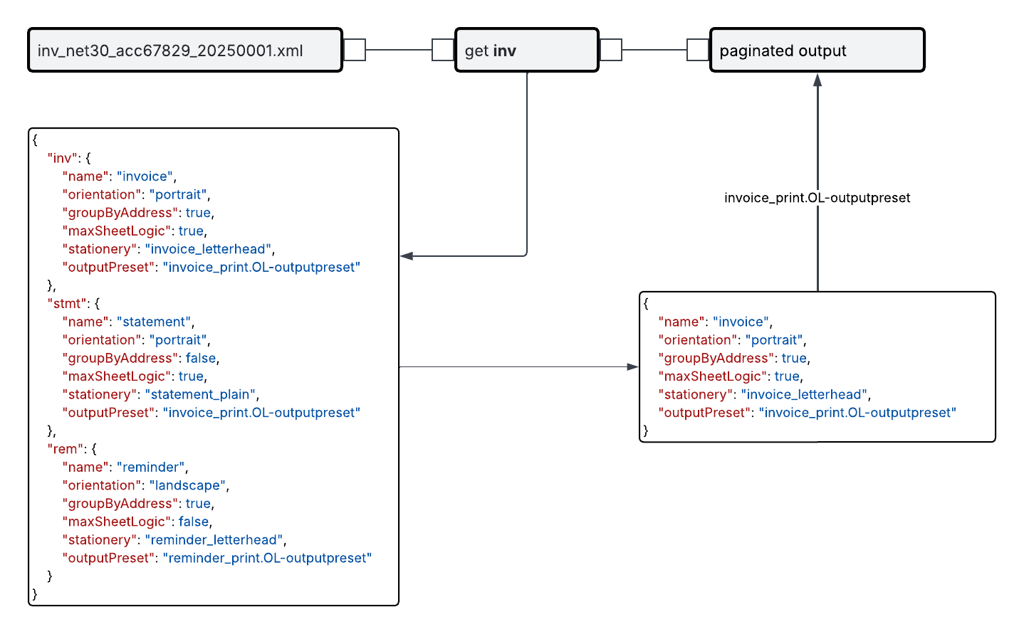
The retrieved configuration is then used to determine job-level parameters such as grouping logic, page orientation, stationery selection, or the output preset applied to the job. This approach separates production configuration from processing logic, allowing operational adjustments without modifying the core flow.
This guide outlines practical, low-complexity methods for managing reference and configuration data using tabular datasets sourced from CSV files or simple JSON structures. These approaches are well-suited to environments where datasets are small to medium in size and maintained operationally. In the case of CSV-based data, maintenance is typically performed using tools such as Excel.
The topics below provide details on creating flows using data lookups. It's best to review them in order:
Note: Before starting, ensure you’re familiar with the essential concepts of OL Connect Automate and Node-RED, including editor features and flow design. See Documentation, Training, and Support for links to getting started topics and information about using samples and tutorials. Nodes shown in flow example images may display their entered names, set in the node Properties panel, instead of their default names.
Working with Tabular CSV data
Working with Structured JSON Data