Apply conditions from file metadata
In document automation flows, it is common to apply conditions based on file metadata, such as the file extension. This can be implemented by using a switch node after the folder capture node.
See Trigger flow with a folder capture node for instructions on setting up a watched folder. That is the first step for this flow.
The switch node allows you to define multiple conditional rules, such as text-based comparisons, against a specified message property (e.g., msg.file.ext). Each rule evaluates the inputted property value and routes the message to the corresponding output if the condition is met.
Routing by File Extension
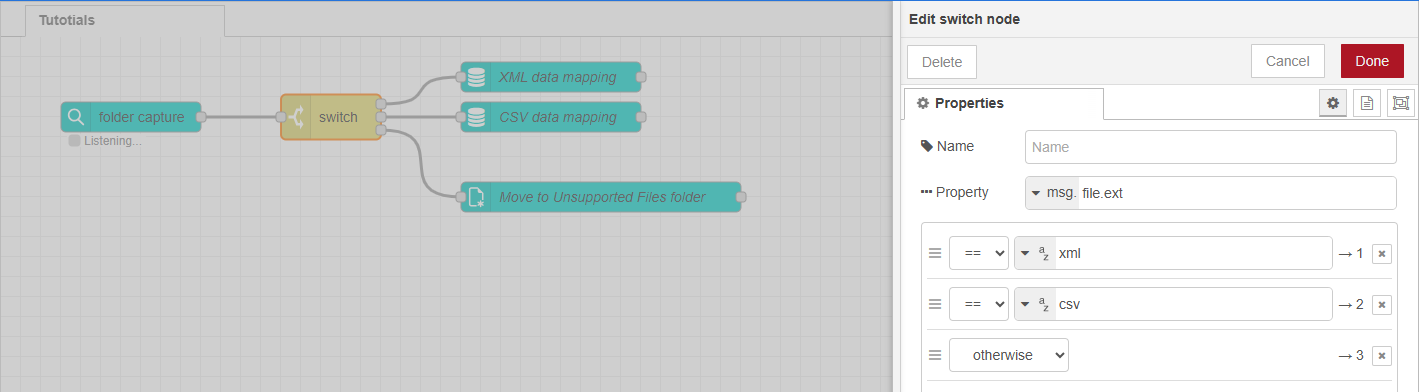
This flow uses a switch node to evaluate the msg.file.ext property. That property is selected in the Properties panel for the node.
-
If the extension is
xml, the flow continues to an XML data mapping configuration. -
If the extension is
csv, the flow branches to a CSV data mapping configuration. -
If the extension doesn't match any defined rule, the message is routed through the otherwise output. This fallback can be used, for example, to move the file to an unsupported folder or log it for manual review.
This approach allows for modular, file-type specific processing, and improves maintainability and error handling in multi-format workflows.
Next use case: Back up file metadata