Read XML file contents
In some scenarios, you need to work with the content of a file, such as extracting a customer ID or document Type from an XML file to use in a file name, runtime parameter, or to apply conditional logic. Since Node-RED operates on JavaScript objects, the XML content must be converted to a JSON-compatible format before you can extract values using Change, Function, or Switch nodes, or with JSONata expressions. A series of nodes can accomplish this.
See Trigger flow with a folder capture node for instructions on setting up a watched folder. That is the first step for this flow.
This flow allows you to convert and extract the contents of a file:
-
Read the file using the read file node; loads content into
msg.payload. -
Convert XML to JavaScript objects using the xml node; replaces
msg.payloadwith a JavaScript object. -
Inspect the output using a debug node; view the converted JSON to identify data paths and values.
-
Extract values using a change or function node; for example, assigning
msg.payload.invoice.CustomerNumbertomsg.customerNo.
This pattern is useful when routing, logging, or dynamically naming output files based on values within the source data.
The following image shows the Copy path option in the debug panel, a handy way to copy the full data path using dot notation. This is especially useful when configuring change or function nodes to access specific values in the message object.
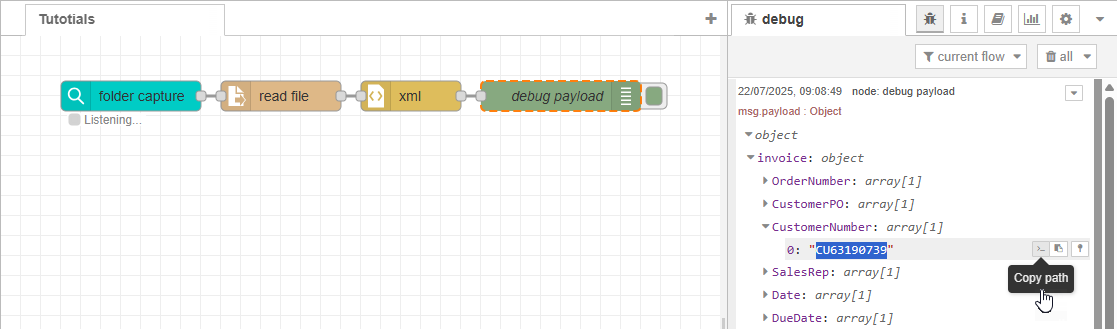
You can build on this flow to modify the XML to JSON behavior, as shown in the next use case, Modify XML to JSON behavior.
Next use case: Modify XML to JSON behavior