2026R1.0 - Controlled Release 4
A controlled release will be deployed to introduce the following high-priority fixes. It will be available on the staging site on Wednesday, August 12th, 2026 and on the production site on Sunday, August 16th, 2026. Individual customer cases will be updated by the support team through the portal.
Note: This page may be updated as new information becomes available.
The fixes fall into the following categories:
PowerSteering bugs
The following issue in PowerSteering has been fixed:
 Copying items fails for certain Object Types (PS-64230)
A bug prevented users from copying work items of specific Object Types. While attempting to copy these items, the screen would get stuck on the "Custom Fields & Tags" portion of the Add Project wizard.
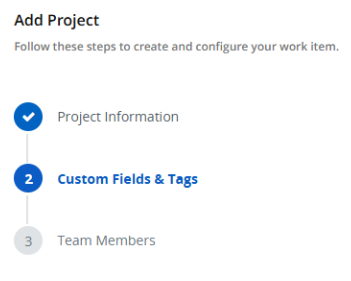
The page would continue to load without any success, eventually leading to a timeout.
This bug has been fixed; copying work items is no longer limited to certain Object Types. All work items can once again be copied in PowerSteering.
Upland Analytics issues
The following issues that occurred following the Upland Analytics 2026R1.2 release have been resolved:
Columns missing from Upland Analytics reports (PS-64688)
After the PowerSteering upgrade to Upland Analytics 2026R1.2, specific pivot columns were missing from certain existing reports.
This bug has been fixed; existing reports have been restored with all of the original columns that were present on Upland Analytics classic.
Pivot columns missing from Upland Analytics reports after exporting (PS-64699)
After the PowerSteering upgrade to Upland Analytics 2026R1.2, specific pivot columns were missing from certain existing reports once they were exported as Excel spreadsheets. This problem was limited to exporting through Excel; reports downloaded as CSV files maintained all of their expected columns.
This bug has been fixed; all of the expected pivot columns will now be displayed when reports are downloaded as Excel spreadsheets.
Unable to access Upland Analytics (PS-64786)
A bug prevented users from accessing Upland Analytics in PowerSteering. Certain users who selected the Upland Analytics icon  from the Navigation Menu were met with a lengthy error message.
This bug has been fixed; users can once again access Upland Analytics without error.
Note: Users require the "View Analytics Reports" Context permission to access Upland Analytics. Users that cannot see the Upland Analytics icon in their Navigation Menu likely do not have this permission.
Error when opening report subscription files (PS-64806)
PowerSteering users encountered errors while downloading Upland Analytics reports from subscription emails. When they selected the Download report button, Microsoft Excel would display an error message claiming that the file was damaged and required fixing. Excel's fix unfortunately required removal of certain sheets from the file, which led to incomplete reports.
This bug has been fixed; Upland Analytics reports can once again be downloaded from subscription emails without requiring repair.