Project History Tab allows you view changes made to the Project within the Project Details page (General, Options and UDF tabs).
Previous values of any changed properties made to the Project Details (General, Options and UDF tabs) can be viewed/verified, as well by whom and how far back the modification was made, should a question/concern arise as a result.
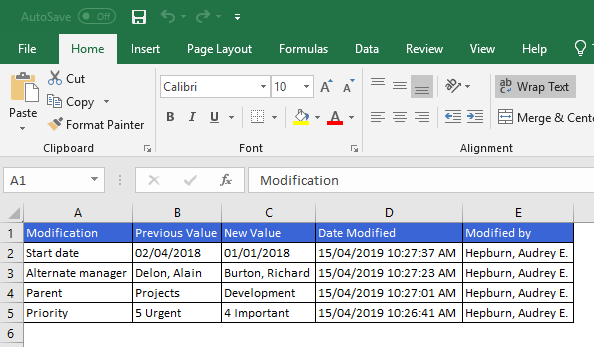
The Project History can also be exported to Excel for auditing purposes. This article details how to export the Project History to Excel.
- From the Icon Bar click Project List
 .
. - From the Project List page, select the Project you wish to edit by following one of these steps:
- Click the Project context menu button
 to expand it. From the available options click Edit.
OR - Click the name of the Project you wish to access.
Tip: Use the search capability for an efficient way of finding the specific project. For further details refer to Searching for a Project within the Project List page.
- Click the Project context menu button
- From the Project Edit page, navigate to the History tab.

- Upon the History tab displaying, click Export to Excel
 .
. - From the prompt that's generated, select the preferred Open or Save option.

- View the exported Project History in Excel.