2022R1.2 - Resolved Issues
The 2022R1.2 version of Eclipse PPM will be deployed on Tuesday, June 28th, 2022. This minor release will address the following high-priority customer issues. Click on any of the resolved issues below to learn more about them.
 Incorrect data in Upland Analytics reports (ECL-12628)
A bug prevented the correct data from appearing in Upland Analytics reports. In particular, the "Work Item" field under the "UA_PROJECT" data view (from the "Project List") would return incorrect values.
Note: The "Work Item" field under the "UA_PROJECT_PROPERTY_SINGLESELECT" data view displayed the correct data when placed into a report.
This error occurred due to a script sync issue. Something was not syncing properly with the old and new data views.
This bug has been fixed; the "Work Item" field will no longer display any incorrect information.
Error message appearing after conducting and API search without specifying "$select" values (ECL-12619)
An error would occur if an API user ran any of the Search endpoints without specifying which fields they would like returned. In other words, their endpoints would not include any values for the "$select" parameter:
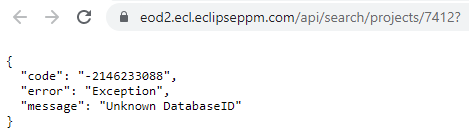
This is confusing because the "$select" parameter is not marked as a required field in Swagger:
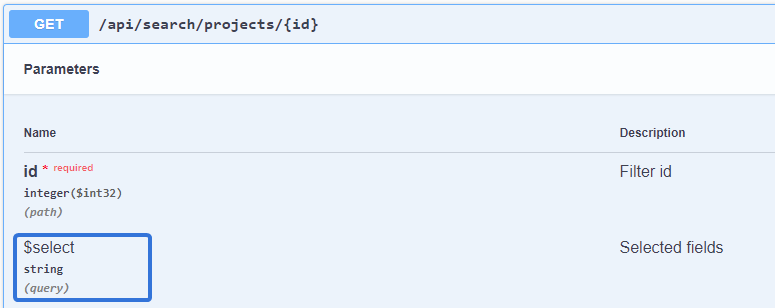
To resolve this, the "id" field for the entity being searched (Projects, Resources, etc.) will now display by default whenever users run the endpoint without the "$select" parameter. For example, running a "Projects" search without specifying any values with the "$select" parameter will return a list of Project ID numbers.
Internal Server Error when running the "Project Portfolio Gantt" report (ECL-12618)
A bug prevented users from running the "Project Portfolio Gantt" Eclipse Report. After configuring the specifications and selecting the Run button, the report would fail to run and users would receive a "FaultException" errror:

This issue has been fixed; the "Project Portfolio Gantt" Eclipse Report can once again be run without causing an error.
"Include allocated time on non-working organization days" option causing incorrect availability calculation in Resource Management (ECL-12617)
The 2022R2 release introduced the option to include non-working day allocations in Resource Availability calculations:
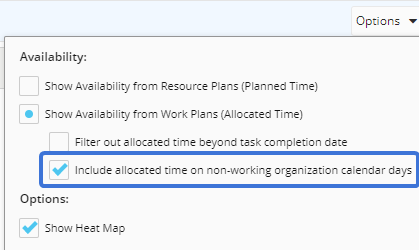
When this new feature was enabled, incorrect data would be displayed. Availabilities displayed in hours would be correct, but they would become incorrect once they were displayed in percentages.
Additionally, the heat map colors for availability cells would also be incorrect. The environment’s Availability Heat Map Settings would be ignored, caused cells to appear green when they should have been yellow or red.
This issue has been resolved; availability percentages will now reflect accurate values and the environment's Heat Map settings will be reflected in the Availability window.
Project Milestone financial quarters appearing out of order on Program Dashboards (ECL-12487)
A bug caused financial quarters from appearing in the correct order while viewing the Project Milestone report from a Program Dashboards:

The quarters are expected to follow a standard flow for each financial year: Q1, Q2, Q3, and Q4.
The bug has been fixed; financial quarters once again appear in the correct order