Lookup using JavaScript
This is the third topic of the Simple Data Lookups guide.
While JSONata provides a concise and declarative way to retrieve configuration values, using JavaScript in a function node offers greater control over validation, normalization, and error handling.
In this approach, the overall flow structure remains largely the same. The change node that previously performed the JSONata lookup is replaced with a function node. A third flow is introduced, using a catch node to handle any errors raised during lookup execution.
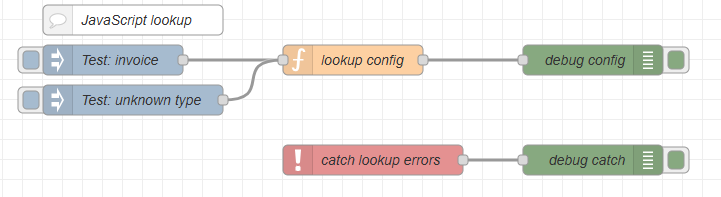
JavaScript logic
The function node implements a controlled lookup process with explicit validation and normalization steps.
Get docTypes
First, the script retrieves the reference dataset from the flow variable docTypes. If the configuration has not been loaded, typically by a startup flow, the function raises an error (Reference data not loaded) and stops further processing. This prevents the flow from executing with undefined configuration data.
const docTypes = flow.get("docTypes")
if (!docTypes) {
  node.error("DocTypes not loaded", msg)
  return null
}
Get docType
Next, the document type is extracted from the incoming filename stored in msg.payload or from msg.docType (depending on your flow). The filename is split at the underscore character, and the first segment is taken as the document type prefix. The value is then normalized by trimming whitespace and converting it to lowercase. This ensures consistent matching regardless of filename casing or formatting inconsistencies.
// Extract and normalize docType
const docType = String(msg.payload)
  .split("_")[0]
  .trim()
  .toLowerCase()
The lookup
The function performs a lookup against the reference dataset. The exact technique depends on how the configuration is structured. A CSV file converted to JSON produces an array of objects, whereas a key-based JSON configuration produces an object keyed by document type. Because the structures differ, the lookup method also differs.
Lookup with CSV-Converted JSON (Array Structure)
When CSV data is converted using the CSV node, the result is typically an array of objects:
[
  {
    "key": "inv",
    "name": "invoice",
    "outputPreset": "invoice_print.OL-outputpreset"
  },
  {
    "key": "stmt",
    "name": "statement",
    "outputPreset": "invoice_print.OL-outputpreset"
  },
  {
    "key": "rem",
    "name": "reminder",
    "outputPreset": "reminder_print.OL-outputpreset"
  }
]
In this case, the lookup is performed using JavaScript’s .find() method to locate the object where the key property matches the extracted document type:
const result = docTypes.find(d => d.key === docType);
Here:
-
drepresents each array element -
d.keyis the property being evaluated -
docTypeis the extracted and normalized document type
The .find() method returns the first matching object, or undefined if no match is found.
Lookup with Key-Based JSON (Object Structure)
With a key-based JSON structure, the document type itself is used as the object key:
{
  "inv": {
    "name": "invoice",
    "outputPreset": "invoice_print.OL-outputpreset"
  },
  "stmt": {
    "name": "statement",
    "outputPreset": "invoice_print.OL-outputpreset"
  },
  "rem": {
    "name": "reminder",
    "outputPreset": "reminder_print.OL-outputpreset"
  }
}
In this case, the lookup is simpler and more efficient:
const result = docTypes[docType]
This performs a direct property access (constant-time lookup) without iteration.
Result check
If no matching record is found, an error is raised (Unknown docType) and processing stops. This ensures that only known and explicitly configured document types are allowed to proceed.
If a match is found, the function stores:
-
The normalized document type in
msg.docType. -
The corresponding configuration object in
msg.docTypeConfig.
These values are then available for downstream nodes to control grouping logic, orientation, stationery selection, output presets, or other production parameters.
The full example using the direct property lookup for Key-based JSON:
const docTypes = flow.get("docTypes")

if (!docTypes) {
  node.error("DocTypes not loaded", msg)
  return null
}


// Extract and normalize docType
const docType = String(msg.payload)
  .split("_")[0]
  .trim()
  .toLowerCase()


// Find record by key
const result = docTypes[docType]

if (!result) {
  node.error(`Unknown docType: ${docType}`, msg)
  return null
}


// Store values for downstream usage
msg.docType = docType
msg.docTypeConfig = result

return msg
The next topic is Sample lookup usage.