Tabular CSV data
This is the first topic of the Simple Data Lookups guide.
Working with tabular data is one of the most common integration scenarios. In many environments, reference data or configuration tables are maintained as CSV files, often created or maintained in spreadsheet applications such as Microsoft Excel. This approach is well-suited to smaller datasets that follow a row-and-column structure.

CSV files are most suitable when the data model is flat and predictable. If the dataset requires hierarchical relationships, nested elements, or more complex structures, a JSON-based format is typically more appropriate.
Although the source format may be CSV, OL Connect Automate does not process CSV natively. Internally, the application operates on JSON objects. Therefore, CSV data must be converted to JSON as part of the flow. Once converted, the data can be efficiently processed using JSONata expressions or standard JavaScript in Function nodes.
Data handling options
Data can be handled in two ways:
Load from an external file
The dataset is read from a CSV or text file at runtime. This approach is appropriate when the data is maintained outside the flow, typically by business or operations users, or when updates occur frequently.
Embed in the flow
The dataset is defined directly in a Template node. In this case, the data becomes part of the flow definition and automatically travels with the flow when exported or deployed. This is suitable for small, static reference datasets such as lookup tables or configuration matrices.
The choice between loading an external file and embedding a file depends primarily on how often the data changes and who is responsible for maintaining it. Either approach can be used in the flows below. A flow that makes frequent calls to load external data from disk may operate slowly. Embedded data is generally more efficient, unless it frequently changes.
Data inline with the flow (message-scoped)

This approach is appropriate when only a single flow requires access to the configuration data. The dataset can either be:
-
Loaded from disk using a read file node.
-
Embedded directly in the flow using a template node.
Reading from disk ensures the latest version of the file is used, but it introduces runtime overhead because the file is read and parsed for every message. For small datasets, this is typically acceptable. A more efficient pattern, loading once at startup and storing in a flow variable, is covered separately.
In this section, the configuration is recreated per message and remains scoped to this flow.
Flow nodes
-
The inject node triggers the flow with a dummy file name in
msg.payload.-
In production, this would typically be a folder capture node.
-
Example payload:
inv_net30_acc67829_20250001.xml
-
-
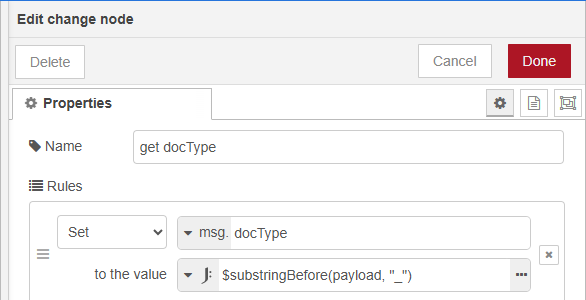
The change node extracts the lookup key (document type prefix) from the filename.
-
Configure the node Properties Rules to set the lookup key as
msg.docType -
Enter the JSONata expression value to
$substringBefore(payload, "_")
-
-
The read file node loads the CSV configuration file from disk.
-
Alternatively, the CSV content can be embedded directly using a template node configured to output Plain Text.
-
-
The csv node converts the CSV content into structured JSON.
-
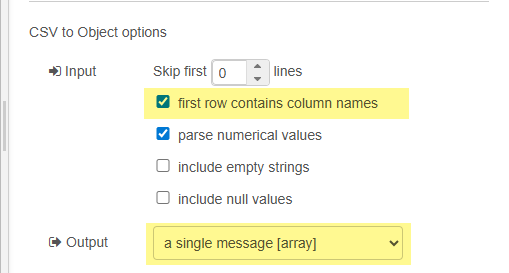
Configure the node Properties as follows to produce an array of objects in
msg.payload, where each object uses the CSV column names as keys:-
In the Input section, enable first row contains column names.
-
Set Output to single message [array].
-
-
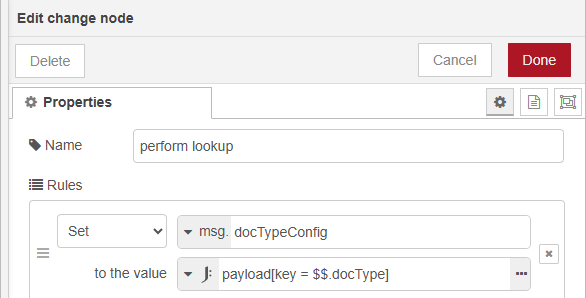
The change node performs the lookup using JSONata and stores the result in msg.docTypeConfig.
-
Configure the node Properties to use the value
JSONata expression: payload[key = $$.docType] -
This lookup does not have direct access the
docTypeusingmsg.docType. The$$prefix assures thedocTypeis read from the root, in this case frommsg.docType. -
This filters the array and returns the object where the
keycolumn matchesmsg.docType.
-
An alternative JSONata approach uses a multi-line expression. This requires the expressions to be wrapped in parentheses
(). The first expression stores the document type in a JSONata variable, which is subsequently used for the lookup:($dt := docType; payload[key = $dt])
Result
At this point, msg.docType contains the extracted document type and msg.docTypeConfig contains the matching configuration object.
Downstream nodes can use this configuration to drive grouping logic, orientation, stationery selection, output preset selection, and other production parameters.
Data in a flow variable (shared configuration)
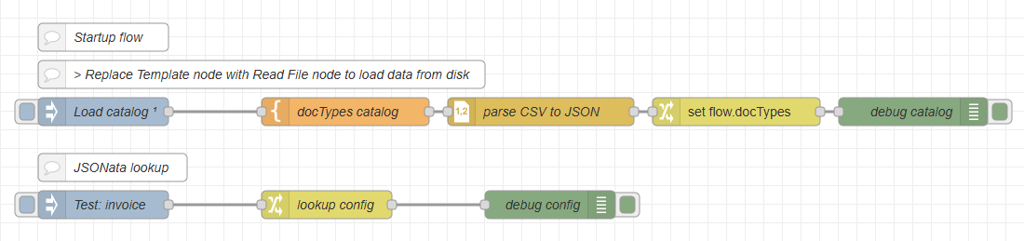
When multiple flows require access to the same configuration data, and when you want to clearly separate configuration loading from production logic, it is more efficient to centralize the loading process.
Instead of loading and parsing the dataset for every message, the configuration can be loaded once in a dedicated startup flow. This flow is responsible solely for reading, converting, and storing the reference data.
The configuration is then stored in a flow-scoped variable, making it available to all production flows on the canvas. This approach provides eliminates repeated file reads and parsing overhead, ensures a single source of truth and separates operational configuration from processing logic.
Flow overview
-
Flow 1: Inject (run on startup/deploy) > Template or Read File > CSV > Change
-
Flow 2: Inject > Change or Function > …
Flow 1 - startup flow nodes
-
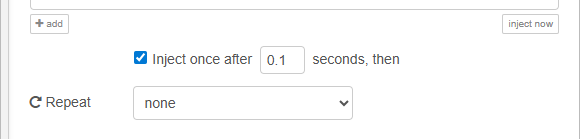
The inject node triggers the flow once after startup/deploy. This ensures the configuration is loaded before production traffic begins.
-
The read file node loads the CSV configuration file from disk. Alternatively, the CSV content can be embedded directly using a Template node configured to output Plain Text. Data is read to
msg.payload.
-
The csv node converts the CSV content into structured JSON, and is configured as outlined above.
-
The change node sets
flow.docTypesto the content ofmsg.payload.
Flow 2 - production flow nodes
-
The inject node triggers the flow with a dummy file name in
msg.payload. In production, this would typically be a folder capture node. Example payload:inv_net30_acc67829_20250001.xml
-
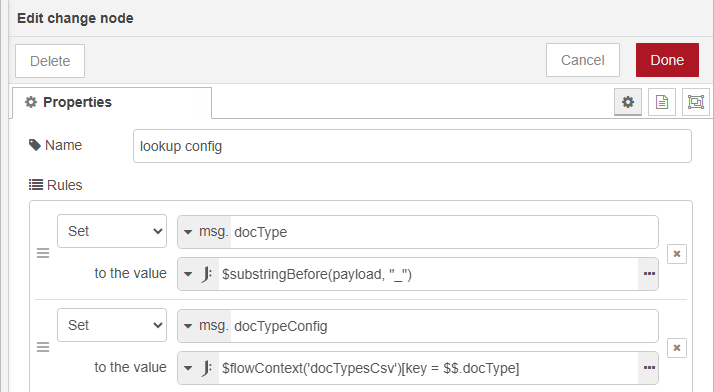
The change node extracts the lookup key (document type prefix) performs the lookup. The properties are configured with two rules:
-
Rule 1 extracts the document type from the file name, using a JSONata expression, and stores it in
msg.docType:$substringBefore(payload, "_") -
Rule 2 performs the lookup in
flow.docTypes, using the extracted document type with a JSONata expression, and stores the configuration inmsg.docTypeConfig.-
The JSONata expression is :
$flowContext('docTypes')[key = $$.docType])
-
-
Result
At this point, msg.docType contains the extracted document type and msg.docTypeConfig contains the configuration object. Downstream nodes can use these values for grouping logic, orientation, output preset selection, etc.
Storing configuration in a flow variable provides a clean architectural separation between configuration management and production processing. It avoids unnecessary duplication, supports multi-flow environments, and ensures predictable runtime behavior while remaining simple and low-tech.
The next topic is working with Structured JSON Data.