Build daily set processing
In this tutorial, you’ll learn how to build a basic daily set processing scenario using OL Connect Automateconnected to an external database.
In print production environments, it’s often necessary to group individual jobs into daily or weekly sets that can be processed together at specific times, such as during end-of-day or end-of-week operations. By integrating a database into your workflow, you can efficiently track and manage these sets and, for example, integrate the information in a dashboard.
By the end of this tutorial, you’ll understand how to configure your flows so they can automatically retrieve all jobs initiated today to create a single batch.
Before starting, ensure you’re familiar with the essential concepts of OL Connect Automate and Node-RED, including editor features and flow design. See Documentation, Training, and Support for links to getting started topics and information about using samples and tutorials. Nodes shown in flow example images may display their entered names, set in the node Properties panel, instead of their default names.
Flow Overview
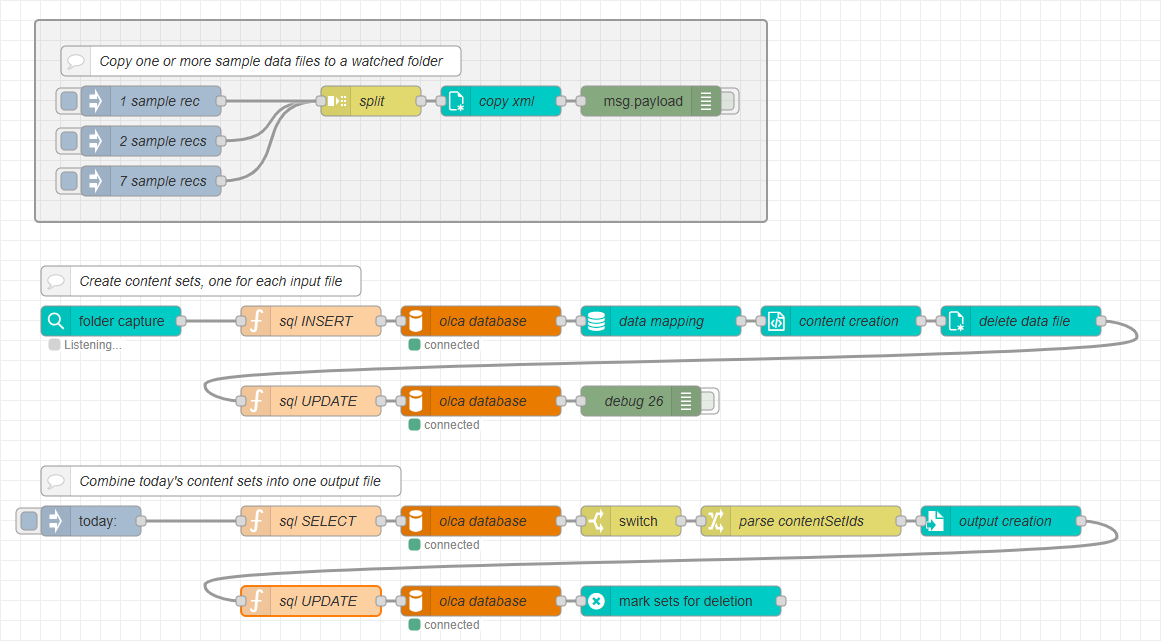
There are three flows, each serving a specific role in the daily set process.
Sample Data Injection flow
This flow uses the sample data injection technique described in the Automate sample data testing tutorial. It allows you to easily test different data files directly from the Flow Editor, without manually copying files into the watched or hot folder.
Job Submission flow
This flow begins with a folder capture node that processes any incoming XML file. It also receives jobs submitted by the sample data injection flow. In a production environment, these jobs would typically be created by an external system such as a CRM or order management platform.
The flow records job information in the external database and generates personalized content for each individual document.
Job Collection flow
Typically triggered on a scheduled interval, for example, at the end of the day or the following morning, this flow retrieves the generated jobs from the database and combines their output into a single consolidated file.
Continue to Set up Database.