About this Early Access Preview
OL Connect based on Chromium
The new version of OL Connect Designer (Chromium Early Access Preview Release) represents a significant upgrade to OL Connect by incorporating the Chromium Embedded Framework (CEF), replacing the older Mozilla Gecko engine.

This transition brings the latest HTML, CSS, and JavaScript standards to the software, opening up new possibilities for future UI enhancements and introducing new output options, such as the ability to generate accessible PDF output using PDF/UA (PDF Universal Accessibility).
The new architecture will enable seamless engine updates with each release, ensuring that OL Connect remains up to date with evolving web technologies.
Since the migration has not yet been completed, some features that are present in the standard version have not yet been implemented in the Chromium Early Access Preview Release. Nevertheless, we would like to give you the opportunity to get acquainted with the renewed Designer and its exciting new features through this technical preview, and we invite you to pass your feedback back to us.
This document details the enhancements and major differences between the OL Connect Chromium Early Access Preview Release Designer and the standard OL Connect Designer, as well as the features that have not yet been implemented, and any known issues and limitations.
Note: It is safe to open exiting Templates in OL Connect Chromium Early Access Preview Release. You will be prompted to save a backup of the original Template, in the Chromium Early Access Preview Release, so you can always return to the backup.
Note: When using OL Connect Chromium Early Access Preview Release in an automated environment, Workflow 2025.1 should be used.
Caution: This version of OL Connect Chromium Early Access Preview Release is a technology preview. We strongly recommend installing and running it in a virtualized environment.
It’s important to note that this version of OL Connect Designer is not fully backwards compatible with previous releases. To assist users with transitioning to the new standards, we have implemented a template migration dialog that performs several checks to ensure templates are updated correctly. The newer web standards may conflict with features previously used in the older Mozilla engine, such as deprecated JavaScript language features or CSS vendor prefixes (such as -moz for Mozilla ).
The migration dialog will notify users of any potential issues, providing options to either create a backup of the template before proceeding or to export a detailed report to a text editor or spreadsheet. This gives you an efficient way to review and address any necessary changes, ensuring that the update process is streamlined and manageable.
Enhancements
Supports Latest Web Standards
By adopting the Chromium Embedded Framework (CEF), OL Connect Designer and Merge Engines support cutting-edge HTML, CSS, and JavaScript features, enabling more advanced designs.
End users increasingly rely on CSS and JavaScript snippets found online or generated by AI tools. These snippets often utilize modern techniques that may not be compatible with the outdated Mozilla Gecko engine and older internal JavaScript engine. This made it essential to transition to a more modern and up-to-date browser engine.
CSS features
CEF supports all modern CSS keywords. If a CSS feature is supported in the current version of Chrome, it is almost certainly also supported in OL Connect Chromium Early Access Preview Release. It has proper support for grid layout, clip-path, text-align-last, text-decoration, and object-fit, to name a few important features.
Some related usability improvements are:
-
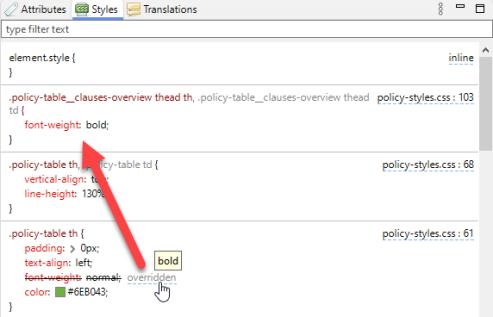
Improved Styles pane. For example:
-
If a style is overridden, a hyperlink allows jumping to the active style. Hovering over this hyperlink shows the style's computed value.
-
You can hover over a CSS variable to see its computed value. Where appropriate, color previews for CSS variables are shown.
-
Improved syntax coloring.
-
If a selector part is not applicable it is grayed out.
-
Better representation of nested selectors, multiple occurrences of the same property name, pseudo element groups, and variables.
-
-
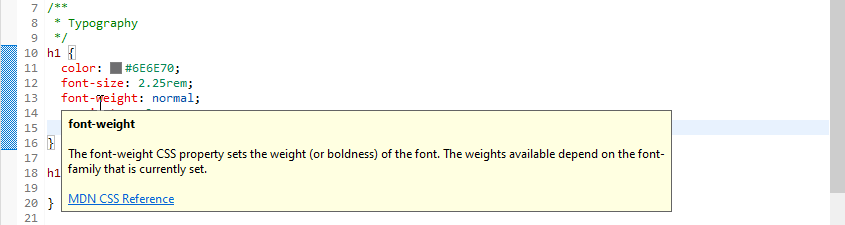
CSS editors now show a tooltip when you hover over a CSS property name, with a short description and a link to MDN.
-
As of OL Connect Chromium Early Access Preview Release the CSS style
text-align:justifynow works correctly for Chinese and Japanese text. -
Many references can function as a hyperlink to open the target resource in an editor.
For example: @use, @forward, @import, CSS variables, SCSS variables, @function, @include, and @extend. This works in regular CSS editors as well as in SCSS editors. In JavaScript editors the same applies to variables and function references.Note: The Ctrl key must be pressed down before you can see and click the hyperlink. Alternatively, select the reference and press F3.
After navigating by clicking or by pressing F3 you can press Alt + left arrow to return to the original location. -
Validation in editors. As an example, validation errors are shown while editing a JavaScript resource.
-
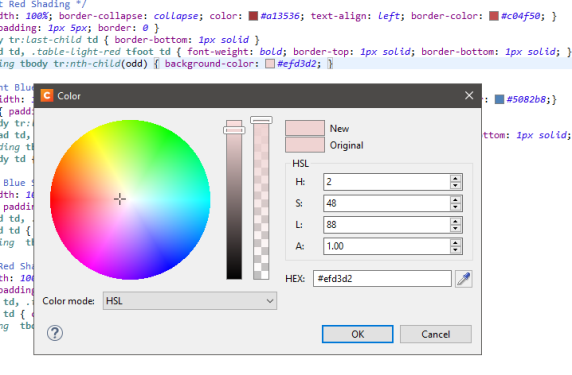
Color previews in CSS, SCSS, and HTML editors (in local and remote files). Clicking a color preview opens the Color Picker dialog if the resource is not read-only.
-
The Color Picker dialog now has an opacity slider, and its brightness slider has been flipped. Hexadecimal colors now use lowercase.
-
The Sass compiler has been updated. It has a number of additional features, such as:
-
The @use and @forward keywords are supported.
-
SCSS partials are validated, but only if they are referenced by at least one regular SCSS resource.
In addition to annotations for errors (one per resource), annotations for warnings (potentially multiple per resource) are supported. -
The error dialog that pops up if SCSS compilation fails contains a hyperlink to the file and the line that caused the error.
-
SCSS files have proper syntax coloring.
-
Compiled CSS files have a source map link at the bottom. This allows the Styles pane to refer to locations in the original SCSS file rather than the compiled CSS file.
-
Enhanced Source Editors
OL Connect source editors, such as snippet and script editors, have undergone significant enhancements. These include better syntax highlighting, enhanced code completion for JavaScript editors, real-time syntax validation for CSS, SCSS, and JavaScript resources, and the ability to quickly navigate to the definition of functions and variables. Additionally, CSS and JavaScript editors now feature links to online documentation for CSS properties and OL Connect Designer Scripting API functions.
Element highlighting
Hovering over a script in the Scripts pane displays a more advanced tooltip. Margins and padding have distinct colors, and the width and height of the first matching element are shown.
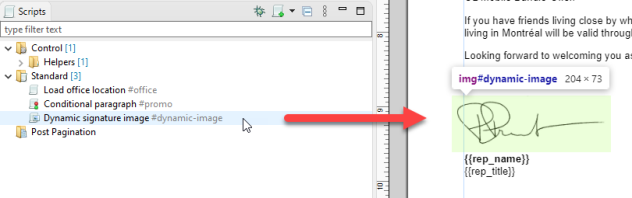
The content color (light-green by default, i.e. #7fff0025) can be overridden in the preferences. The other highlight colors cannot be changed.
OL Connect CEF also highlights matching element(s) in the main editor if you hover over an entry in the Outline pane, breadcrumbs, and Styles pane.
Holding the Ctrl key while hovering scrolls the highlighted element(s) into view.
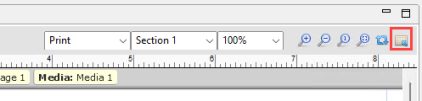
An Inspect Mode toggle button has been added to the editor toolbar. With Inspect Mode turned on, elements in the main editor are highlighted if you hover over them. This includes extension lines that connect to the rulers, if rulers are visible.
Holding the Shift key highlights child elements (one level deeper).
Handlebars built-in Helpers
Many of the built-in Helpers for Handlebars accept more arguments than before. For example, you can pass three or more arguments to or, and and log.
Example: {{log "a" "b"}}.
Script editors: tooltip with help text
The help text for code completion proposals includes one or more links to the Online Help or other websites, as appropriate. This help text is now also shown when the user hovers over a word in a script editor.
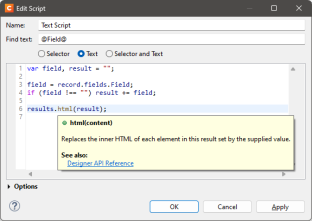
The message that is displayed when hovering over a warning or error annotation in a script editor includes relevant help text.
Note: If help text or a link is missing or should be changed, please let us know!
Unlocks Future UI Improvements
The new browser engine sets the stage for several upcoming user interface enhancements, responding to popular requests. Some improvements are already integrated into the software. For instance, tasks like aligning text to the bottom of a box (which was challenging with the Mozilla Gecko engine) and automatically scaling images to fit within a specific bounding box have already been implemented.
Theme support
Choose between a dark or light theme for the Designer user interface, with matching color schemes for source editors. The theme can be selected under Window > Preferences > Theme.
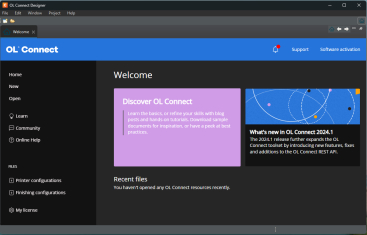
Note that this feature is still under construction; e.g. an icon set for the dark mode has to be added yet.
Also note that a dark theme is only fully supported if the operating system supports themes, which is not the case with a Core installation of Windows Server.
New Output Option – PDF/UA (Universal Access)
OL Connect Chromium Early Access Preview Release supports the generation of accessible PDF documents using PDF/UA (Universal Access) output type.
This allows individuals with disabilities to access and navigate content using assistive technologies. Such as making documents navigable via keyboard for users with varying motor skills and compatible with screen readers for those with visual impairments.
Additionally, it ensures compliance with regulatory standards such as the ADA, Section 508, and the European Accessibility Act (AEE) (June 28 2025).
While web and email content could already be accessible (depending upon the capabilities of web browsers and email clients) generating documents for digital distribution to individual recipients requires the ability to produce PDFs using the PDF/UA standard.
Whether your documents are accessible depends on their content. Simply generating PDF/UA documents doesn't automatically ensure compliance with standards like EAA, ADA and Section 508. To meet these requirements, you should follow WCAG guidelines (such as Web Content Accessibility Guidelines (WCAG) 2.1), which may require extra effort before generating PDF/UA output.
WCAG (Web Content Accessibility Guidelines) are a set of standards designed to make web content more accessible to people with disabilities. These guidelines ensure that digital content is usable by individuals with various impairments, such as visual, auditory, cognitive, and motor disabilities.
Template designers must, for example, ensure a logical reading order, proper tagging of content, adequate color contrast, and the conversion of essential image-based information into selectable text. Images should be tagged with meaningful alternative text, generic tags like "image1" are not sufficient for accessibility.
These steps are essential for making PDFs truly accessible and ensuring compliance with industry standards. See the
Differences
Output
The output that the CEF version generates from existing templates may not be identical to the output of the standard version.
Text is rendered differently, which means the output will look slightly different overall. Text is drawn at different offsets, which may affect word wrap. As a result, content that fits on a page in the standard version of OL Connect might be (partially) pushed to the next page or run shorter with OL Connect CEF, which may affect the page count.
Note: It is safe to open exiting Templates in OL Connect Chromium Early Access Preview Release. You will be prompted to save a backup of the original Template, in the Chromium Early Access Preview Release, so you can always return to the backup.
Source view
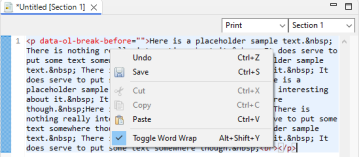
You can now easily word wrap text in Source view mode (the Source tab).
Preview view
In Preview view mode (the Preview tab) content is read-only; it cannot be edited.
Note: If there is a circumstance where it is important to be able to edit a template in preview mode, please let us know.
Formatting of numbers and dates
Formatting is now based on the latest CLDR standard. This means there may be differences in the way numbers and dates are formatted, compared to previous versions of OL Connect.
Currencies now consistently use standard-currency rather than accounting-currency, which means negative values are not enclosed in parentheses by default, but instead have a minus sign.
Example: In content with the en-US or fr-CA locale, a negative amount of 28,50 (formatted as Currency) will be displayed as follows in the Chromium Early Access Preview Release version: -$28.50
In the standard version it looks like this: ($28.50)
An option to select either standard-currency or accounting-currency will be added in a later version.
Colors
The following differences are related to colors:
-
Chromium Early Access Preview Release currently behaves quite different to the Mozilla based Designer in how it handles color spaces and profiles of images used within the Template.
Tip: For color critical images we recommend putting the image in a PDF file and using that PDF file as the image in the Template, rather than placing the image directly into the template.
-
Custom color names (or "color swatches") are now case-sensitive.
-
Renaming a Custom color (or "color swatch") now cascades the update in all (non-remote) CSS and HTML resources.
-
To refer to a custom color in CSS or HTML, you must use the var() function and add two hyphens.
Example:
color: var(--WebGreen)It is no longer possible to directly refer to a custom color (e.g.
color: WebGreen).
When you select a custom color from a color drop-down, the style value is automatically set using the var() function (e.g.var(--WebGreen)).
To make working with variables easier, CSS editors provide completion proposals for variables starting with "--". -
The CMYK() function is no longer supported. When an older template is opened, cmyk(c, m, y, k) references are automatically changed into var(--cmyk-c-m-y-k), with appropriate values for c, m, y, and k.
Note: While most older styles are automatically updated, styles in read-only resources like remote CSS or JavaScript will not be updated.
-
The preference in Editing > CSS > Sass CSS preprocessor that allows users to configure the output style offers two settings - Compressed and Expanded (the default) - rather than four.
-
The Box Formatting and Paragraph Formatting dialogs show the current font color in the various border color fields if no border color style is present.
-
The Color Picker dialog opens when "Other" is clicked in the Color drop-down (opened via Format > Color, or the Text color toolbar button), instead of the Text Formatting dialog. .
User scripts
The following differences are related to user scripts:
-
Each user script now runs in its own isolated scope. Functions and variables declared with
const,varorletcan only be accessed from the script (or function) in which they are declared.Scripts in existing templates may rely on global variables declared with
const,varorletin a Control Script.
Remove theconst,varorletkeyword to make these scripts work again.Example:
x = 123;To make a function global you should use a function expression.
Example:
fn = function() { … } -
The
resultsobject is now iterable. This means you can loop over it like this:Copyfor (const result of results) {
...
}You can now break out of a
results.eachloop by returningfalsein the callback, just like with jQuery. -
Fields and tables are now plain objects rather than arrays/object hybrids. This means the
lengthproperty is no longer supported for record.fields and record.tables, and it is no longer possible to access a field or table through a numeric index. The following script will now produce errors:Copyfor (let i = 0; i < record.fields.length; i++) {
logger.info(record.fields[i]);
}If
record.fieldsorrecord.tablesreally need to be treated as an array, they can be transformed with either Object.keys, Object.values, or Object.entries.The above script could be rewritten as:
Copyfor (const name of Object.keys(record.fields)) {
logger.info(name);
}Note: A detail table is still an array. For example, if you have a detail table with the name mydetailtable then
record.mydetailtableandrecord.tables.mydetailtableare still arrays. This still allows you to get data from a specific detail record in a script. -
Resource names (sections, master pages, media) are now case sensitive. If you refer to a section in a script you will need to make sure to use the same casing as in the Resources pane.
-
Validation for user scripts in Design mode is now limited to syntax errors. In Design mode, in the Scripts pane and in script editors you will no longer get runtime warnings (such as when a table or field name is unknown) or runtime errors (such as when unknown properties are referenced).
Warnings and runtime errors are still visible in Preview mode. -
All properties underneath
sheetConfig.positions.allare now write-only. -
The Rhino library is no longer used for user scripts, which means that scripts are no longer affected by bugs or limitations in that library. For example: it is now possible to use the
constkeyword for the variable in afor...ofloop.
Previously that would trigger a syntax error because of a limitation of Rhino.Note: In DataMapper scripts, the underlying architecture has not changed. They still rely on Rhino.
-
The Script Debugger has been simplified and been made more user-friendly. Some examples: the call stack has been removed; hovering over a script now highlights the selector results in the main editor and scrolls them into view if necessary; the debugger automatically pauses when an error is thrown instead of continuing with the next script; if a line consists of multiple statements, you can step through each statement.
-
When
merge.section.paginate()is called in a post pagination script, pagination is no longer triggered immediately, but is postponed until the script is done. Code that relies on the new state will need to be placed in a separate post pagination script. -
Broken Image detection has also been moved to post pagination.
Known issues and limitations
The following features are waiting to be implemented in OL Connect CEF.
-
The OL Connect Chromium Early Access Preview Release does not support AFP or PCL input. This will be fixed in a subsequent release.
-
The Inserter Mark Position Options page in the Print Wizard is not working in Chromium Early Access Preview Release. This will be fixed in a subsequent release.
-
There is an issue with the "Rasterize Options..." dialog. This will be fixed in a subsequent release.
-
When uninstalling OL Connect Chromium Early Access Preview Release you might encounter a issue with an active Java Chromium Embedded Framework (JCEF) Helper. To avoid this issue, close down all OL Connect Merge Engines via the Windows Task Manager, before attempting the uninstallation.
-
Color management (i.e. support for color profiles) is not supported yet.
-
CMYK output is supported for custom colors, but images in CMYK format (with or without a color profile) will be changed to RGB format.
-
The Rasterization feature has not been fully implemented yet.
-
This means that boxes cannot be rasterized
-
It also means that using the REST API to generate image previews is not currently supported.
-
-
The Facing pages feature, which alternates the side margins in Print output, cannot be used; it corrupts the output.
-
Support for scripted passwords for PDF attachments is not yet implemented.
-
When printing via a remote server, the output may not look exactly the same as displayed in the Designer if the display scale on the client-side is not identical to the display scale on the server-side.
-
There are some minor usability issues. For example: formatting multiple boxes at the same time is not yet possible.
-
The Generate Thumbnails option has been temporarily removed from the File > Export Report feature, for CEF Early Access version.