PlanetPress Workflow Configuration Program
This chapter centers on the PlanetPress Workflow Configuration program, which you use to create and edit your configurations.
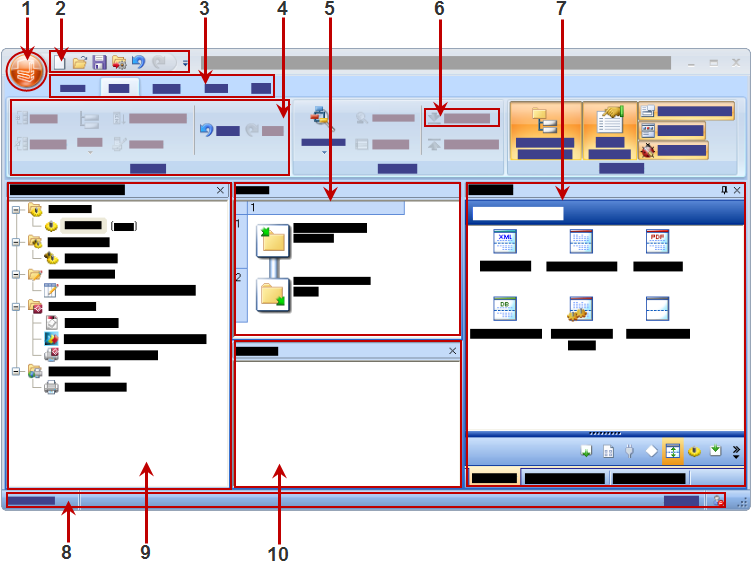
The basic user interface elements are as follows:
- The PlanetPress Suite Button. See The PlanetPress Button.
- The Quick Access Toolbar. See The Quick Access Toolbar.
- The Ribbon Tabs. See The PlanetPress Suite Ribbon.
- A Group within the Ribbon
- The Process area. See The Process Area.
- A specific link (aka a "component", "button" or "link").
- The Dockable panels including The Plug-in Bar, The Object Inspector Pane and The Debug Information Pane.
- The status bar. This displays your current software version and status of the PlanetPress Service.
- The Configuration Components Pane. See The Configuration Components Pane.
- The Messages area Pane. See The Message Area Pane.
You can customize the appearance of PlanetPress Workflow Configuration programs to your needs. See Customizing the Program Window.