Delete a Deliverable
Deliverables are work items (Milestones, sub-Projects, Documents, etc.) that are associated with Project Gates. They can be marked as optional or required, which means that they must be completed in order to advance the Gate.
Deliverables that should no longer be associated with a Gate can be easily deleted.
Caution: Deleted Deliverables, as well as all of their data, cannot be recovered. Make sure you have retrieved everything you need from the Deliverable before deleting.
Tip: If the Deliverable is should fall under a different work item or Gate, consider moving the Deliverable instead.
To delete a Deliverable from a Gate:
Before You Start: Users require the "Add Child" and "Delete" Project Task permissions on the work item to delete its Deliverables.
-
Navigate to the work item.
-
Select Add / Remove from the "Descendants" module:

-
Use the checkboxes to select the Deliverables you would like to delete:
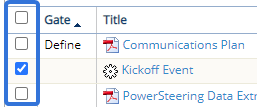
Tip: Selecting the checkbox in the table header will automatically select every checkbox.
-
Select the Delete button:
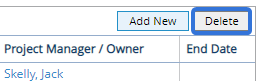
After clicking Delete, the Deliverable will be removed from PowerSteering. It cannot be restored; it will have to be recreated to be brought back (see Create a Deliverable).