Two pre-configured homepage templates provide a quick starting point for users. Each template includes tiles tailored to common tasks for the respective role. Administrators can use the templates as-is or customize them further.
The Standard User Homepage consolidates everyday work into a single, streamlined view, helping users stay focused on projects, tasks, approvals, and frequently used tools.
The Project Manager Homepage delivers a role-specific dashboard that highlights project health, financials, and operational tasks, enabling managers to monitor progress and make timely decisions.
Standard User Homepage
In Summary: The Standard User Homepage consolidates everyday work into a single, streamlined view. The My Work tile displays current projects, tasks, and timesheets. The My Assigned Items tile highlights pending approvals without requiring navigation across multiple areas. The Quick Links tile provides direct access to frequently used tools such as Timesheets, Work Plans, and Expense or Leave Request Managers, reducing search time. The My Recent Items tile makes it easy to resume work, supporting a faster and more efficient workflow.
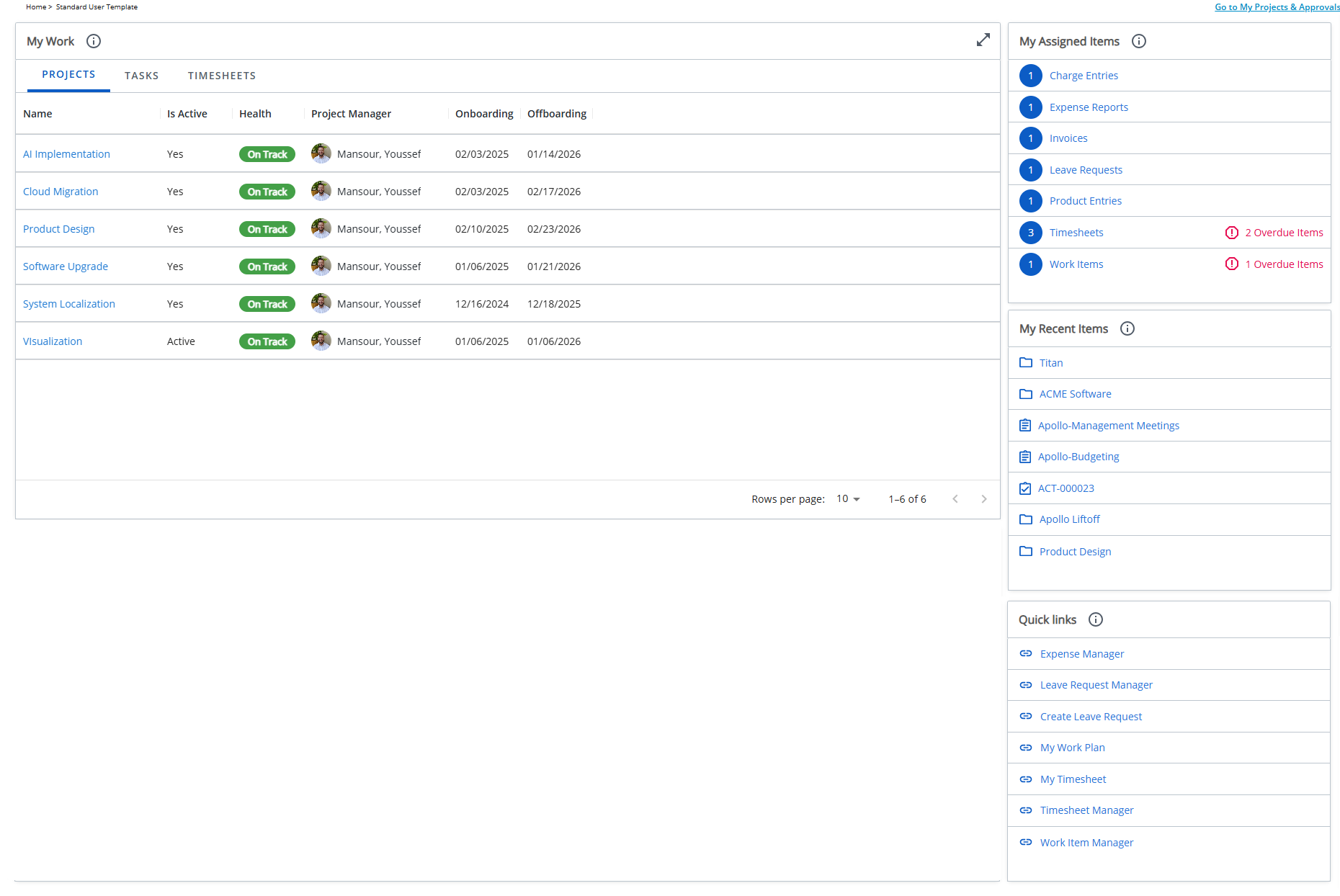
Designed for individual contributors, this Homepage brings together the tools and information you need most often:
- My Work tile
Projects tab: Shows Projects where you are a Team member. You can view details such as Project Name, State, Health, Project Manager, and your Onboarding and Offboarding dates. Suspended Projects are not included.
Tasks tab: Lists Tasks assigned to you. You can view the Task Name, State, Start date, End date, Project, Project Manager, and Alternate Project Manager. Includes Upcoming Tasks (Start date within the next 7 days) and Inactive Tasks (no Time entries in the past 7 days). Completed Assignments are not included.
Timesheets tab: Displays the last 10 Timesheets you opened and/or submitted. Approved Timesheets are not included.
- My Assigned Items tile
Consolidates all items that require your review or approval. Includes pending Timesheets, Expense Reports, Invoices, Leave Requests, Work Items, Charges, and Product Entries, helping you manage approvals more efficiently.
- My Recent Items tile
Provides quick access to Projects , Work Items, Tasks and Users.
- Quick Links tile
Provides shortcuts to: Expense Manager, Leave Request Manager, Create Leave Request, My Work Plan, My Timesheet, Timesheet Manager and Work Item Manager.
Project Manager Homepage
In Summary: The Project Manager Homepage delivers a role-specific dashboard focused on project health, financials, and operational tasks. KPI tiles surface key metrics, including billable hours, charges, and expenses, providing immediate insight into project performance. The My Projects tile centralizes access to active projects, and the My Assigned Items tile streamlines approvals for Timesheets, Expenses, and Work Items. Quick Links offer shortcuts to essential project and resource management tools, while My Recent Items enables easy return to in-progress work. Together, these elements help project managers monitor progress, act quickly on approvals, and make informed decisions with minimal effort.
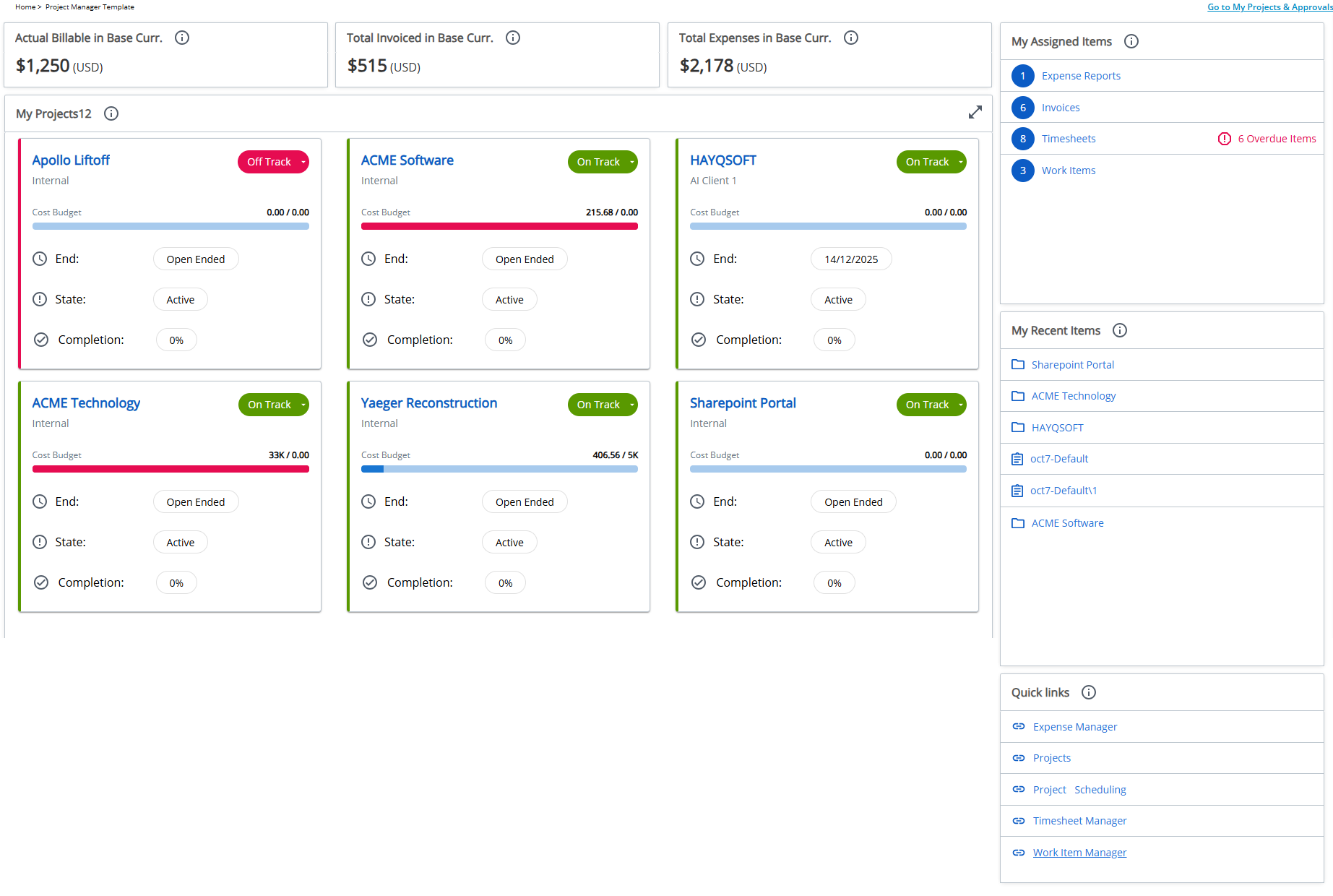
Designed for project managers, this homepage provides visibility into key metrics and access to management tools.
- KPIs tiles – Shows high-level project metrics based on My Projects View, including:
- Actual Billable in Base Curr. – Displays the total billable amount for all projects shown in the My Projects View for the logged-in user.
- Total Invoiced in Base Curr. – Displays the total invoiced amount across all projects listed in the My Projects View for the logged-in user.
- Total Expenses in Base Curr. – Displays the total expense amount for all projects included in the My Projects View for the logged-in user.
- My Projects tile – Shows the projects you manage, helping you track performance and stay focused on active work.
- My Assigned Items tile – Consolidates all items requiring your review or approval, including pending Expense Reports, Invoices, Timesheets and Work Items.
- My Recent Items tile – Provides quick access to Projects, Tasks, and Work Items you recently viewed.
- Quick Links tile – Provides shortcuts to: Expense Manager, Projects, Project Scheduling, Timesheet Manager, and Work Item Manager.