Expanding or Contracting Table Line Items of a Given Project Through the Project List page
This article covers the expanding/contracting of the table line items of a given Project through the Project List page.
- From the Icon Bar click Project List
 .
. - View the Project List page, and proceed to search for the existing project which you wish to copy.
Tip: Use the search capability for an efficient way of finding the specific project. For further details refer to Searching for a Project within the Project List page.
-
Upon the Project List displaying, click the respective Expand/Collapse arrow based on what you wish to be displayed/hidden:
- Click the Expand
 arrow (down arrow) to the left of the Project Name to display all available Project information.
 - Click the Collapse
 arrow (up arrow) to the left of the Project Name to hide all available Project information.
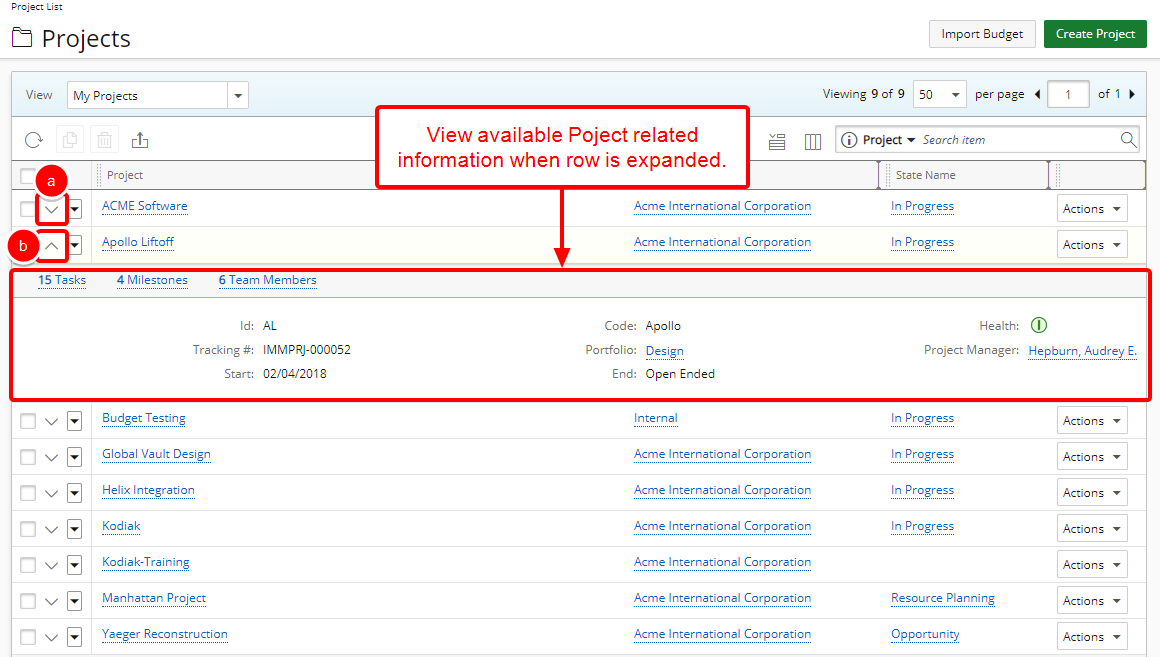
Note: Form more information on how to add or remove information from the Expanded row view please click here.
- Click the Expand