AI Approver Review
The AI Approver Review feature allows approvers to compare the current and the original versions of a solution in Solution Manager using AI-powered analysis. The key differences are displayed under Summary of Changes within the solution pending approval.
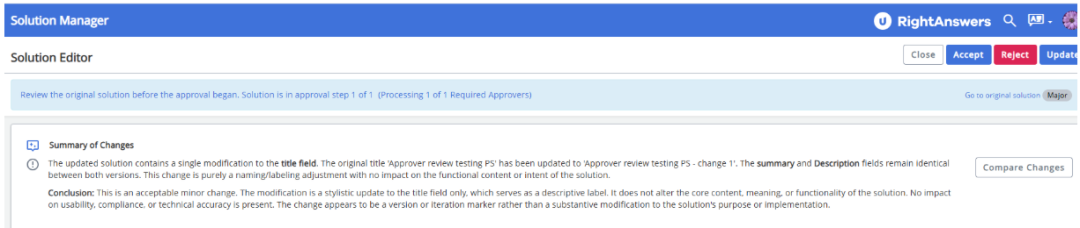
The AI Approver Review feature analyzes the following:
-
For Solutions: It automatically detects content changes in the following fields:
- Title
- Summary
-
All the solution fields:
The solutions fields vary based on the template. For example, the Break-Fix template has Symptoms, Cause, Details fields, while the Q&A template has the , Answer and Resolution Category.
-
For Decision Trees:
- It detects if child responses have added/removed but will not detect content changes within the child responses.
- It will detect the content changes within the solution fields of the parent Decision Tree.
For multiple reviewers, the AI Approver Review summary is visible to each approver in the workflow. Approvers can expand the summary, review AI-generated changes, and add comments. If one approver updates the solution, other approvers receive a pop-up to reload and trigger a new AI review. The solution is approved if all approvers accept it; otherwise, it is sent back for revisions. The tooltip disclaimer 'AI review is intended as a supplementary tool only and should not replace thorough human evaluation.' is displayed when hovering over the Summary of Changes.
The AI Approver Review feature is disabled by default. It can be enabled by setting AIApprovalSolutionReviewEnabled to True. When enabled, the AI review is triggered only if both solution versions meet the predefined AI token limits. If the limit is exceeded, the system does not trigger the review and notifies the user. This feature is also available for custom role authors if AI features are enabled for custom roles (EnableAIFeaturesForSolutionManagerByRole must include 'Custom').For more information on enabling and configuring the AI Approver Review feature, refer to the following solutions:
Configure AI Approver Review prompt,