Reviewing recent activity
 To return to the Home dashboard from anywhere in Mobile Commons, select the Mobile Commons logo in the upper-right corner of the page.
From the Home dashboard:
Active subscribers and new profiles
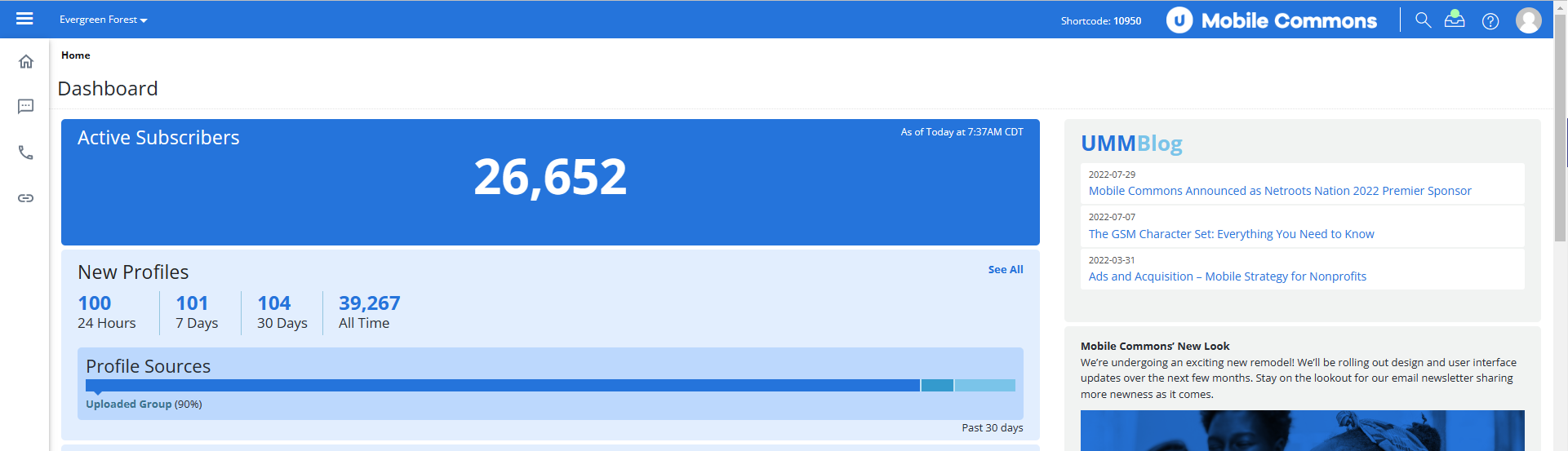
The upper two sections in the left pane of the Home dashboard display basic statistics about active subscribers and new profile records:
| Section | Description |
|---|---|
|
Active Subscribers |
Displays the number of user profiles that are currently subscribed (opted in) to active campaigns, as of the date and time displayed in the top-right corner of the Active Subscribers pane. These numbers are refreshed hourly. |
| New Profiles |
Displays the number of user profiles added in the past 24 hours, 7 days, 30 days, and in total, with a graph of the top three sources of user data for the past 30 days.
|
This month's statistics
The Statistics section summarizes the following key messaging statistics for the current month:
| Statistics | Description | |
|---|---|---|

|
Sent as single SMS |
Number of single, text-only (SMS) messages sent from Mobile Commons to subscribers during the past month. |
|
|
Sent as failover SMS | The number of SMS messages sent after receiving an invalid response from the recipient during the past month. If Suppress SMS Failover is selected in the original MMS message, then no message is sent when the recipient cannot receive MMS messages. |
|
|
Sent as multi-part SMS |
Number of overlarge SMS messages that were divided and sent in parts during the past month. Note: An SMS message that contains more than the standard number of characters may be divided into multiple parts that are sent separately and reconstructed upon delivery. |
|
|
No. of SMS multi-parts | Number of parts sent in SMS multi-part messages during the past month. |
|
|
Total sent as SMS | Total number of text-only messages sent from Mobile Commons to subscribers during the past month. |
|
|
Received as SMS | Number of SMS messages received from subscribers for during the past month. |
|
|
Sent as MMS | Number of MMS (multimedia message service) messages sent from Mobile Commons to subscribers during the past month. |
|
|
Phone calls | Number of mConnect phone calls made during the past month. For more information, see Phone Calls. |

|
Dollars raised | If you have Fundraising add-on enabled, the amount of money raised by donation campaigns during the past month. For more information, see Accessing fundraising reports. |

|
Links clicked (total) | Total number of times users clicked on shortened, trackable links during the past month. |
|
|
Links clicked (unique) |
Number of users who clicked on shortened, trackable links during the past month. |

|
Churn rate | Percent of users who have opted out of at least one campaign during the past month. |
For reports containing statistics for the past year, see Reviewing usage reports.
Broadcasts
The lower two sections in the left pane of the Home dashboard list upcoming broadcasts and recent broadcasts:
-
To open the Broadcasts table, select See All in the upper-right corner of the Upcoming Broadcasts or Recent Broadcasts section. For more information, see Working with broadcast messages.
-
To open the broadcast conversation page, select the broadcast name in the right column of the Upcoming Broadcasts or Recent Broadcasts section.
Additional resources
The sections in the right pane provide access to additional resources:
| Section | Description | |
|---|---|---|
| UMM Blog | Expert advice on improving customer engagement with Mobile Commons. Select a title to open a recent article. | |
| Announcements |
|