Planning your text-messaging campaign
Note: Text messaging via mobile devices is subject to regulation, so before you begin, make sure you understand the compliance requirements set by the Federal Communications Commission (https://www.fcc.gov), CTIA (https://www.ctia.org), and your mobile messaging provider. For more information, see Understanding compliance requirements.
Your customer success manager will help you to work with your mobile messaging provider and obtain the code that identifies your text-messaging campaign. For more information, see Working with short codes and long codes.
Mobile Commons supports two types of text messages:
- Opt-in path introduces your company or organization and obtains permission to send text messages to mobile users. Opt-in path messages may also be used to qualify mobile users based on age or location. For more information, see Adding a new opt-in path message.
- Broadcast message sends targeted, personalized messages to those mobile users who have given permission to receive them. For more information, see Adding a new broadcast message.
Promoting your campaign
When you have set up the opt-in path for your campaign, you are ready to promote it with a call to action (CTA) encouraging mobile phone users to text a keyword to a special code or to provide the mobile user’s cell phone number on a web form, in a phone contact, or on a sign-up form, etc.
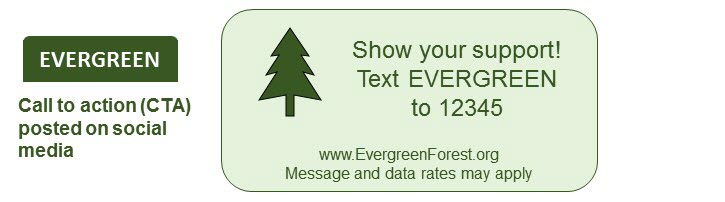
Take the time to design an effective message that will build a list of users for your messaging program:
- Be clear and concise, keeping your CTA focused on a single response—texting a memorable keyword to a specific code.
- Emphasize the value your program provides, giving the users an incentive to respond and to anticipate recurring messages in the future.
Plan a program that gets your CTA out to your target audience in a well-crafted promotion across a variety of channels, such as social media and broadcast, print, and online outlets.
Tip: The opt-in path message must be in place before you advertise your CTA promotion. For more information, see About opt-in path messages.
Obtaining subscriptions
There are three ways to obtain permission to send text messages (subscription):
-
In response to call to action (CTA) promotion, a mobile user texts a keyword to a short or long code. Mobile Commons responds with an opt-in message requesting confirmation. The mobile user then does one of the following:
- Responds YES to confirm.
- Responds YES to confirm, and then supplies a qualifying ZIP code (ZIP confirmation).
- Responds YES to confirm, and then supplies a qualifying date of birth (age verification).
For more information, see Creating an opt-in path message.
- On your website, a web user fills out and submits a sign-up form. Mobile Commons responds with an opt-in message requesting confirmation. The mobile user then does one of the following:
- Responds YES to confirm.
- Responds YES to confirm, and then supplies a qualifying ZIP code (ZIP confirmation).
- Responds YES to confirm, and then supplies a qualifying date of birth (age verification).
For more information, see Creating a web opt-in path.
- Your IT team works with Mobile Commons to integrate your CRM data into the Mobile Commons database. A profile is created for each user, based on the their mobile phone number. For more information, see Integrating data from CRM platforms.