Apply conditions from file data
In document automation flows, it's common to apply conditional logic based on data values. A typical example is branching logic based on a document type specified in the content.
Just like with file metadata, as shown in Apply conditions from file metadata, the switch node can be used to evaluate fields within the JavaScript object produced after converting XML to JavaScript objects.
See Trigger flow with a folder capture node for instructions on setting up a watched folder. That is the first step for this flow.
These examples build on previous examples, such as Read XML file contents
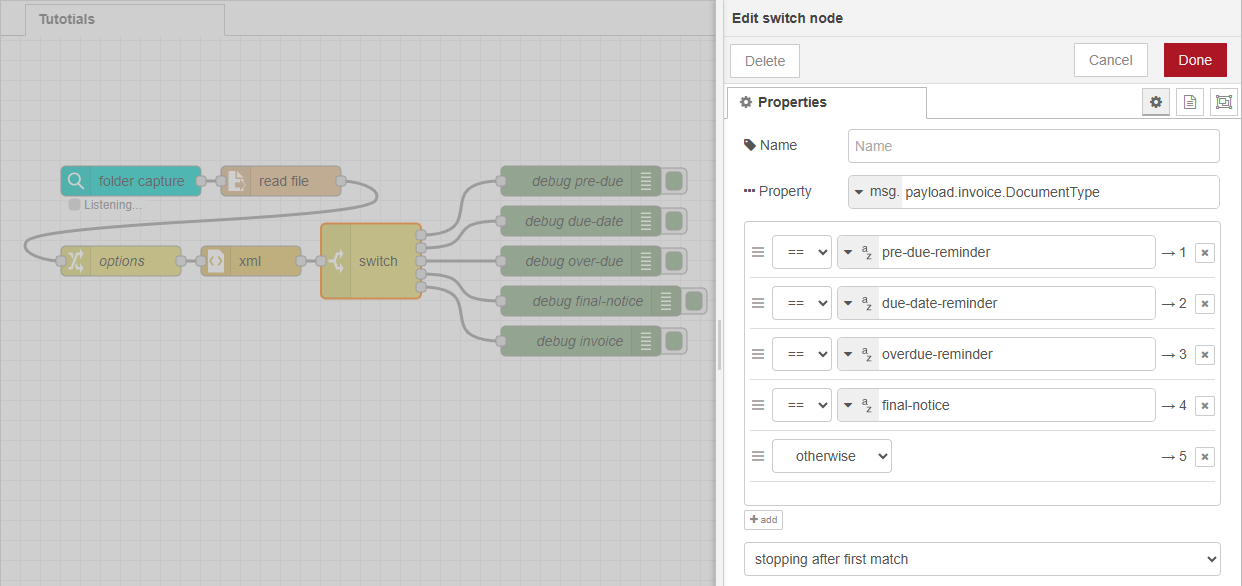
Routing by Document Type
In this example, the flow checks the value of msg.payload.invoice.DocumentType using a switch node.
-
If the value is "pre-due-reminder", the flow continues to render a pre-due reminder template.
-
If the value doesn't match any of the defined rules (e.g., rules 1–4), the message is routed through the otherwise output. This fallback can be used to render the default invoice template.
This technique enables type-specific processing logic based on the content of the incoming data, allowing the flow to dynamically adapt to different document types.
Routing via Scripting
As an alternative to the switch node, you can use a function node to implement the same logic programmatically. This allows you to:
-
Direct messages to specific outputs, or
-
Dynamically set properties such as
msg.templateormsg.dataMapper, which can be used by nodes like paginated content, data mapping, or all in one to set the template or data mapping configuration.
The following JavaScript snippet performs a lookup in an array of valid template names. Array.includes() checks if docType is in the list and falls back to invoice if it's not.
const docType = msg.payload.invoice.DocumentType;

const validTemplates = [
    "pre-due-reminder",
    "due-date-reminder",
    "overdue-reminder",
    "final-notice"
];

const templateName = validTemplates.includes(docType) ? docType : "invoice";
msg.template = `${templateName}.OL-template`;

return msg;
Next use case: Delete input file