Use OL Connect Automate with OL Remote Print
OL Remote Print (OLRP) is an IP printing solution that enables documents from any Windows application to be securely printed to any remote OLRP server. Background processes deliver solution-specific web pages and apply print production parameters.
This section presents three tutorials demonstrating example of how OL Connect Automate (OLCA) and OL Remote Print (OLRP) work together with olconnect. Each example showcases the implementation of an interactive web page launched by the OLRP Client (printer driver) as part of the print workflow. These examples are designed to help you understand and effectively implement solutions using OLRP, whether you are building a proof of concept, integrating into an existing workflow, or developing a new service.
Before starting, ensure you’re familiar with the essential concepts of OL Connect Automate and Node-RED, including editor features and flow design. See Documentation, Training, and Support for links to getting started topics and information about using samples and tutorials. Nodes shown in flow example images may display their entered names, set in the node Properties panel, instead of their default names.
The tutorials cover the following scenarios:
-
Check Job Status: Displays a busy page while receiving the print job, then shows static job data on completion. This demonstrates how to check job status in the OLRP database.
-
Mail Merge: Demonstrates a typical one-to-many communication workflow, starting with a generic letter in an application like Microsoft Word. Users can select recipients or tenants, then generate individualized documents initiated from the browser. Personalized additions to the output include contract information, address blocks, salutations, subjects, avatars, and stationery.
-
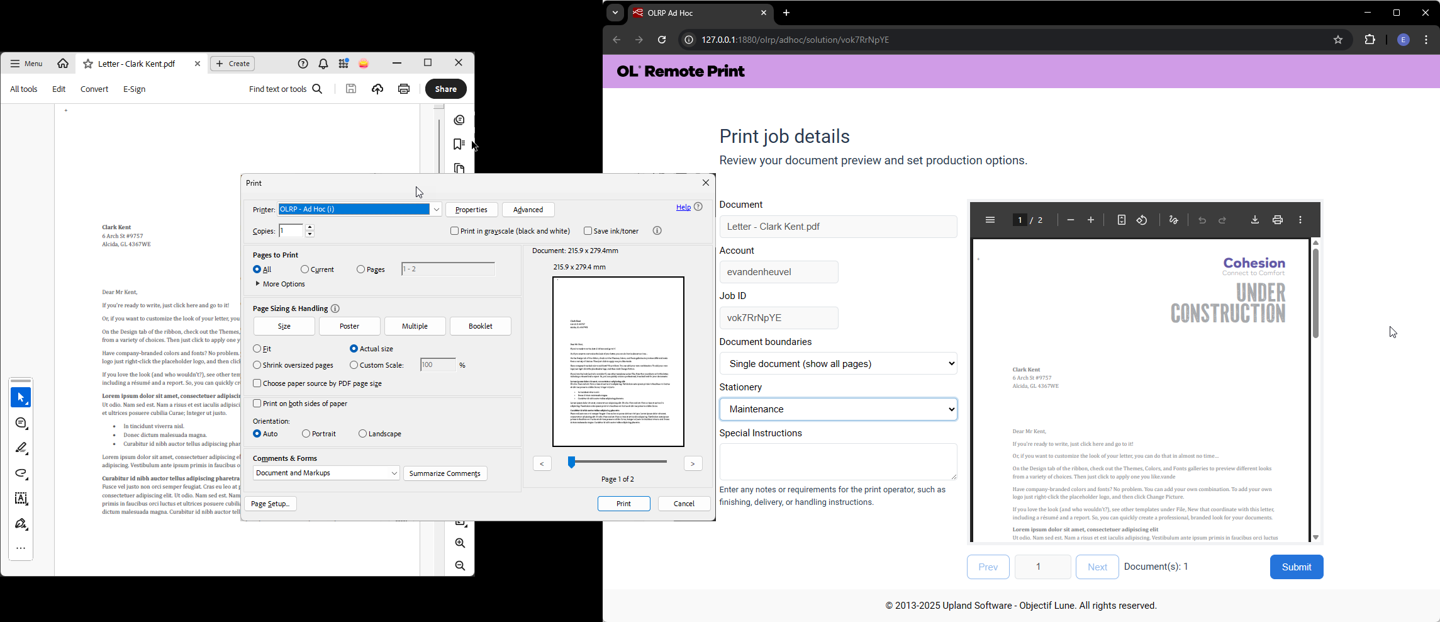
Print Preview: Demonstrates generating an online PDF preview of a print job. Users can choose a stationery background, configure document boundary options for mail merges, and generate a JSON job ticket upon submission. Changing boundary settings or selecting a different stationery immediately updates the PDF preview.
All demos are written in plain HTML, CSS, and JavaScript, and are intended to:
-
Inspire solution developers and system integrators.
-
Provide development patterns that can serve as a foundation for your solutions.
-
Demonstrate the capabilities of OLRP, OLCA, and OL Connect in practical scenarios.
The image below shows the OLRP Print Preview web page, showcasing the online PDF preview.
Key functionality
-
OL Connect Automate serves all web pages, including the HTML, CSS, and JavaScript files.
-
OL Remote Print nodes for OL Connect Automate handle interactions with the OLRP server.
-
OL Connect nodes for OL Connect Automate manage personalization and PDF previews through OL Connect design templates, with boundary detection logic implemented via a Data Mapping configuration.
Go to OLRP tutorials
-
OLRP check job status (used in the subsequent tutorials)