Extract transactional data
Promotional data are data about customers, such as addresses, names and phone numbers. In OL Connect, each record in the extracted record set represents one recipient. The number of fields that contain promotional data is the same in each record. These data are stored on the root level of the extracted record.
Transactional data, on the other hand, are used in communications about transactions between a company and their customers or suppliers: invoices, statements, and purchase orders, for example. Naturally these data differ per customer. They are stored in detail tables in the extracted record. The number of detail lines in a detail table can vary from record to record.
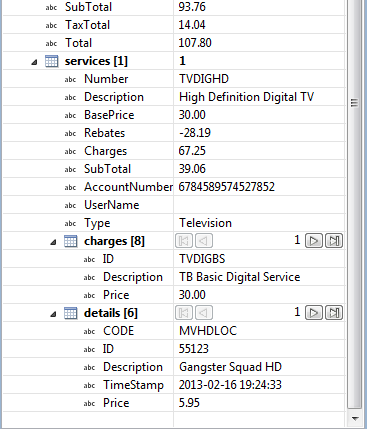
Detail tables are created when an Extract step is added within a Repeat step.
-
The Repeat step goes through a number of lines or nodes.
-
The Extract step within that loop extracts data from each line or node.
How this loop is constructed depends on the type of source data. See the following topics for how to construct loops, depending on the source data:
Tip: To break out of a loop and immediately jump to the next task following the current loop, use an Action task and set its action to Break out of repeat loop.
Loops work well when the data are structured uniformly, e.g. when all rows have the same number of columns, and when detail data always start at the same point in the line. That is not always the case.
-
To extract transactional data that is structured differently, see Extract data with an Action step script.
-
The topic Extract data of variable length explains a few ways to extract data from a variable number of lines into one data field.