2026R1.0 - Controlled Release 1
A controlled release will be deployed to introduce the following upgrades and fixes. It will be available on the staging site on Wednesday, May 6th, 2026 and on the production site on Sunday, May 10th, 2026. Individual customer cases will be updated by the support team through the portal.
Note: This page may be updated as new information becomes available.
The following improvements are available with this release:
 ! Improved New recommended Microsoft Azure permission for Microsoft Teams integration
What's Different:
A new API permission is recommended for organizations that have set up a Microsoft Teams integration through Microsoft Azure.
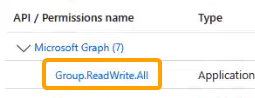
Prior to this release, one of the recommended permissions was "Group.ReadWrite.All".

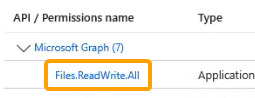
With this update, PowerSteering recommends switching this permission for the "Files.ReadWrite.All" permission instead.

Note: Keeping the original permission will not break the integration. This is simply a recommendation for improved security.
Benefit:
"Group.ReadWrite.All" is a very high-priveleged permission that allows an application to access and configure more than an integration usually requires. Many IT teams are hesitant to include this permissions because it increases the risk of unintended changes or exposure of sensitive information if something goes wrong.
On the other hand, the "Files.ReadWrite.All" permission is much more targeted. It only permits PowerSteering to manage files without having broad control over Microsoft Teams or other Microsoft 365 Groups, which lowers risk while keeping the core functionality of the integration intact.
Tip: Speak to your PowerSteering representative if you would like additional information on which permission best suits your integration.
Recommended Action:
Users with Microsoft Teams integrations with PowerSteering are encouraged to make this change. See Setting Up a Microsoft Teams Integration with Microsoft Azure for information on changing the permissions.
Improved Private Microsoft Teams Spaces by default
What's Different:
New Microsoft Teams Spaces created through PowerSteering will now be private by default.
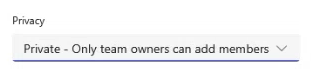
This means that only the Team Owner can invite and approve users to join the Teams Space. It also means that other users in the organization will not be able to search for the space or access any of its content.
Note: The owner can edit privacy settings for a Microsoft Teams Space at any time.
Benefit:
While public spaces are great for organizing company-wide initiatives or projects that encourage open collaboration, private spaces are ideal for sensitive projects that contain information about clients or confidential work. Prior to this update, each Microsoft Teams Space created through PowerSteering was public by default, which meant that sensitive information could have been exposed if the Team Owner forgot to switch the privacy settings. With this update, this information will be protected immediately. Owners will still have the option to let others access their projects whenever they like.
Improved Increased Document URL length to 2000 characters
What's Different:
Users can now add URLs with up to 2000 characters while adding URLs as Documents to work items.
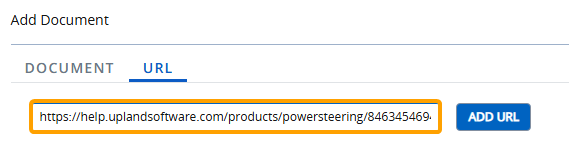
Prior to this release, these URLs could only contain up to 255 characters.
Note: This feature has been applied to the new "UI 2.0" PowerSteering interface. The character limit for URLs added to legacy pages was always 2000 prior to this release.
For example, URLs always featured a 2000 character limit when they were added to Gates as Documents through the Deliverables module.
Benefit:
Increasing the URL limit from 255 to 2000 removes common frustrations that many users have faced while saving links in PowerSteering. Contrary to what many might think, URLs can easily exceed 255 characters in length. Modern web applications increasingly try to pack more into URLs (encoded JSON-like data, tracking parameters, etc.). Steeply increasing this limit to 2000 characters makes it highly unlikely for users to hit this limit again in the foreseeable future.
The following issues have been resolved with this release:
Visibility rules affecting fields (PS-63533)
A visibility rule issue caused certain fields to disappear when work statuses were changed. Summary page widgets would display empty windows without any fields.
This issue has been fixed; fields will no longer disappear when certain visibility rules are applied.
"End Date" field disappearing while creating other work (PS-69625)
A bug caused the "End Date" field to disappear when users created other work in PowerSteering.
This bug has been fixed; the "End Date" field can once again be seen and interacted with while creating new work.
Error when copying work items (PS-63655)
A bug caused an error when users attempted to copy certain work items. The copy would result in a failure and a red error banner would be displayed at the top of the screen.
This bug has been fixed; users can once again copy work items without causing an error.