2021R2.1 Resolved Issues
The 2021R2.1 version of Eclipse PPM will be deployed on Saturday, January 29th, 2022. This minor release will address the following high-priority customer issues. Click on any of the resolved issues below to learn more about them.
Note: Eclipse PPM users can now try out "NextGen" Upland Ananytics. This new version of Upland Analytics features a brand new user interface that makes it easier for users to find and organize their reports, graphs/charts and dashboards. To explore "NextGen", select the Try New Analytics button in the top right-hand side of the Upland Analytics screen: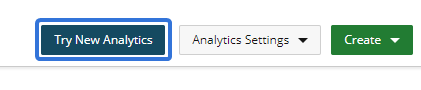
Visit the New Analytics Help Center for more informatoin or see Navigating "NextGen" Upland Analytics to view the major differences between "NextGen" and Analytics Classic
 Reformatted timestamps on Adhoc reports (ECL-12462)
The 2021R1 release added timestamps to dates within exported Adhoc reports. These new dates were formatted to include both a calendar date and a time:
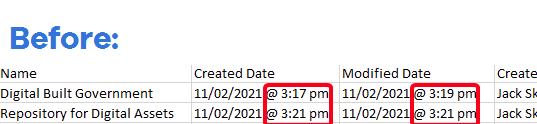
Unfortunately, the "@" symbol between the date and the time caused issues for users who fed the CSV data into report-building applications. For example, the "@" symbol prevented Microsoft Excel from recognizing the newly-formatted data as a date and time. This would cause problems if the Excel report contained any age-counting functions that relied on date recognition.
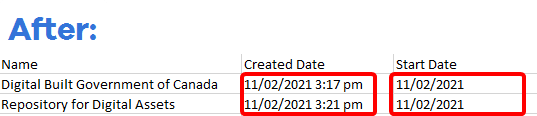
Also, timestamps were added to certain dates that did not require them. For example, Project start dates and end dates would always start at the beginning of the work day or end at the close of the work day. Because of this, these timestamps were redundant and unnecessary.
With the 2021R2.1 release, both of these timestamp issues have been resolved. The "@" symbol has been removed from date columns in exported Adhoc reports and the timestamps have been removed from dates in which they were not necessary:
Incorrect timestamps on reports ran through the Excel Add-In (ECL-12402)
A bug prevented timestamps from displaying correctly when Adhoc reports were ran with the Excel Add-In. The timestamps in these reports would always display as "12:00 AM" in the "Created Date", "Modified Date" and "Last Status Update" columns instead of the actual time of creation / modification / status update:
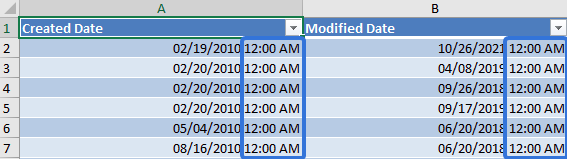
This issue has been addressed and resolved; the correct timestamp now appears under each relevant column in reports ran with the Excel Add-In.
Error received while trying to add a new Portfolio (ECL-12476)
A bug prevented Eclipse PPM administrators from adding new Portfolios. After creating a new Portfolio and clicking the Save button, Eclipse PPM would fail to save the new Portfolio and present the user with an irrelevant error message:

This issue has been resolved; after creating a Portfolio and clicking Save, the error message no longer appears and the Portfolio is once again retained in Eclipse PPM.
"Resources" panel on a Project Home page did not display all contact details (ECL-12461)
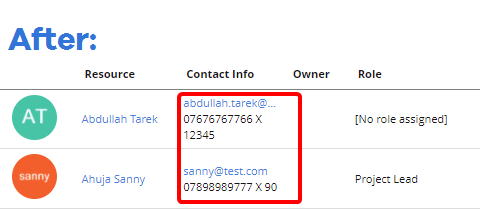
The 2021R2 release updated the "Resources" panel on Project Home pages to include a column for contact information. This new column is supposed to include (if available) the Resource's email address, phone number, and phone extension. However, the column unexpectedly regressed to only show the Resource's email address:
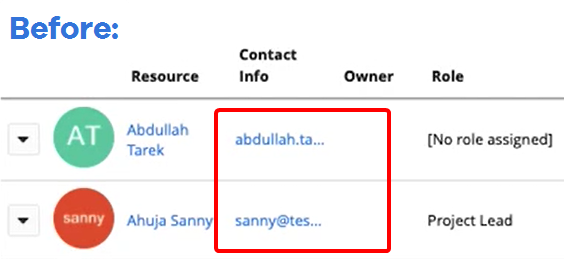
This issue has been resolved; the "Contact Info" column once again displays the Resource's phone number and phone extension along with the email address:
Unsaved time erased after removing a Task or a Project on a Timesheet (ECL-12407)
A bug caused any unsaved time on a Task to be erased from a Timesheet after another Task or a Project was removed. This occurred when users attempted to both add time and remove entities while editing a timesheet. Any changes to a Task's time were not saved to the Timesheet until the Save button was pressed:
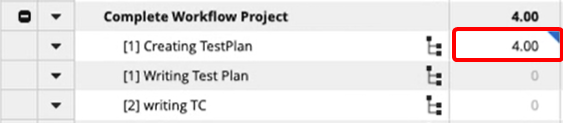
The blue indicator means that the time value is unsaved.
Deleting another entity would trigger a page refresh, which ended up discarding any changes made to the Timesheet:

The unsaved value has disappeared. Notice how the "Writing Test Plan" Task from the previous image has been deleted.
This issue has been resolved; Tasks and Projects can once again be deleted from a Timesheet without erasing any unsaved time entries.
Health Indicator sorting numbers showing up out of order (ECL-12457)
The 2021R2 Release introduced the ability to reorder Health Indicators on a summary page. However, a bug caused the sorting numbers to appear unordered while users would rearrange the Health Indicators on the Configuration page:
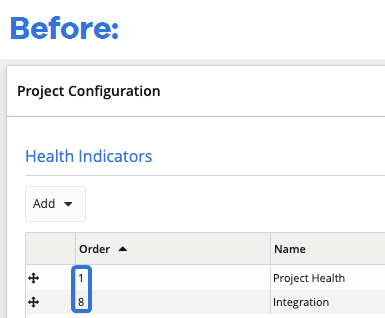
Although the Health Indicators would still appear in their listed order on the summary page, the numbers on the Configuration page still caused unnecessary confusion.
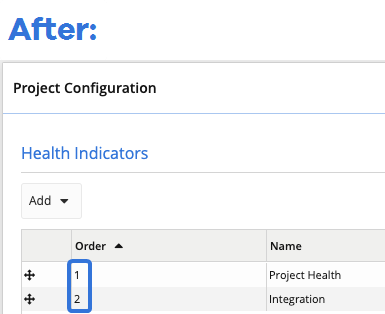
This bug has been resolved; the sorting numbers on the Configuration page are now ordered correctly: