2022R1 - Resolved Issues
Below is a summary of the main issues addressed by the Eclipse PPM 2022R1 release. Individual customer cases will be updated by the Support team through the portal. Cases will be closed out with customers upon confirmation that the issue has been resolved to their satisfaction.
Note: This page may be updated as new information becomes available.
The resolved issues in this release fall under the following categories:
API
 Unable to use the search endpoint for Tasks (ECL-12520)
A bug prevented users from using the "GET" API endpoint that searches for Tasks in Eclipse PPM:

To use this endpoint, a user must insert a search ID for Tasks into the endpoint:
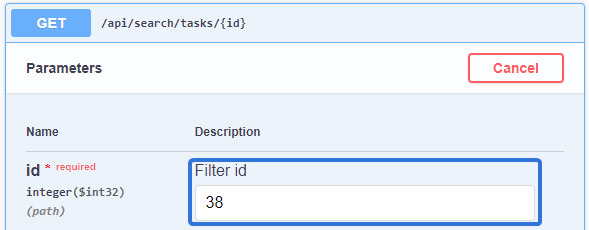
Note: A full list of system-built Eclipse PPM search IDs for Tasks can be found on the Advanced Search API Reference Sheet.
After running a search with an acceptable search ID, the endpoint would return a "200 OK" response without any data. The endpoint is supposed to return data based on the selected / expanded fields that were specified by the user.
This bug has been fixed; the endpoint once again returns the requested data.
Bulk Import
Sample Bulk Import file for Projects displays incorrect description for "Project Owner" column (ECL-12379)
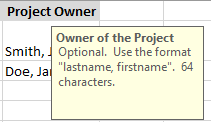
The sample Bulk Import file for Projects contains notes that describe each column header. The "Project Owner" column header contained the wrong note; its note described the "Resource Role" column header instead:
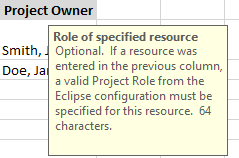
Aside from incorrectly describing the term "Project Owner", this was especially problematic because each note contains specifications for the data that is entered below the column header. Users could not be sure about the field's character limit or whether or not the field was mandatory.
This issue has been fixed; the "Project Owner" column header once again has a note that correctly describes it:
Comments
Users not receiving email notifications when mentioned (ECL-12506)
A bug prevented users from receiving email notifications after being mentioned on a Comment. This occurred even when the "Notify the people I've mentioned via email" checkbox was selected:
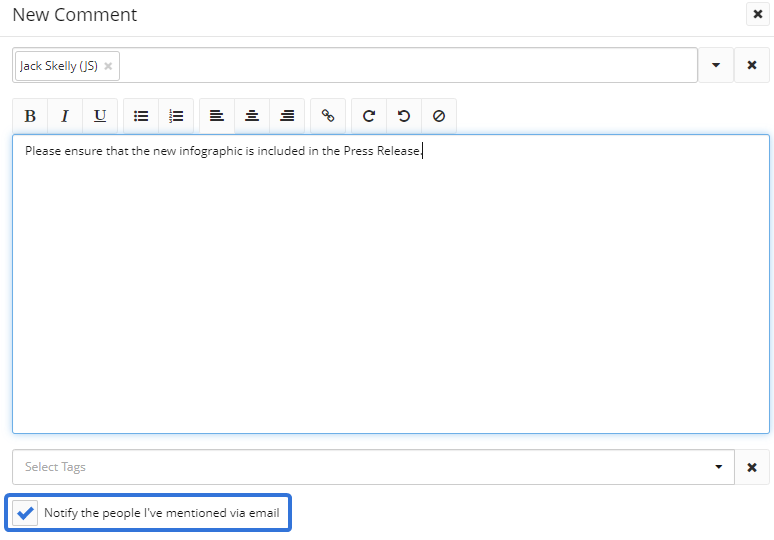
When this checkbox is selected, the users mentioned on the comment are supposed to receive an email notification. This should happen regardless of the user's Alerts & Notifications settings or Following status on the work item (Project, Task, etc.) that the Comment was created for.
This bug has been fixed; mentioned users once again receive email notifications when the "Notify the people I've mentioned via email" checkbox is selected.
Dashboards
Financial quarters repeating themselves and appearing out of order (ECL-12487)
A bug caused display issues with financial quarters on Dashboards. Quarters would either repeat themselves (i.e. Q1, Q1, Q2, Q3) or show up completely out of order (i.e. Q4, Q3, Q2, Q1). Each financial quarter should show up in chronological order under each year (Q1, Q2, Q3, Q4).
This bug has been fixed; financial quarters once again appear in order on Eclipse PPM Dashboards.
Home Page
Timesheet notes appearing on Home page "Notes" panel when "My Work Items" filter is selected (ECL-12512)
A bug caused Timesheet notes to appear on the Home page "Notes" panel after applying the "My Work Items" filter:
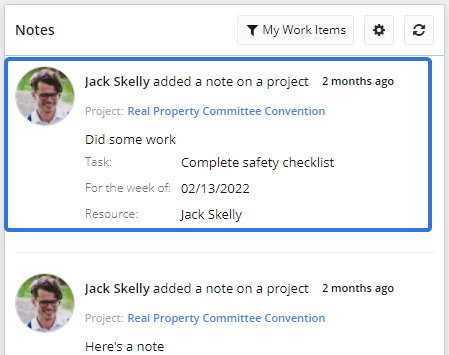
When the "My Work Items" filter is selected, users are only supposed to see notes that were left on items in their work, which excludes Timesheet notes.
This bug has been fixed; Timesheet notes no longer appear in the "Notes" panel when the "My Work Items" filter is selected.
Reports
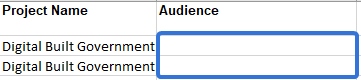
"Resource Time" report does not include Project Property values (ECL-12412)
A bug prevented the "Resource Time" report from displaying Project Property values. After users selected the Property as a column and downloaded the report, the cells under the column would be empty even if the Property was populated with values on the Project:
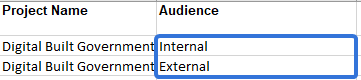
This bug has been fixed; Project Property values once again appear on the "Resource Time" report:
System Performance
Slow application performance (ECL-12314)
An issue caused Eclipse PPM to run slowly when users navigated to pages and made updates. For example, it would often take up to a minute for a User's detail page to load. Users would sometimes receive a "Timeout" error once the page eventually loaded:

Additionally, carrying out simple functions such as updating Task durations on the Work Planner would take up to 15 seconds. None of these instances should take more than a few seconds maximum.
This issue originally occurred due to API connector logs that were bloating the system. These connectors have been cleared and the issue has been resolved; navigating to pages and carrying out basic functions in Eclipse PPM once again deliver immediate results.
"Remember Me" login selection not being retained (ECL-12358)
A bug prevented the "Remember Me" checkbox from remaining checked after users logged out of Eclipse PPM and then logged back in:
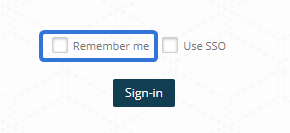
The "Remember Me" function retains users' login credentials between logins. Once the "Remember Me" checkbox is selected, it is supposed to remain checked whenever the user opens the login page.
This bug has been fixed; the "Remember Me" checkbox once again retains the user's preference whenever the login page is opened.
Uninformative "Bad Request" message after user chooses an unacceptable password (ECL-12474)
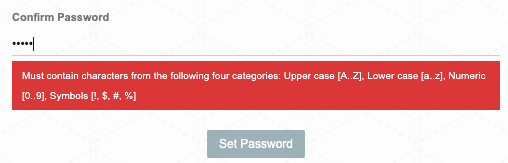
When Eclipse PPM users would choose login passwords that did not meet the requirements (i.e. upper case, lower case, numeric, and special characters), the login would fail and produce a "Bad Request" webpage. This page did not let users know that their chosen password was the problem; many just assumed that the application had crashed.
Instead of seeing a "Bad Request" page, users now receive an error message that confirms what they need to do to make their new password acceptable:
Internal server error constantly appearing (ECL-12485)
A bug caused Eclipse PPM to produce an internal server error for random users:

This error would occur on various pages in Eclipse PPM (logging in, updating Resources, saving Timesheets, etc.).
The bug has been fixed; the internal server error will no longer randomly appear throughout Eclipse PPM.
Tasks
"Adjust assignment units when duration is changed (fix work)" selection not retained on Tasks (ECL-12427)
A bug prevented Tasks from retaining their "Adjust assignment units when duration is changed (fix work)" selection after leaving or refreshing the page.
Note: This bug was only relevant to Projects that had the "Adjust assignment units when duration is changed (fix work)" selection enabled through Project Configuration.
When users selected the "Adjust assignment units when duration is changed (fix work)" checkbox from a Task details page, the selection would be forgotten as soon as they left / refreshed the page:
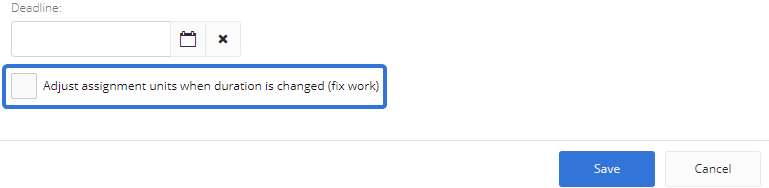
This bug has been fixed; the "Adjust assignment units when duration is changed (fix work)" settings will once again be retained whenever the user leaves or refreshes the page.
Templates
"Eclipse Doc" type Approval Templates selectable on Project Templates and Project / Project Template Advanced Workflows (ECL-12345)
A bug allowed users to select incompatible Approval Template types on Projects and Project Templates. In particular, users could select an "Eclipse Doc" Approval Template for Project Templates or on as the Advanced Workflow of a Project or Project Template. When either of these instances occurred, users would receive errors whenever they attempted to update the Project's Status:

"Eclipse Doc" type Approval Templates should not be visible options for either of these configurations; they should only be used to configure the approval workflow on Eclipse Documents.
This issue has been resolved; "Eclipse Doc" type Approval Templates will no longer appear as configurable options for Projects and Project Templates.
"[Blank Template]" option grayed-out when creating a Project / Program "using a different template" (ECL-12359)
A bug caused the "[Blank Template]" Program option to be grayed-out while selecting a template to create a new Project or Program. This occurred when the user selected the "Create a new project / program using a different template" option and tried to select the "[Blank Template]" Program option:
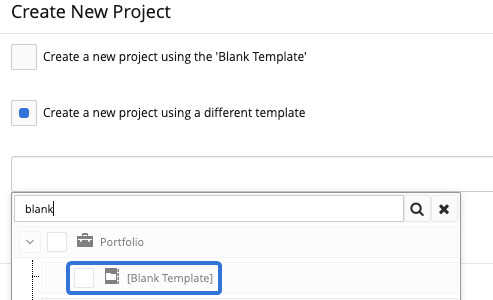
This bug has been resolved; the "[Blank Template]" Program option can once again be selected from the list of available templates.
Mandatory Project Properties accepting empty values on Project Templates (ECL-12459)
A bug allowed Project Properties marked "Mandatory" to have blank values on Project Templates. While configuring Project Templates, users have the option to mark any Project Properties as "Mandatory" through the Configuration page:

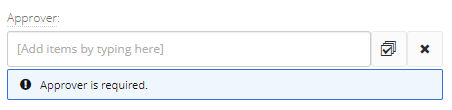
When a Property was marked as "Mandatory", users would still have the option to give it an empty value while editing the Project Template. Also, the "Required" banner could not be seen:
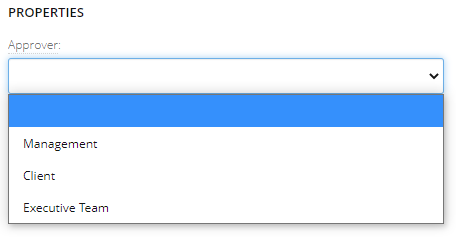
This bug has been fixed; users can no longer choose empty values on "Mandatory" Properties while editing Project Templates. Also, the "Required" banner has returned:
Timesheets
Timesheets automatically grouping by Operations even though no grouping option is selected (ECL-12291)
A bug caused Eclipse PPM Timesheets to automatically organize themselves by Operations even when no grouping option was selected. After opening the "Options" drop-down menu, all of the "Group By" options would be unchecked:
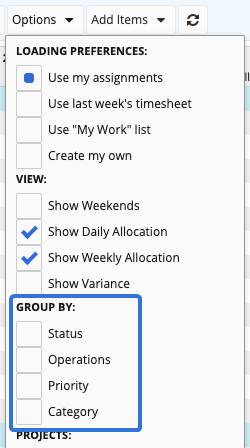
None of the Timesheet results are supposed to be grouped when none of the "Group By" options are selected. Despite this, the Timesheet would split the results into "Projects" and "Operations", which is the expected behavior whenever Timesheets are grouped by "Operations".
This bug has been fixed; Timesheets no longer automatically group the results by "Operations".
"Operations" grouping appearing above "Projects" grouping when Timesheet is grouped by Operations (ECL-12295)
A bug caused the "Projects" and "Operations" sections to switch places on a Timesheet when grouped by Operations. After a certain date, the "Operations" section appeared at the top of the Timesheet while the "Projects" section appeared directly below it:
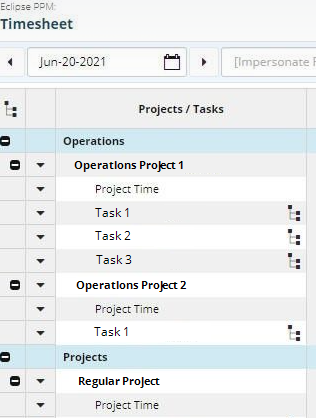
When "Operations" is selected as a grouping option under the "Options" drop-down menu, "Projects" is expected to appear above "Operations":
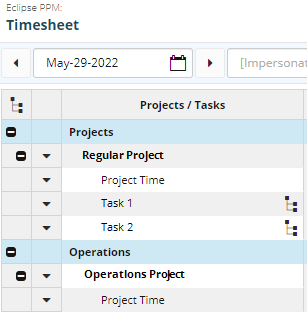
This bug has been fixed; "Projects" once again appears above "Operations" when the Timesheet is grouped by Operations.
Projects not listed in alphabetical order on Timesheets (ECL-12327)
A bug caused Projects to appear out of alphabetical order on Timesheets for certain users:
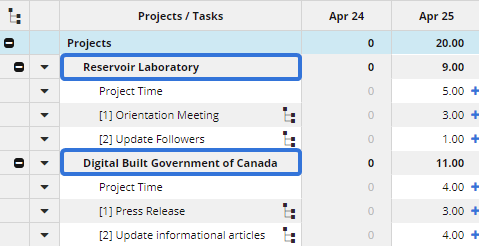
Projects are always supposed to appear in alphabetical order on Timesheets, regardless of any "Group By" selections:
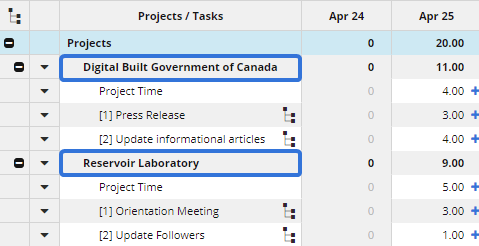
This issue has been fixed; all Projects now appear in alphabetical order on Timesheets.
Timesheet / Resource Management window navigates to Home page instead of closing (ECL-12486)
A bug prevented the Timesheet and Resource Management windows from closing when users selected the  button in the top right-hand corner of the screen. Instead, the window would navigate to the Eclipse PPM Home page.
When either Timesheet or Resource Management is chosen from the Navigation Menu, another browser tab opens up specifically for the worksheet. After exiting the worksheet, the browser tab should close instead of staying active. This ends up cluttering the user's web browser with unnecessary Eclipse PPM tabs.
This bug has been fixed; the Timesheet / Resoure Management windows once again close the browser tab when users select the button.
Upland Analytics
Bar graphs ignoring decimal formatting options (ECL-12064)
An issue prevented users' formatting settings from appearing on Bar Graphs in Upland Analytics. Specifically, the Bar Graphs would ignore the Currency / Volume Formatting options from the "General" tab of the Report Settings window:
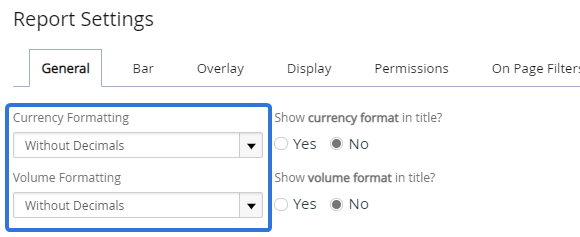
If "Without Decimals" was selected from these drop-down menus, the Bar Graph would incorrectly display decimals on quantitative values:
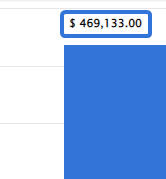
This issue has been resolved; Bar Graphs in Upland Analytics once again respect the formatting options set out in Report Settings.
Roles for Projects and Programs not appearing in Upland Analytics (ECL-12373)
A bug prevented newly-created Resource Roles for both Projects and Programs from appearing in Upland Analytics as fields to be reported on.
This bug has been resolved; new Resource Roles can now be included in Upland Analytics reports.
Errors after Upland Analytics report extraction (ECL-12393)
A bug caused users to receive multiple errors after exporting a report to an .xls file. When this occurred, Microsoft Excel would produce an error window claiming that the file contained problems that needed to be fixed. It would also produce another window that claimed it had to repair or remove parts of the content in order to open the file. Reports from Upland Analytics are always safe to download; they never include any harmful or damaged content.
This bug has been fixed; Microsoft Excel no longer produced any errors after a user extracts a report from Upland Analytics.
Filtering by Manager not working as expected (ECL-12442)
A bug prevented Upland Analytics reports from filtering out results by three fields in the "Resource Direct Managers" data view: Name (URL), First Name, and Last Name. Filtering by these fields would either not work or pull wrong information. For example, if you filtered the Manager's name by "Thomas Chabot", the report might still include results with "Colin White" as the manager.
This bug has been resolved; filtering reports by Manager name once again works as expected.
Work Planner
Substituting a Resource with "Replace assignments after a specific date" mode selected flattens allocations (ECL-12255)
After substituting a Resource on a Work Plan with the mode set to "Replace assignments after a specific date", an issue caused the replacement Resource's daily allocations to average out across the transferred duration.
For example, imagine a Resource's Detailed Time window was used to allocate the Resource's time towards only one week of a Task. For each day of this week, a different number of hours were allocated:

Now, imagine that this Resource was replaced by another Resource with "Replace assignments after a specific date" chosen as the mode:

Once the replacement had completed, the allocations would be averaged out over the remaining duration of the Task instead of respecting the first Resource's daily amounts:

This issue has been fixed; daily allocations are once again respected after replacing Resources on a Work Plan.
Portion of the Work Planner unresponsive to web browser zoom (ECL-12305)
An issue prevented the Work Planner from being responsive at a certain zoom display on the Google Chrome web browser. When Chrome users zoomed out on the Work Planner (the level of zoom varied depending on the user's monitor size), the lower-right panel of the Work Planner would be completely blank:
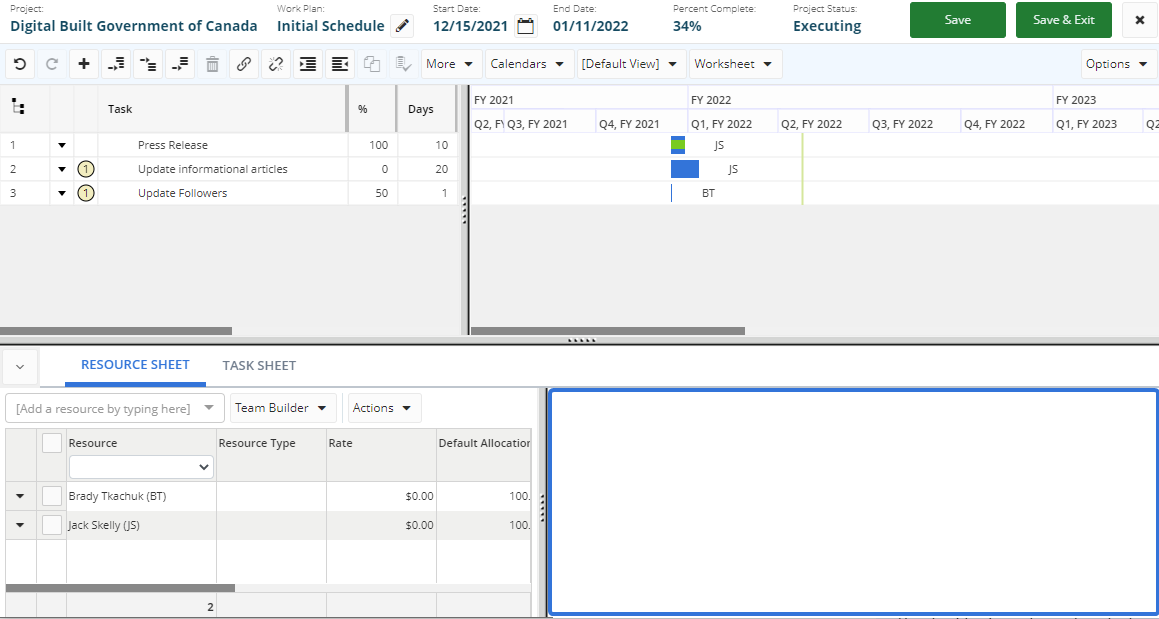
Click thumbnail to enlarge.
This panel, located directly on the right-hand side of the Resource / Task Sheet, can be used to assign / manage Project Resources:
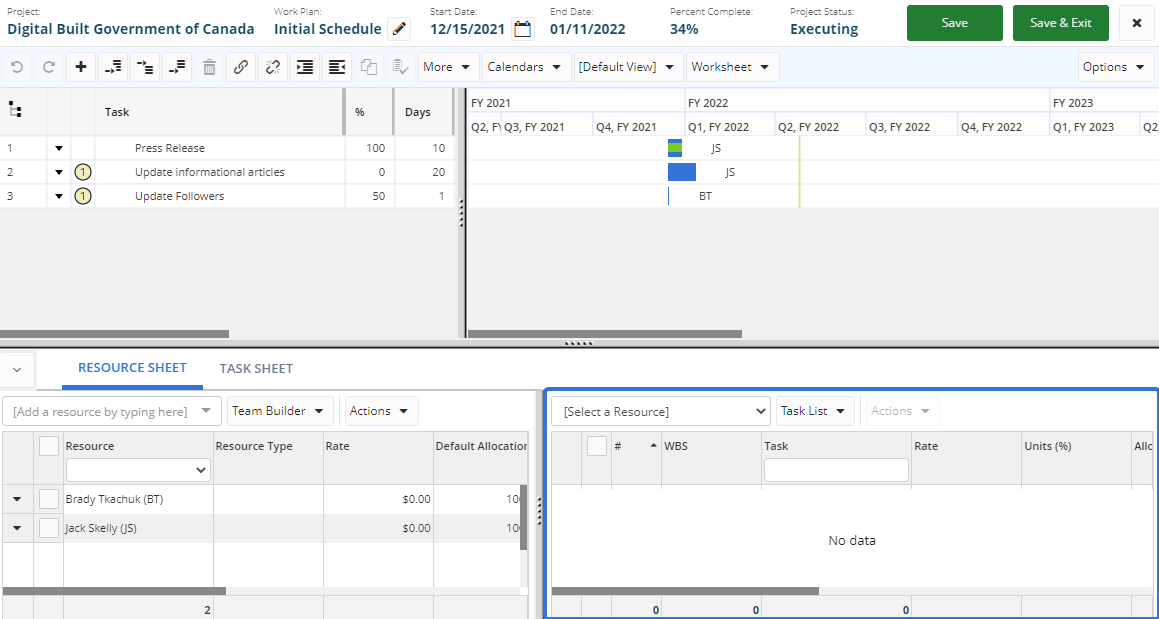
Click thumbnail to enlarge.
This issue has been resolved; the lower-right panel no longer becomes blank when users adjust their zoom level on Google Chrome.
Error received while importing Work Plan from Microsoft Project (ECL-12343)
An issue prevented users from importing Work Plans into Eclipse PPM by using the "Import from Microsoft Project" feature. The import would fail and users would receive a "Request Entity Too Large" error:

Note: Specifically, this error would occur when users selected "Yes" from the "Synchronize Work Plan" pop-up.
The "Request Entity Too Large" error should only appear when the upload file is too massive. However, this error would appear even if the file was an appropriate size.
This issue has been resolved; Microsoft Project files can once again be imported into Eclipse PPM without error.
Incorrect dates displayed on "Start-Start" External Predecessors (ECL-12376)
A bug caused Tasks to display incorrect Start dates after they received External Predecessors with "Start-Start" relationships.
For example, imagine you added an External Predecessor (referred to here as "Predecessor Task") to one of your Project Tasks with a "Start-Start" relationship. When this occurs, the Start date of the Project Task should be automatically changed to match the Start date of the Predecessor Task. However, the Start date of the Project Task would automatically change to one day after the Predecessor Task's End date. This is the expected behavior when an "End-Start" relationship is selected for External Predecessors, not a "Start-Start".
After some investigation, it was found that "Start-Start" External Predecessors were incorrectly saving themselves with "End-Start" relationships. This occurred after users would click the Ok button to save the predecessor:
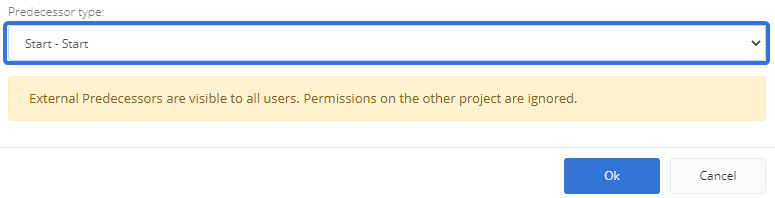
Even though a "Start-Start" relationship was chosen, the External Predecessor would display itself with an "End-Start" relationship:

This bug has been fixed; External Predecessors with "Start-Start" relationships will no longer have "End-Start" relationships after saving. Tasks with "Start-Start" External Predecessors will once again have the same Start date as their Predecessor Tasks.
Opening Work Planner on new Projects causes a validation error (ECL-12452)
A bug prevented certain users from opening Work Plans on new Projects. Whenever they tried, the Work Plan would pop up with no data, along with the following error message:

This bug has been fixed; users can once again open Work Plans on newly-created Projects.
"Select All" selections not retaining on the Task Sheet after action is taken (ECL-12477)
A bug prevented the Resource checkboxes from remaining checked after selecting the "Select All" checkbox, unselecting some Resources, and removing the selected Resources from the Task using the "Actions" drop-down menu. When this occurred, the "Select All" checkbox would remain checked, but the checkboxes of the remaining Resources would not be checked:
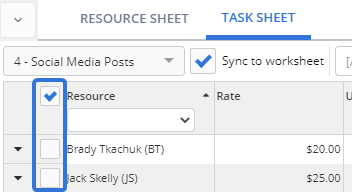
This caused users to unselect and then reselect the "Select All" checkbox if they wanted to highlight all of the Resources at once.
This bug has been fixed; the Resource checkboxes, along with the "Select All" checkboxes, will remain selected after action is taken on them using the "Actions" drop-down menu.
Timeout errors occurring while exporting a Work Plan (ECL-12488)
A bug prevented users from exporting their Work Plans as downloaded files on their computer. Instead, this would cause a timeout error after taking a while to load:

This bug has been fixed; Work Plans can once again be exported without prompting a timeout error.
Error while trying to view a Task's Detailed Time (ECL-12577)
A bug prevented users from viewing Detailed Time on Tasks in the Work Plan. After opening up a Task's "Detailed Time" window, an error would appear and none of the data was displayed:
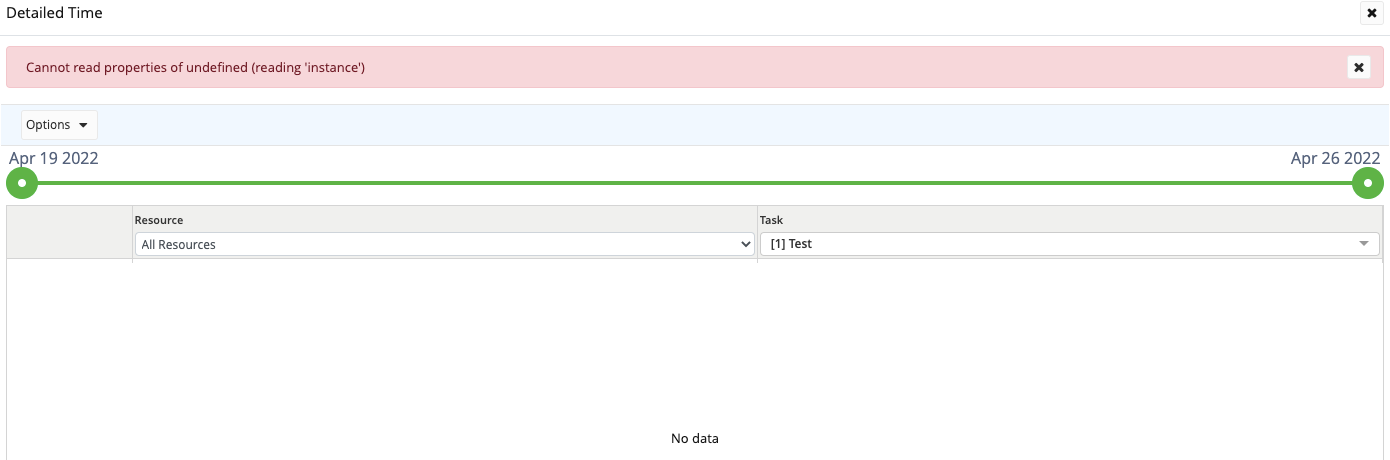
This bug has been fixed; users can once again view a Task's Detailed Time data from the Work Plan.