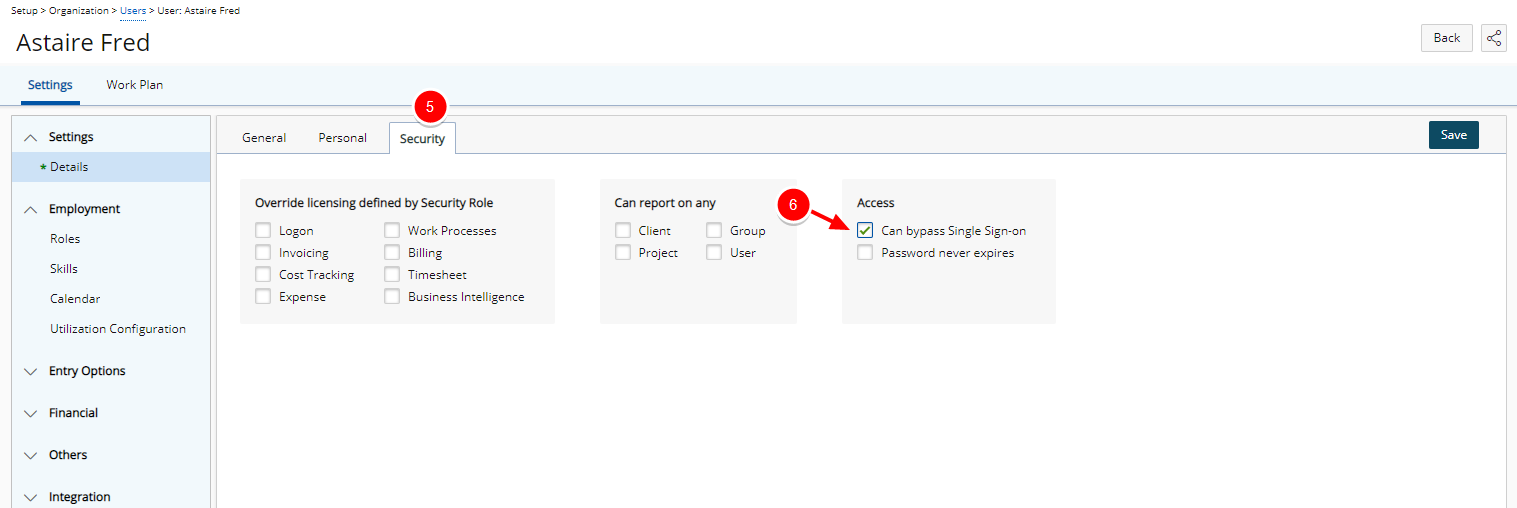
You can allow users to bypass SSO login and use their PSA login credentials instead by choosing Can bypass Single Sign-on located on the Security tab of User Edit page.
The following Live Link email notification parameters are available for users bypassing SSO login:
- Timesheet:
%TIMESHEETNOSSO_LINK%* - Leave Request:
%LEAVEREQUEST_LINKNOSSO%* - Password Reset Notifications:
%LOGONNOSSO_LINK%* - Workplan Live Link:
%WORKPLAN_LINK%* - My Work Plan:
%LINK_ROLE_WORK_PLAN_NOSSO%** - Role Work Plan:
%LINK_GROUP_WORK_PLAN_NOSSO%** - Group Work Plan:
%LINK_PROJECT_WORK_PLAN_NOSSO%** - Expense Report:
%EXPENSEREPORT_LINK_NOSSO%*** - Invoice:
%INVOICE_LINK_NOSSO%*** - Workflow Entry:
%WORKFLOWENTRY_LINK_NOSSO%***
Users who are not part of a company’s domain and cannot use a Single Sign-on can use an alternate login information to access the application.
This article details how to set rights to allow users to Bypass SSO login.
Example: Adam, the site administrator, has been tasked to give login access to a contractor to enter time. He can now select the Can bypass Single Sign-on option located on the security tab of the User Edit page to grant the external user access to enter time.
Note: Your PSA page may differ slightly or significantly from what you see in this article, due to being on a different version, your organization having opted for different modules, having been granted different security rights, AND/OR terminology/naming convention having been modified to suit your respective organization. But, essentially the features/functionality referred to, herein, are still the same across the board.
- From the Icon Bar click Setup
 .
. - From the Navigation Menu click Organization.
- From the available options select Users.
- Upon the Users list page displaying, click the name of the User you wish to edit, to access the User Edit page.
Tip: You may wish to narrow your Users list so that you retrieve just the right amount of information you need. To do so you can perform a search. Select a search criterion from the list of available search criteria and then enter a corresponding value in the Search box. Click the Search icon to narrow down the Users list. For more information on the contains-in logic search click here.
- Upon the Settings tab displaying, navigate to the Security sub-tab.
- From the Access section, select the Can bypass Single Sign-On selection box.
- Click Save and then Back to save your changes and return to the previous page.