2025R2 Release Notes
This Release Notes gives you an overview of the 'new features/enhancements' and the 'Known Issues' that we fixed in the 2025R2 release! The release builds upon the core strengths of RightAnswers in the areas of AI-powered knowledge management, search, and content delivery.
The 2025R2 release of RightAnswers delivers enhanced AI-powered features to improve productivity, search accuracy, and knowledge creation workflows. This release introduces smarter search behavior, automatic knowledge synchronization to Amazon S3, and enhanced administrative tools and APIs that simplify content management and system integrations. Overall, the update provides a more intelligent, efficient, and user-friendly experience across the Self Service and Support Agent portals, Solution Manager, and the Administrator Console.
All changes made in the 2025R2 release are listed below. Use the following buttons to filter by type:
Note: The following new features, enhancements and bug fixes are part of the main 2025R2 release.
2025R2 New features
2025R2 Enhancements
2025R2 New features/enhancements
AI Features
We are excited to introduce new AI-powered features and enhancements designed to simplify your tasks, improve productivity, and deliver a smarter, faster user experience. Click the feature/enhancement below to view the details:
What’s improved:
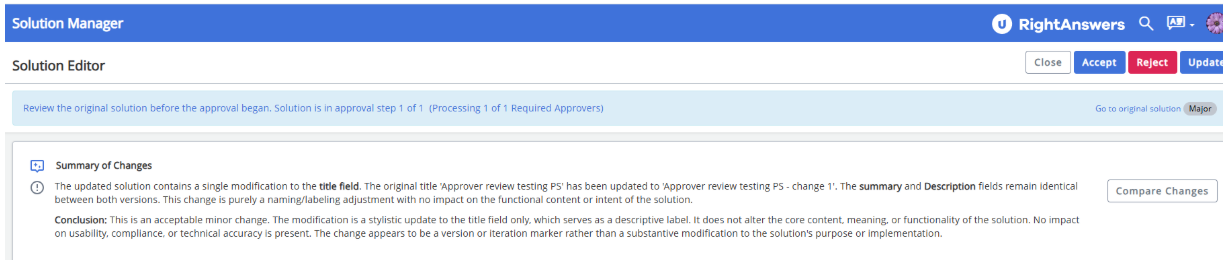
The AI Approver Review feature now evaluates all changes in a revision by comparing the revision solution to its base solution (the parent solution) in an approval workflow. It lists all cumulative modifications made since the solution was created. This improvement highlights key differences more effectively, replacing the earlier method where comparisons were made only against the immediately preceding version.
For more information:
Benefits:
The approvers can now see and understand how a solution has evolved by displaying all cumulative changes at once. With the differences highlighted in one place, the approvers can move through the review process faster and make informed decisions more easily. This update enhances accuracy and clarity in the review process.
What’s New:
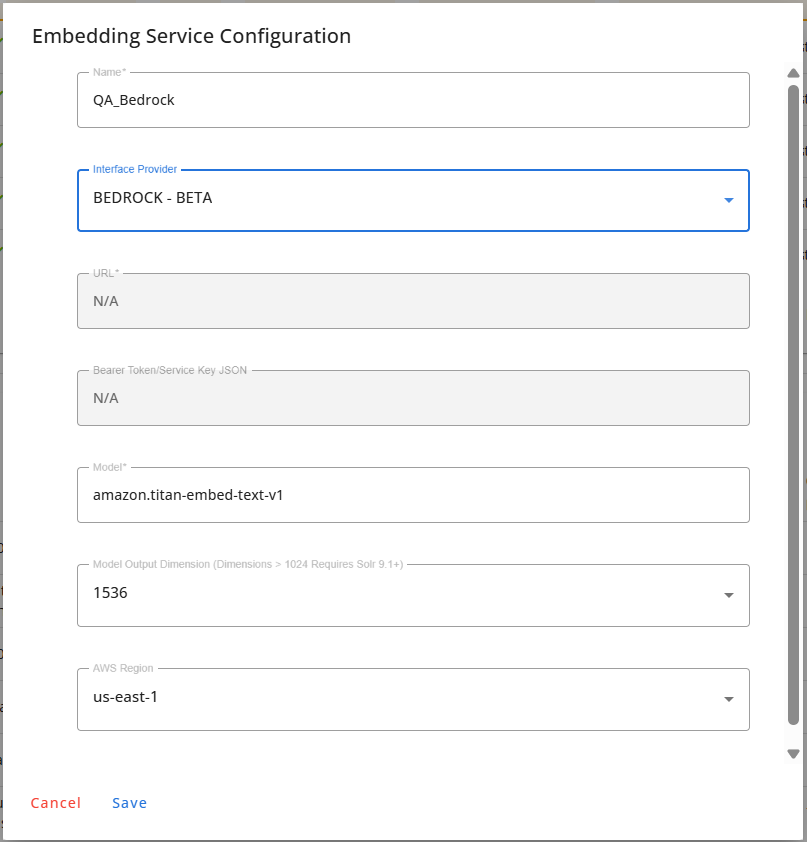
We have introduced support for Amazon Bedrock for embedding services for neural and hybrid searches. Administrators can now select Amazon Bedrock as the embedding engine directly within the Solr Configuration section of the Administrator Console. When enabled, the system generates vector embeddings using the Amazon Bedrock model.
For more information:
Benefits:
This enhancement gives greater control over the exported solution fields being exported and shared via PDF or Print. It allows you to manage the PDF export-related customizations from one centralized setting.
What’s new:
Solution Manager now supports Amazon Bedrock’s agentic workflows to deliver more accurate, context-aware, and automated AI-generated knowledge content. This enhancement allows the AI Knowledge Assistant and AI Knowledge Creation features to intelligently orchestrate multiple steps in the content generation process, resulting in higher-quality solutions with less manual effort.
When a Bedrock configuration is detected, the AI Knowledge Assistant and AI Knowledge Creation features will automatically use the Bedrock agentic workflow. If no configuration is available, the AI features will seamlessly fall back to the default AI model and workflow to ensure uninterrupted functionality.
We have introduced new settings to enable and configure Bedrock agentic workflows. The Bedrock agentic workflows can be enabled using the new setting, AIAddToKbAgenticEnabled. When enabled, the AI model will use the Bedrock workflow configurations defined in the AIAddToKbAgenticParameter setting. When disabled, the AI features will continue using the default AI model.
For more information:
Benefits:
This update integrates Solution Manager’s AI workflows with Amazon Bedrock’s agentic workflow engine, enabling the system to handle more advanced and complex knowledge-creation tasks. As a result, the AI-generated knowledge will be more accurate and higher in quality.
All RightAnswers Platforms
We have introduced some common enhancements across all the RightAnswers platforms, including the Portals, Solution Manager, and the Administrator Console. These enhancements aim to improve the overall user experience and increase efficiency.
What's new:
We are excited to introduce a new feature that enables automatic synchronization of solution content to Amazon S3 buckets, making it simple to distribute knowledge articles across external applications and AI platforms.
When enabled, this feature ensures that your published solutions are continuously synchronized to Amazon S3 in the selected file format, providing a reliable and scalable way to serve external systems.
How it works:
To enable the automatic synchronization, the KnowledgeSyncEnabled setting must be set to 'True'. The solutions' collection and status must match with those configured in the KnowledgeSyncParameters setting. When an eligible solution is saved, a backup file is uploaded to the S3 bucket immediately. If a solution no longer matches the configured criteria or is deleted, its corresponding backup file is automatically removed from the bucket. Newly saved solutions are synced immediately, while support teams can optionally run a one-time SQL job to backfill previously eligible content. The supported backup file formats include PDF, CSV, XML, DOCX, and SALESFORCE-CSV.
For more information:
Benefits:
This feature removes the need to manually transfer or update content across external systems or repositories, saving time and reducing the risk of errors. This automation ensures that your knowledge is distributed seamlessly and reliably wherever it is needed.
What's improved:
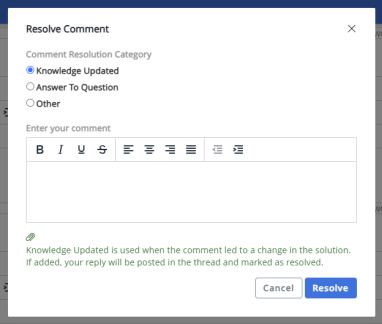
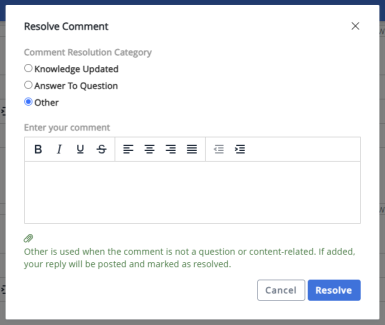
You can now add an optional comment when you resolve a comment using the Knowledge Updated and Other resolution categories in addition to the existing mandatory comment for Answer to Question.
What it means:
You now have the option to include a comment when resolving feedback, enabling you to provide valuable context whenever needed. This is especially helpful for categories like Other and Knowledge Updated, where previously there was no option to post a comment.
Whether you are a Self Service user, Support Agent, or Solution Manager user, you will now see an optional comment box appear when you select Other or Knowledge Updated as the resolution category. You can add a comment to explain your resolution, but it is not mandatory. If you add a comment, it will be posted in the thread and marked as resolved. Upon comment resolution, the user who posted the original comment thread will be automatically notified by email. Comment remains mandatory for the Answer to Question category.
Our API (POST /comments/resolve/{commentID}) now fully supports submitting comments for all three resolution categories: Answer to Question (required), Knowledge Updated (optional), and Other (optional).
To improve clarity, we have also updated the descriptions for each resolution category.
For more information:
Benefits:
This enhancement allows you to add helpful context when resolving or unresolving comments, making feedback clearer, more informative, and easier for others to understand why the comment was resolved or unresolved.
What’s improved:
Users can now quickly access the official RightAnswers product documentation directly through the Help icon across all platforms - Self Service and Support Agent portals, Solution Manager, and the Administrator Console. This enhancement ensures every user has a consistent, reliable source of guidance at their fingertips, reducing the need to search multiple locations for answers. With centralized and up-to-date documentation readily available, teams can more efficiently learn features, resolve issues, and make the most of their RightAnswers experience.
For more information
Benefits:
This feature ensures the users always have quick access to the latest documentation, improving efficiency, accuracy, and the overall user experience.
Portals
To provide you with a seamless and more efficient search experience when using the Self Service and Support Agent portal, we have introduced the following enhancement.
What’s improved:
Our hybrid search now adapts dynamically to the length of your query. The system automatically adjusts its search strategy, shifting from prioritizing exact matches for short queries to using advanced neural search for long and complex questions, so you receive the most relevant results. RightAnswers search is now configured to:
-
Prioritize exact keyword matching for very short queries.
-
Blend exact matches with contextual understanding for medium-length queries.
-
Rely on the neural search method to grasp the intent of longer, more descriptive queries.
Why it matters:
You don’t have to change how you search because RightAnswers adjusts it for you and provides the best possible results:
-
More accurate results on the first try.
-
Fewer clicks to find the right article.
-
A search experience that “gets” what you mean, no matter how you phrase it.
For more information:
Benefits:
Our upgraded search now delivers faster, more accurate results, regardless of the length or complexity of your search query. It intelligently adapts to your search style, helping you find what you need in fewer clicks.
Solution Manager
We have made the following enhancement in Solution Manager to improve your content management experience.
What's improved:
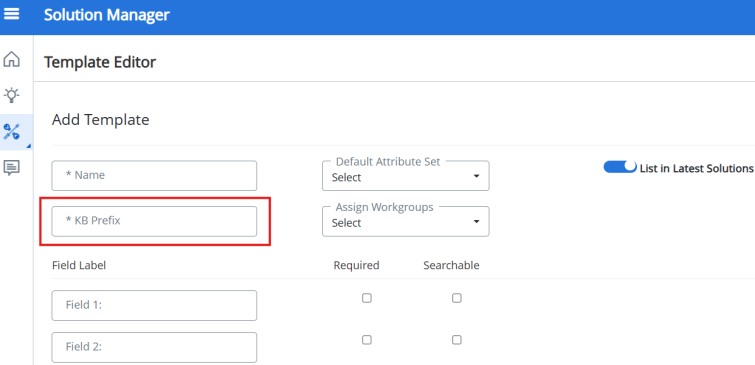
We have refined the KB Prefix field rules on the Manage > Templates page in Solution Manager to ensure solution identifiers remain consistent and error-free.
-
Special characters (including commas) are no longer permitted in the KB Prefix field.
-
Entering spaces or any invalid characters (' " { } < > \ ? # * ; % ,) now triggers an error message, ensuring cleaner and more reliable prefix entries.
For more information:
Benefits:
This enhancement helps maintain standard naming conventions and eliminate formatting issues when creating or editing templates.
Administrator Console
We continue to enhance the Administrative Console to improve usability and administrative efficiency.
What's improved:
We have significantly redesigned and simplified the Administrator Console home page exclusively for the Super Admins. This page is now rebranded as the Application Status page and serves as the landing page for the Super Admins. It will be a single point of entry for managing the health and performance of your pplication.
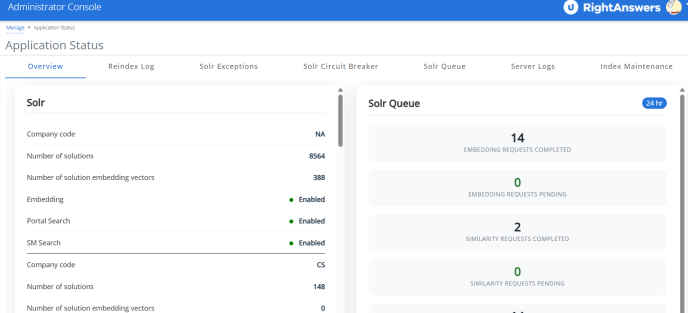
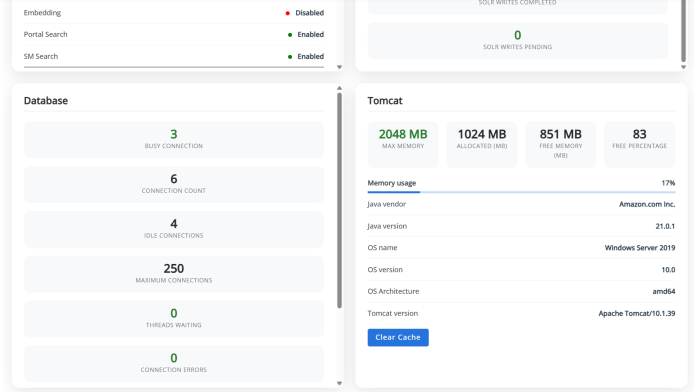
The core of the new design is the Overview tab, which provides a comprehensive, 24-hour snapshot of the application's current health and status. This tab centralizes vital information across key areas: detailed Solr connection health and the status of Solr Queue (pending and completed indexing requests); Database health, performance, and connection statistics; and Tomcat server status, uptime, and resource utilization, including a convenient Clear Cache button.
In addition to the Overview, all critical maintenance and diagnostic tools have been consolidated onto the new Application Status page for easy access. This includes dedicated tabs for: Reindex Log (history of Solr reindexing), Solr Exceptions (listing errors generated by Solr), Solr Circuit Breaker (monitoring Solr client limits), Server Logs (for troubleshooting), and Index Maintenance (for optimizing search indexes). A new Solr Queue tab has also been added, allowing you to filter and view pending indexing tasks across various time frames (5 minutes, 30 minutes, or 24 hours). This consolidated approach ensures that all necessary performance monitoring and diagnostic tools are available to Super Admins from a single, intuitive location.
For more information:
Benefits:
The redesigned experience provides a centralized, real-time view of system health and activity, helping Super Admins quickly assess performance and identify issues across critical components. By consolidating key operational insights and tools into a single, streamlined interface, it improves efficiency, reduces navigation time, and enhances overall system oversight.
What’s Improved:
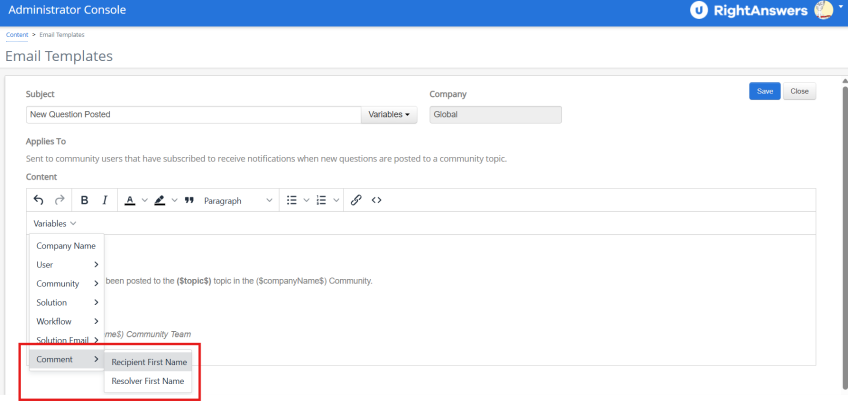
You can now create personalized email notification templates for comments using the new variables we have introduced. Two new variables have been added to the Comment variable in the email templates under the Administrator Console > Content > Email templates:
-
$(RecipientFirstName)- the first name of the recipient of the email notification. -
$(ResolverFirstName)- the first name of the user who resolved the comment.
For more information:
Benefits:
This enhancement allows you to deliver more personalized and engaging email notifications, making messages feel more relevant and user-specific.
What's improved:
We have introduced an important update to how Super Admin accounts are accessed and tracked to improve security and auditability across the Admin Portal.
Direct Super Admin Login can now be restricted
To enhance accountability and meet enterprise audit standards, system administrators can now disable direct logins for the Super Admin account using a system parameter, restrictSuperadminLogin, in web.xml.
-
When enabled (
restrictSuperadminLogin= true):-
Direct login via the Super Admin username is blocked.
-
Users will see this message: "SuperAdmin login restricted. Contact Systems Administrator."
-
Super Admin access is still possible, but only via impersonation using the Support Agent portal.
-
Access will be limited to the Admin Portal only.
-
-
When disabled (
restrictSuperadminLogin= false): Direct login as Super Admin works as before.
-
Super Admin access is only allowed via impersonation
Only users logging in through the support portal with valid credentials can impersonate a superadmin.
Impersonation allows access to the admin portal with full Super Admin privileges.
-
Full Audit Trail for Impersonation Sessions
-
Impersonation sessions using the Super Admin account are now fully logged in the Admin Audit Trail.
-
All actions taken during impersonation will be logged in the audit trail.
-
The username field will include both the impersonated account and the actual impersonating user. This ensures complete traceability of administrative actions.
-
-
Super Admin Navigation Restrictions via Quick Access
-
While impersonating Super Admin, users will no longer be able to navigate to Solution Manager, Support Agent, or Self Service Portal via the Quick Access menu.
-
For more information:
Benefits:
This update enhances security by restricting direct Super Admin logins through authenticated impersonation. It also strengthens auditability through detailed logging and controlled navigation, providing full traceability and reducing the risk of unauthorized or untracked administrative actions.
What's improved:
We have made some enhancements to improve transparency and auditability for administrators managing users in bulk.
Available reports:
-
Audit Trail Logging: Whenever users are activated or deactivated in bulk, these bulk actions will be recorded in the Admin Audit Trail. This provides clear visibility into who made the changes and when.
-
Detailed History Tracking: Bulk user activate/deactivate actions will be logged as individual records in the user history database tables..
Why This Matters:
These changes make it easier to:
-
Monitor administrative actions at scale
-
Track user status changes more accurately
-
Ensures traceability, compliance and accountability across the system
For more information:
Benefits:
Bulk activation and deactivation of users are now thoroughly tracked to enhance visibility and accountability. Each user’s status change is individually recorded, ensuring accurate auditing and a clear historical record. This ensures that all user changes are tracked at the individual level for better auditing and historical context.
What's improved:
We have enhanced the 'API Account' checkbox on the Users page with a new tooltip to provide more context.
Now, the following tooltip will be displayed when you hover over the checkbox: “Skips password expiry. Does not control API access permission.”
This update helps ensure you understand exactly what the setting does, making account management more transparent and user-friendly.
For more information:
Benefits:
This update clarifies the purpose and functionality of the API Account checkbox, helping prevent confusion and configuration errors during user setup.
What's Improved:
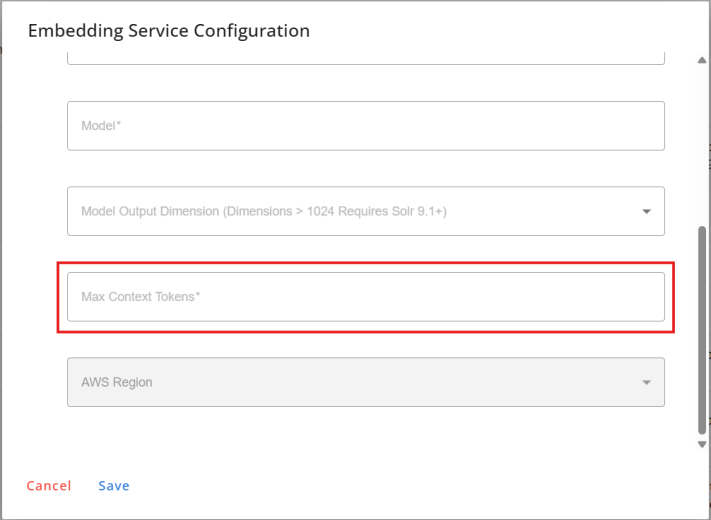
We have enhanced the embedding process to handle large solutions more effectively. Previously, when a solution exceeded the AI model's token limit, the embedding process failed. With this update, the system automatically chunks solutions that exceed the defined token limit, ensuring the embedding process completes successfully without losing essential context. You can configure the maximum token limit for content using the new Max Context Tokens field under the Solr Administration > Embedding Services UI in the Administrator Console. If this field is set to '0', content will not be chunked.
For more information:
Benefits:
This enhancement ensures that even large or complex solutions can be reliably embedded by automatically chunking content that exceeds token limits, preventing failures and preserving essential context. It also gives you greater control over embedding behavior by allowing you to define token limits, resulting in more consistent and reliable AI-driven search performance.
What's new:
We have introduced a new system setting that gives you more flexibility in managing how solution counts (like views and helpful votes) are updated across your search experience. You can now choose between real-time updates and delayed batch updates. The new setting, RealTimeSolutionCountIndexUpdateEnabled, allows Super Admins to enable or disable real-time updates to solution counts.
How it works:
-
When the setting is enabled (set to 'True'): solution 'Views' and 'Helpful' counts update in real time. By default, this setting is enabled and allows real-time updates to solution counts.
-
When the setting is disabled (set to 'False'): updates are delayed and handled by the nightly batch updates.
-
RAKE solutions may only partially update the solution counts (For example, 'Helpful' counts are updated while 'View' counts are not).
For more information:
Benefits:
This update gives Super Admins greater control over how solution engagement metrics are updated, allowing you to choose between real-time accuracy and optimized system performance through batch updates. It helps balance responsiveness with efficiency, depending on your organization's needs.
What's new:
We have introduced a new system setting, RestrictedSqlResources, to enhance security by restricting specific database tables and columns from being queried. This setting defines the list of database resources (table names, column names) that are restricted from being queried via the report builder or SQL execution features. This setting can only be accessed by Superadmins.
Queries to restricted resources are blocked and will display an error message.
For more information:
Benefits:
The new setting enhances security and compliance, prevents unauthorized access, and reduces the risk of data exposure.
What's improved:
The default value of the following settings has been updated:
-
AIAddToKbInstructionRequest- default value has been updated to include double quotes. This setting is accessible only to Super Administrators. -
AllowedidleMinutes- default value has been changed to 60 minutes. This Super Admin setting controls how long the Administrator Console can remain idle. Its default value was previously 10 minutes.
For more information:
Benefits:
The update to AIAddToKbInstructionRequest helps distinguish conversational text from other values in the AI prompt. Increasing the default time each session can stay idle for 60 minutes in AllowedidleMinutes helps keep sessions stable by preventing unnecessary disconnects.
To improve data integrity and reduce the risk of configuration errors, we have introduced range validations for several application settings.
What's improved:
Several key application settings now include minimum and maximum allowed values.
Administrators will be prompted by an error message if entered values fall outside the defined range.
Updated Settings:
The value range validation is introduced for the following settings:
| Setting | Minimum value | Maximum value |
|---|---|---|
| NumOfDYKS | 1 | 10 |
| NumOfFaqs | 1 | 20 |
| NumOfFavs | 1 | 20 |
| NumOfHitsToDisplay | 1 | 20 |
| ReportRows | 1 | 250 |
| maxDocumentsForImport | 1 | 25 |
| MaxNumberOfPdfExport | 1 | 250 |
| SharepointMaxHits | 1 | 200 |
| LatestSolutionsCache | 30 | 240 |
| LatestQuestionsCache | 30 | 240 |
| SolutionSaveBatchSize | 100 | 2000 |
| DailyPopularItemsCacheExpiration | 30 | 240 |
| PopularItemsCacheExpiration | 30 | 2880 |
| MaxSearchableFavorites | 1 | 300 |
| SMAutoSaveInterval | 15 | 120 |
| NumOfRowsInAdminPortlets | 1 | 40 |
| NumOfHighlightedSummaries | 1 | 10 |
| RelevancyPercentageCutOff | 0 | 100 |
| AbsoluteCutOffPercentage | 0 | 100 |
| MaxAttachmentSize | 1 | 50 |
| SimilarityMaxMatches | 1 | 25 |
For more information:
Benefits:
This update ensures that only valid values can be entered for these settings, helping maintain system stability and consistent performance. It helps prevent misconfigurations that could overload the application and affect functionality.
Reports
We have introduced a new report and report filtering capabilities in the Administrator Console to provide deeper insights into AI adoption and search behavior.
What's new:
You can now choose the version of Upland Analytics for use within RightAnswers. We have introduced a new company-level setting, UANextGenEnabled, to help you toggle between the 'Classic' and the 'Next Gen' version of Upland Analytics.
NOTE: Within H1 2026 post upgrade to 2025R2, Upland will be rolling out the next generation Upland Analytics platform. Further details will be provided in Q1.
How it works:
When UANextGenEnabled is enabled or set to 'True', RightAnswers will use the 'Next Gen' Upland Analytics interface and features.
When the setting is disabled or set to 'False', RightAnswers will use the 'Classic' version of Upland Analytics.
Only Superadmins have access to this setting.
For more information:
Enable Next Gen Upland Analytics
Benefit:
This enhancement provides the flexibility to choose between Upland Analytics' Classic and Next Gen version. Enabling the setting provides access to the Next Gen version of Upland Analytics that offers enhanced performance, updated reports and features.
What’s new:
We have introduced a new report named Portal AI Licensing, designed to help administrators monitor the usage and adoption of the AI Answer Generation feature across portal groups.
What it does:
This report displays the number of unique active users in each portal group for companies where AI Answer Generation is enabled. It provides clear insights into which portal groups have this feature active, supporting better visibility and license management.
How it works:
The report lists each Portal Group, its associated Company, and the count of unique active users in that group.
-
Only the portal groups with AI Answer Generation enabled are shown.
-
If AI Answer Generation is enabled at the company level but disabled for a specific portal, that portal is excluded from the report.
-
To generate data, a company-level AI Answer Generation setting must exist—even if the feature is enabled globally.
For more information:
Benefits:
The new report helps administrators track the adoption of the Generative Answers feature and monitor its license utilization across different companies and portal groups.
We have introduced a new filtering capability and improved existing filters to help you analyze search behavior more effectively.
What’s New:
A new filter, Filtered Collection, is now available, enabling you to refine results based on the collections selected by users during their portal searches. The new filter is available in the following reports:
-
By No Results
-
Searches
-
Searches By Day
This filter helps you analyze how users interact with collections during searches and how the results vary based on the chosen collections.
What’s improved:
The Collection filter in reports is renamed as Solution Collection for better clarity because it refers to the collection(s) the solution belongs to. This avoids confusion with the new filter, Filtered Collection (which refers to the collection the user selected during search).
The Collection column is added to the Solutions with zero views report to help you identify the solutions that users are not using.
For more information:
Benefits:
These enhancements provide clearer and more targeted filtering options, making it easier to analyze how users interact with collections during their searches. They also help you quickly identify underutilized solutions and uncover opportunities to improve content visibility and engagement.
APIs & Integrations
To ensure seamless integrations and flawless working of APIs, we have made some changes.
What’s improved:
We have enhanced the GET Solution API to now return rich-text field responses in Markdown or HTML. A new boolean query parameter fieldContentMarkdownto be added in the GET Solution API.
-
If
fieldContentMarkdownto=true, all rich text fields (for example, Description, Symptoms, Resolution) are returned in Markdown format. -
If
fieldContentMarkdowntois set to false or not present, the content is returned in HTML format. This is the default value.
The API continues to return data in JSON format, with field values changing based on the value of the fieldContentMarkdownto parameter. It is compatible with CommonMark and GitHub variants of Markdown.
Additional updates:
-
The Markdown response is compatible with HTML elements produced by the Rich Text editor (TinyMCE) in Solution Manager and includes support for strikethrough, underline and code samples.
-
The Markdown response does not support the conversion of audio, iframe, embed tags, styles and scripts.
-
Nested tables and PNG image formats may not be rendered correctly.
-
Video Tags will be converted to clickable links.
For more information:
Benefits:
The enhanced GET Solution API now allows developers to optionally retrieve rich text fields in Markdown format, simplifying the integration of knowledgebase content into modern applications and interfaces that natively support Markdown rendering.
What’s new:
We have just made it easier to access and manage your solution templates across platforms with a new REST API. You can now use the new API to retrieve all solution templates for a specific company, along with their fields.
API Path:/api/rest/templates
Type:GET
Request: Required query parameter: companyCode
Response: All templates available for the companyCode. The response will include the template and its fields.
How it works:
-
The API returns all templates with their fields: templateName, kbPrefix, fields (fieldName, description, required, searchable), and a new property templateType (standard/custom).
-
Works seamlessly for both standard and custom templates.
-
The response also includes a new templateType field which indicates the type of the template, whether 'standard' or 'custom'.
For more information:
Benefits:
The new REST API allows developers to programmatically and efficiently retrieve all standard and custom solution templates for a given company, streamlining cross-platform integration and facilitating easier template management.
What’s new:
We have developed a new REST API to retrieve images by image ID for a given company.
API Path:/api/rest/solution/image
Type: GET
Request: Required query parameter:
-
companyCode- the unique identifier of the company -
imageID- The file name of the image to be retrieved. This must include the full file name with extension (for example, "010250512411331.jpg") and must exactly match the file name stored in the system.
Response: Returns the image file.
How it works:
-
The API returns the image file that matches the file name specified in the imageID parameter.
-
In the Swagger UI, a download option will be available for the image.
-
The
DownloadKpaksImagessetting must be enabled to allow Kpak image downloads. -
If the image doesn't exist or cannot be found, a 404 response is returned with the error message "Image not available. Please check the image ID:
<imageid>and ensure theDownloadKpaksImagessetting is enabled". -
If the image ID is empty, a 400 response is returned with the message: "imageID cannot be empty."
For more information:
Benefits:
The new API makes it easier to integrate images from the RightAnswers knowledgebase into external applications.
What’s new:
We have developed a new API to retrieve datasources using the Datasources ID in the Datasources report.
API Path:/portal/api/rest/datasource/run?datasourceId=10&appInterface=sa&companyCode=na
Type:GET
Request: Required query parameters:
-
companyCode- the unique identifier of the company -
datasourceId- the unique identifier of the datasource -
appInterface- the RightAnswers interface (Support Agent or Self Service portal)
Response: Returns the datasource corresponding to the datasourceId.
How it works:
-
The Superadmins can access the new Datasource reports via API using the corresponding report ID.
-
The API access to each datasource can be enabled or disabled within the new Datasource report using the new Super Admin setting,
EnableDatasourceApi. The Datasource report is available to the Super Admins under Reports in the Administrator Console. -
To effectively manage Datasource API cooldown across distributed servers and prevent concurrent execution, a new concurrency control mechanism is being implemented. This includes a new Super Admin setting,
DatasourceApiTimeoutLockDelay, which ensures that if a server crashes or a timeout occurs, the lock is automatically released after this duration, preventing indefinite blocking and allowing other servers to proceed. The default value is 2 minutes.
For more information:
Benefits:
The new API provides superadmins with an efficient and controlled way to retrieve datasource report. It also improves reliability and governance with configurable access controls and built-in concurrency mechanisms that prevent execution conflicts and ensure smooth operation across servers.
What’s new:
We have added a Ticket Activity endpoint to help users retrieve recent ticket activity with detailed metadata. This API is available under the 'Other' section of the Upland RightAnswers API documentation.
-
API Path:
/api/rest/activity/ticket -
Type: GET
-
Request:
-
Required query parameter:
ticketID,companyCode,appInterface -
Optional parameter:
username
-
-
Response: list of detailed ticket activities with metadata
How it works:
This endpoint retrieves a paginated list of recent ticket activity actions filtered by ticket. Each action related to a specific ticket is returned with detailed metadata.
It supports filtering by ticketID (required) and username (optional) to view user-specific actions.
For more information:
Benefits:
The new Ticket Activity API endpoint enables efficient retrieval of detailed ticket activities with metadata, improving the traceability and analysis of ticket interactions.
What’s improved:
We have enhanced the SolutionByLMD API to provide results sorted by modified date in ascending order (oldest solutions first).
Additionally, three new optional parameters have been introduced to offer greater flexibility:
-
max: Specifies the maximum number of solutions to return. If not provided, the API continues to return all solutions within the specified date range. When used, the API returns up to the specified number of solutions, starting from the oldest. -
statuses: Filters the results based on solution status. Accepts a comma-separated list from the following:approved,noapproved,draft,archived,deleted,review. If left empty, the API returns solutions of all statuses, maintaining current behavior. -
responseFields: Controls which fields are included in the response, helping reduce payload size. Accepts a comma-separated list of fields such assolutionID,submittedBy,author,lastmod,lastMajorMod,templateSolutionID,status,templateName,id,collections,taxonomy. If not specified, all fields will be included as before.
Additional updates:
-
The response now includes the solution’s collections and taxonomy.
-
The
linkToken JWTfor images no longer expires, ensuring continued access without time-based restrictions.
For more information:
Benefits:
The enhanced SolutionByLMD API significantly improves data retrieval efficiency by offering results sorted by modified date, and introduces new parameters that allow users to further refine the results.
What’s improved:
We have updated the Get Solution by ID API to return the list of images present in the solution.
A new field called images is now part of the Get a Solution by ID REST API response when retrieving a solution by its ID. This field returns an array of image filenames that are actively used in the solution’s template editor fields. It indicates the number of images (on the RA-hosted server) associated with the solution.
-
Only images hosted by RightAnswers are returned
-
This feature focuses on images used in template editor fields
-
Document type solution images are not included
-
Duplicate image filenames are also returned.
-
Links or external URLs are not returned
-
The
KPakMediaPathapplication setting is used to identify and retrieve image filenames for RA solutions.
For more information:
Benefits:
The API now directly provides a list of image filenames associated with a solution, making it easier and efficient to The benefit is that developers can now easily and reliably retrieve the exact image filenames used in a solution, which greatly simplifies the accurate rendering and integration of the solution's images into external applications during integrations.
What’s improved:
We have enhanced the RightAnswers API to give you more control and transparency over your comment workflows.
-
Support for all resolution category:
You can now use all three resolution categories with the POST /comments/resolve/{commentID} API, not just "Answer to Question" and "Other." The API now supports the following resolution types:-
Answer to Question
-
Knowledge Updated
-
Other
This gives you a more precise way to track how a comment was resolved, whether it led to an update in your knowledge base or was handled in another way.
-
-
Add a comment with any resolution type:
You can now include a comment with any resolution type, not just Answer to Question. This update ensures consistency between API and UI behavior—and gives your users full flexibility to explain resolutions. -
Richer Metadata in Comments API response:
We have updated the GET /comments/ endpoint to provide more detail on resolved comments. You will now receive a richer set of metadata for each comment, including:-
isResolved: A boolean value indicating if the comment is resolved. -
resolvedBy: The username or email of the person who resolved the comment. -
resolvedDate: The exact date and time the comment was resolved. -
resolutionCategory: The specific category used to resolve the comment. -
resolvedFrom: The interface from which the comment was resolved (e.g., SA, SS, SM).
This new information makes it easier to track the lifecycle of a comment and build automations based on its status.
-
-
Automated Notifications:
To improve transparency, we have enabled automated email notifications. When a comment is resolved, an email is now automatically sent to the original commenter, the person who resolved the comment, and the solution author. This ensures that all relevant parties are immediately notified, closing the feedback loop and keeping everyone informed.
For more information:
Benefits:
These enhancements improve transparency, automate user feedback workflows, and ensure all stakeholders are notified about comment resolutions.
What’s improved:
We have enhanced the RightAnswers API to give you more control and transparency over your comment workflows.
-
Support for all resolution category:
You can now use all three resolution categories with the POST /comments/resolve/{commentID} API, not just "Answer to Question" and "Other." The API now supports the following resolution types:-
Answer to Question
-
Knowledge Updated
-
Other
This gives you a more precise way to track how a comment was resolved, whether it led to an update in your knowledge base or was handled in another way.
-
-
Add a comment with any resolution type:
You can now include a comment with any resolution type, not just Answer to Question. This update ensures consistency between API and UI behavior—and gives your users full flexibility to explain resolutions. -
Richer Metadata in Comments API response:
We have updated the GET /comments/ endpoint to provide more detail on resolved comments. You will now receive a richer set of metadata for each comment, including:-
isResolved: A boolean value indicating if the comment is resolved. -
resolvedBy: The username or email of the person who resolved the comment. -
resolvedDate: The exact date and time the comment was resolved. -
resolutionCategory: The specific category used to resolve the comment. -
resolvedFrom: The interface from which the comment was resolved (e.g., SA, SS, SM).
This new information makes it easier to track the lifecycle of a comment and build automations based on its status.
-
-
Automated Notifications:
To improve transparency, we have enabled automated email notifications. When a comment is resolved, an email is now automatically sent to the original commenter, the person who resolved the comment, and the solution author. This ensures that all relevant parties are immediately notified, closing the feedback loop and keeping everyone informed.
For more information:
Benefits:
These enhancements improve transparency, automate user feedback workflows, and ensure all stakeholders are notified about comment resolutions.
What’s improved:
A new optional filter parameter, templateSolutionIDs, is added to the Search API endpoint. This parameter will accept a comma-separated list of template solution IDs to filter search results matching the template ID.
The API will return only those solutions whose template solution ID exactly matches one of the provided IDs. Solutions that merely reference the ID in comments, body text, or metadata will not be included.
For more information:
Benefits:
This enhancement enables the API to return exact matches and gives you greater control over the search results.
2025R2 Known Issues
-
Slow performance and outages when loading SM Workgroups in Solution Manager for large user bases have been resolved by optimizing the Get Platform User API. (RA-17240)
-
The list of solutions pending approval were not visible to the non admin users if an administrator triggers the workflow for archived solutions. (RA-17248)
-
Viewing or adding/removing a solution from the Favorites list in the Portals caused slowness due to the solution being retrieved twice from Solr. (RA-17298)
-
Slow performance in Solution Manager was rectified by indexing and loading the solutions from the database instead of Lucene/Solr. (RA-15619, RA-16078)
-
The responses of Decision Trees were missing after upgrading to 2024R2. (RA-16651)
-
Unable to attach solution within Salesforce integration when the solution Title contains double quotes. (RA-17392)
-
Solution Manager experienced slow performance, especially when using workflows. (RA-17262)
-
The Quick Links > In-Progress Solutions option did not navigate directly to the Incomplete tab, and the labels "Complete," "Incomplete," and the phrase "No in-progress solutions" were not translated into Dutch in the Support Agent portal. (RA-16592)
-
Solution details were lost after saving a revision in Solution Manager. (RA-17436)
-
The getSolution API returned NULL for TemplateName and TemplateSolutionID for some decision trees and document solutions. (16802)
-
Search using TemplateID returned unrelated results in Solution Manager. (RA-17305)
-
The Announcements were not displaying correctly on the Support Agent portal after updaring to 2024R2 version. (RA-16866)
-
Selection and deselection of Upland Analytics Builder checkbox was not possible on the Edit User page in the Administrator Console. (RA-17292)
-
Commenter names were displayed incorrectly in solution comments in the portal after the 2024R2 upgrade. (RA-17164)
-
The solution view page showed an unexpected reload popup message when users interacted with feedback options on the solution in the Support Agent or Self Service portal. (RA-16650)
-
In the Gamification UI, the text in the 'Overall Status' and 'Game Name' title overlapped when it exceeds a certain number of words. (RA-17327)
-
Users encountered an error when trying to open custom reports. (RA-17137)
-
Unable to delete taxonomy although it has no associated solutions. (RA-17043, RA-17329, RA-17061, RA-16981)
-
Connection Reset Error encountered when using the RightAnswers Integration API. (RA-16817)
-
The "Did you mean" section displayed inaccurate suggestions. (RA-16478)
-
The Generative Answers on the Portal was not generated when single query keyword was used. (RA-17010)
-
Words were not getting added to the "Suggestions" in the Spell Check feature in Solution Manager. (RA-16967)
-
Some Format > Attention menu items in the Solution Manager Editor remained untranslated despite the specified Language Setting. (RA-16768)
-
The Export to CSV feature in Solution Manager returned an empty file. (RA-16869)
-
When the browser language was set to non-English, the file format options could not be selected for exporting reports in the Administrator Console. (RA-17226)
-
The 'Did You Mean' section on the Portals suggesting incorrect and inconsistent words for English and German languages. (RA-17224, RA-16743)
-
When copying bulleted content containing images from a WRod document into Solution Manager, the bulllet points were misaligned and the images were not copied. (RA-17064)
-
The following issues were encountered while using user-specific content blocks after upgrading to 2024R2: (RA-16968)
-
Plain Text content blocks were not rendering HTML tags within the content.
-
HTML Tag Display Discrepancy: TinyMCE Editor showed HTML tags in user-specific content blocks, but the Edit Content Block modal did not.
-
When a Word document was imported into Solution Manager, the source code was not generated correctly although the solution appeared correctly in the Rich Text Editor. (RA-16915)
-
The getSolution API call returned NULL for the TemplateName and TemplateSolutionID for some decision trees and document solutions, whereas the getLMD call returned correct values for the same. (RA-16802)
-
When the Solution Template was changed, the Template Solution ID was not updated to reflect the selected solution template. (RA-15420)
-
Solutions with titles containing double quotes could not be attached to tickets within Salesforce-RightAnswers integration. (RA-17392)
-
After applying the LMD patch, the "/api/rest/users" API call returned an error in the response. (RA-17461)
-
The comment text was not available under Solution History > Feedback History, although the entry displayed the timestamp and username for the comment. (RA-17277)
-
The Get Solution API front-end was not retrieving solutions after shifting all the solutions to a new collection. (RA-16881)
-
The contents of the solution fields were shifted one field down in the solutions under Refresh Reminder in Solution Manager (RA-16056)
-
In the Support Agent portal, executing a search query containing the term “preview” resulted in solutions that did not display the comments section and the back button failed to function. (RA-17602)
-
An HTTP 500 – Internal Server Error occurred when accessing Upland Analytics from the Administrator Console, caused by the application linking to an outdated Upland Analytics URL. (RA-17536)
-
Solutions loaded very slowly in Solution Manager. (RA-16936)
-
Bullet point did not display after the 'Decrease Indent' option was used. (RA-16815)
-
SharePoint federated search results summary text included unrendered highlight tags like <c0> and <ddd>. (RA-17597)
-
Navigation from RightAnswers to Upland Analytics (UA) was broken after Upland Analytics was upgraded. (RA-17591)
-
Non-admin users could access admin report endpoints and the internal user management API advanced search due to insufficient input validation in SQL queries. This issue was resolved by introducing the RestrictedSqlResources setting, which allows configuration of database resources that can be restricted from querying. (RA-17688, (RA-17687)
-
The "Did this help?" section, along with other labels like 'Comment' and 'Favourite', was not translated to the page language. (RA-17605)
-
Parent solution ID was not replacing the revision solution ID after the revision solution no longer existed (either deleted or merged with the parent). (RA-16663, RA-17762)
-
Fixed potential security vulnerabilities in our platforms. (RA-16300, RA-15253, RA-15088, RA-15017, RA-15015, RA-15014, RA-15013, RA-15012)
-
The Get API and the Solution_by_lmd API returned inconsistent and conflicting solution status values for the same request, causing problems for data ingestion and automation. (RA-17802)
-
The /api/rest/search endpoint failed to return articles with 'noapprove' status values, contradicting the behavior documented in the API's Swagger specification. (RA-17887)
-
The 'Get Comment by SolutionId' API returned a null response for specific solutions. (RA-17948)
Hotfixes for 2025R2
The latest hotfix for 2025R2 is now available. Click the hotfix version number below to view the details of the updates and bug fixes.
Enhancements
The following enhancements are part of the 2025R2.2 release.
Portals
What’s improved:
We have enhanced the copy-to-clipboard functionality to give you more control over what gets copied. When you click Copy to Clipboard in a solution in the Support Agent portal, you will have the option to select which link you want to copy:
-
Support Agent link
-
Self Service link
-
Combined link (both SA and SS)
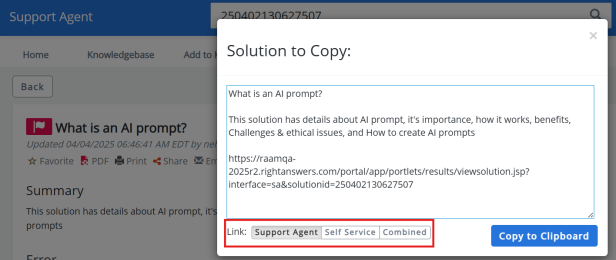
The copied content will continue to include the Title and Summary along with the selected link. The last selected option is retained per browser, regardless of page reloads or new browser sessions.
This enhancement applies only to the Support Agent portal. The Self Service portal behavior remains unchanged.
For more information:
Benefits:
This update helps ensure you only copy the information you need, while still providing easy access to the solution link on the Self Service portal when required.
Solution Manager
Description:
You can now choose whether to include or exclude RAKE solutions in search results on the Solutions page in Solution Manager. The existing RAKEShowInSM setting has been extended to apply to the Solutions page as well.
To hide RAKE solutions from search results, set RAKEShowInSM to False and the searches performed on the Solutions page and across Solution Manager will no longer return RAKE solutions in the results.
For more information:
Benefits:
This enhancement improves the relevance of the solutions displayed and makes it faster and easier to find the exact solution you need. It helps reduce clutter and improves the relevance of search results.
All RightAnswers Platforms
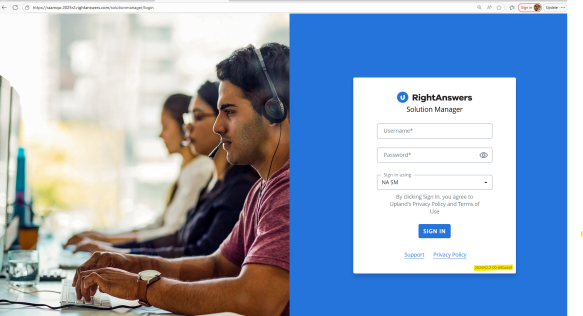
We have made it easier for you to ascertain which version of RightAnswers you are using. The version number will be in a new format and will be clearly displayed at the following locations in your RightAnswers platform:
-
On the login page
-
In the user profile/avatar pop-up
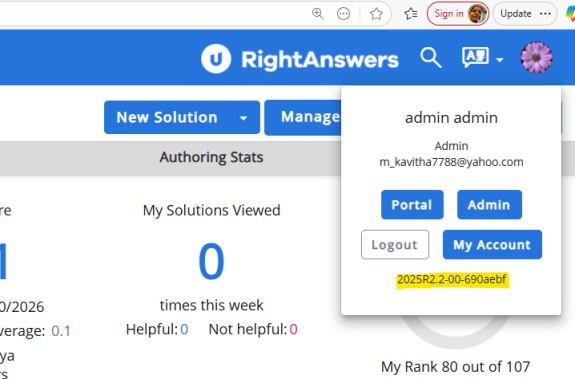
The version number will be in the format <year>R<major>.<minor>-<ps version>-<git hash>. For example, 2025R2.2-00-ABC123.
For more information:
Benefits:
This enhancement allows you to quickly and easily confirm the current version of your RightAnswers platform at any time. It improves transparency and makes it simpler to confirm version details when troubleshooting, reporting issues, or contacting support.
Known Issues
- The Search API was not returning solution summary. (RA-17634)
-
A null pointer exception occurred during social reindexing during data migration using the Environment Migration Utility tool. (RA-18324)
-
API failures and latency spikes noticed in the Support Agent portal. (RA-18193)
-
The comment thread was not displaying all comments associated with a specific solution in Solution Manager. (RA-17872)
The following enhancements are part of the 2025R2.0.1 release.
Administrator Console
What's improved:
A default Time to Live (TTL) has been introduced for new Redis cache keys to prevent cache resources from persisting indefinitely. Any new cache key created without an explicit TTL will now automatically expire after seven days. Existing cache keys and the keys that already specify their own TTL will remain unaffected.
Benefits:
This update helps ensure regular automatic cleanup of cache data while preserving the caching behavior for existing cache keys. This frees up cache by preventing unwanted cache build-up over time.
API
What’s improved:
We have enhanced how the RightAnswers solution links are rendered in Markdown tables by replacing the custom link syntax with a standard Markdown-compatible format. The solution links will now display correctly and consistently inside tables without disrupting the page layout or structure.
For more information:
Benefits:
RightAnswers solution links now render correctly and consistently inside Markdown tables, making content easier to create and read without layout issues.
Known Issues
-
RightAnswers platforms faced slowness or timeout issues because of a licence-related SQL query. (RA-18230)
-
Multiple APIs displayed the '503 Service unavailable' error. (RA-15589)